 When you are the leading CMS platform in the world and the preferred online publishing platform used by millions of businesses and loved by thousands of website developers and website designers, it’s inevitable that at some point in time, WordPress will become a prime target for attacks from hackers wanting to score a “big win”.
In 2013 a mass brute force attack struck WordPress installations on virtually every WP host server in existence around the world.
These attacks were caused by botnets (networks of infected computers programmed to attack other vulnerable computers).
How To Protect Your WordPress Site From A Brute-Force Attack
What Are Brute Force Attacks?
A brute-force attack is a technique used to break an encryption or authentication system by trying all possibilities.
(Source: Chinese University Of Hong Kong)
There are many methods hackers use to try and break into WordPress sites. One of these is by trying to guess the site admin’s login username and password. This can be achieved using scripts and tools that automatically tries to guess hundreds of login combinations in minutes.
If you’re using weak usernames and weak passwords that are easy to guess, your website could be an easy target for hackers.
This is called a “brute-force” attack.
What Is A Botnet?
A botnet is a number of Internet-connected computers communicating with other similar machines in an effort to complete repetitive tasks and objectives. This can be as mundane as keeping control of an Internet Relay Chat (IRC) channel, or it could be used to send spam email or participate in distributed denial-of-service attacks. The word botnet is a combination of the words robot and network.
(Source: Wikipedia.org)
A “Botnet” is a network of private computers that have been infected with malicious scripts or code, which are then controlled remotely as a group, typically without the computer owners even being aware that this is taking place.
Botnets are often used to send out mass spam emails from computers of compromised user accounts.
The screenshot below was taken from a site that monitors online security showing the locations of the command centers of ZeuS – a botnet that has been actively compromising computer networks all around the world since 2009 …
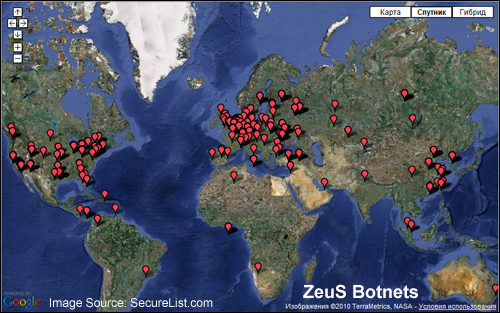
(ZeuS is a botnet that has been actively infecting computer networks all around the world since 2009. Image source: SecureList.com)
These were highly distributed and well organized attacks on WordPress sites. Over 90,000 IP addresses were identified by a number of hosting companies in the initial attack, when the web was flooded with millions of attempts to force their way into WordPress user admin areas. The large-scale attack continued after this, with over 30,000 WordPress sites being hacked per day.
Coverage of this worldwide brute-force botnet attack was widely reported in all of the major webhosting companiesand leading technology publications, such as TechNews Daily, Forbes, PC Magazine, Tech Crunch, BBC News, and even on the official website of the US Department of Homeland Security …
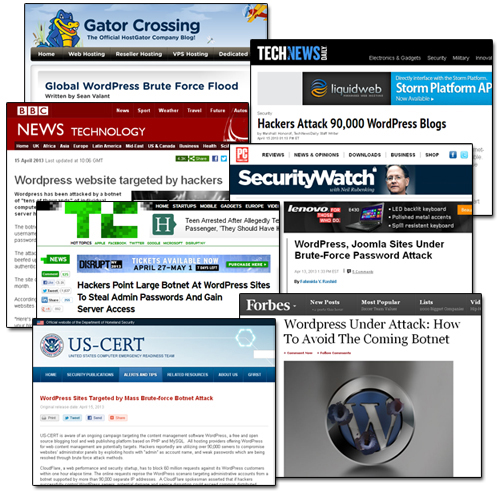
(WordPress powers millions of sites worldwide, which makes it a target for hacker attacks)
Does This Mean WordPress Is Not Secure And We Should Stop Using It?
No. In fact, there are many great reasons why you should choose WordPress if you are concerned about website security.
To learn what makes WordPress a very secure platform for websites, read this article: Can You Build A Secure Business Online Using WordPress?

It’s important to note that, in the case of the brute-force botnet attack described above, no specific WordPress vulnerability was being exploited (the same script was also targeting sites built using other applications like Joomla).
Mike Little, the co-founder of WordPress, made this comment about the botnet attacks:
It is a “simple” script that attempts to login using the admin login and a generated password. So if your password is too short or based on dictionary words it will be guessed and then the script can login legitimately and do whatever it wants including installing scripts (as plugins) or editing files. The attack tries to guess your password, if it succeeds, the most secure site in the world is wide open because they have your password.
How To Protect Your WordPress Website From Being Brute Force Attacked – 10 Security Measures
You may think that the information in your site has no value to hackers, but the reality is that all websites have some value to a malicious user.
If hackers can discover a security weakness, your web site can then be used to attack larger and more valued sites.
Additional undesirable results of having your website hacked and your site security compromised include being blacklisted by search engines, having stealthy spam links advertising things like online meds, cheap offers on brand names, etc. in your content and page title and descriptions, malicious redirects to phishing sites and other websites, drive-by downloads (adding malicious software on your visitors’ computers), and lots of other nasties.
The truth is that software-driven bots are most likely trying to break into your web site right now. Whether they will hack into your site will depend on how challenging you will make things for hackers and botnets to keep trying until they discover how to get in, or give up and decide to look for a more vulnerable target.
How Much Information Are You Broadcasting To Hackers About Your WordPress Site?
If you visit a site like Hackertarget.com and run your website through their WordPress security scan …
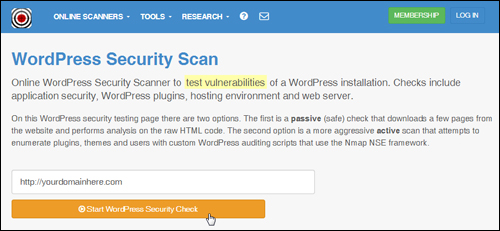 (WordPress Security Scan Source: https://hackertarget.com/wordpress-security-scan)
You will see that the scan returns various results and details about your WordPress installation …
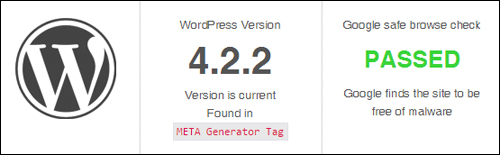
(WP security check results. Screenshot source: Hackertarget.com)
It should be obvious after using the tool shown above that if you are able to freely access all of this information, then so can hackers.
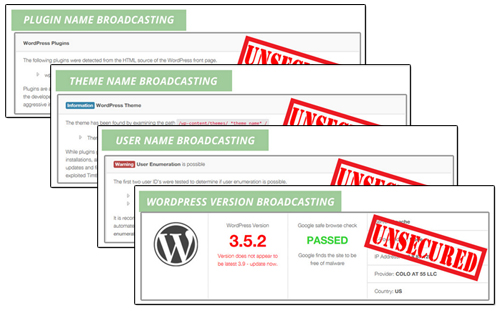 (Screenshot: Blog Defender)
Being able to see what version of WordPress you are using, which plugins and themes you have installed, and which files have been uploaded to certain directories on your server can be potentially useful information to hackers, as these can inform them about exploitable holes or weaknesses, especially where the owners haven’t updated their sites.
If your site or blog runs on WordPress and you’re not proactive steps to harden your site, it’s practically guaranteed that, at some point, someone will attempt to hack your website, because these attacks are systematically targeting WordPress installations worldwide!
When a website or blog gets broken into, site owners can discover much to their dismay that they have been “locked out” of their own site, or notice that their files have been interfered with or even entirely wiped out. Often, most compromised sites will be infected with malicious scripts without the owner’s knowledge or awareness.
To avoid the heartache and frustration of having your website or blog being hacked into, we have listed below 10 essential and effective security measures that will help to prevent your WordPress site from brute force botnet attacks.

Note: A few of the measures listed below need some technical understanding of how to modify core WordPress and server files. If you have no web skills, or don’t want to mess around with code on your site, then ask your web host or search for a WordPress service provider in our WordPress Services Directory.
***
Security Measure #1 – Contact Your Web Host
Get in touch with your hosting provider and ask them what systems are in place to help prevent your site from brute force attacks, and what they do to make sure that your site files get regularly backed up.
It is important to check that your hosting provider backs up your sites and that, if disaster strikes, you can quickly and easily get back your files and data.
Security Measure #2 – Back Up Your WordPress Data And Files And Keep Your Website Or Blog Regularly Up-To-Date
Never rely just on your web host for site backups. Instead, learn how to manage your WordPress site or get this service done for you and maintain a habit of religiously performing a complete WordPress site maintenance routine on a frequent basis (e.g. daily, weekly, fortnightly, etc …)
A full WordPress maintenance routine ensures that:
- All unnecessary files and data are deleted,
- All files and data are free of errors, optimized and backed up,
- All WP software, plugins and themes are up-to-date,
- etc …
A proper WP maintenance routine looks like this …
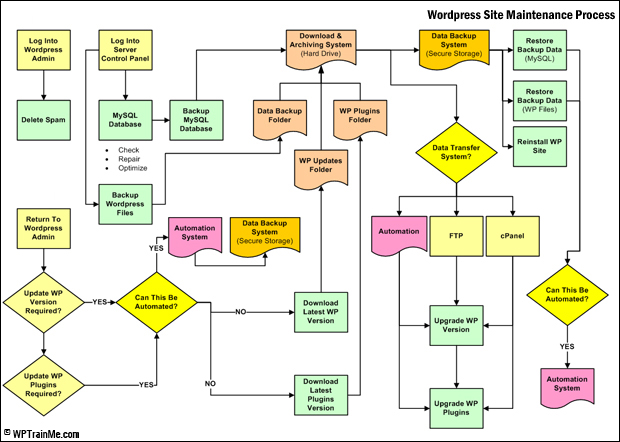 (Maintaining your WordPress web site fully backed up and updated is vitally important for WordPress security. Image source: WPTrainMe.com)
Again, we cannot stress enough how vitally important maintaining your WP site regularly backed up and updated is. WP site maintenance is not hard or time-consuming, but it must be done to ensure the security of your website or blog. If you do not want to learn how to do WP maintenance yourself, get someone else to do it but make sure this gets done. Backing up your site is the next most important thing you must do after making sure that your heart is still beating!
If you don’t want to back up your files manually, there are many WordPress plugins you can use. You can read about a WordPress backup plugin that can fully automate your site backups here: Back Up, Duplicate & Protect Your WP Websites And Blogs With Backup Creator WP Plugin
Security Measure #3 – Make Sure That Your Username Is Not “Admin”
the worldwide brute force attack on WordPress is mostly an attempt to compromise website administrator panels by exploiting WordPress installations using “admin” as the username.
For reasons of website security, never install a WordPress site with the username “admin”. This is the first area of potential vulnerability hackers will test. If your site’s user name is admin, then make sure you change this immediately.
We have created a simple step-by-step tutorial that shows you how to change your login username here: How To Change Your Admin User Name In WordPress
Security Measure #4 – Use Strong Passwords
A “brute force” attack occurs when malicious software continually hits a login or password field with different character strings in an attempt to guess the right login combination that will unlock your site.
Unless some measure is put into place to prevent the brute-force attack (see further below for a couple of effective ways to do this), the “bot” will just continue attacking your site until it eventually breaks into your admin area.
Weak passwords, therefore, become very easy targets for attacks. Make sure that you change your password combination to something that is at least eight characters long, with upper and lowercase letters, and “special” characters (^%$#&@*).

Roboform is a password program that lets you create very secure passwords …
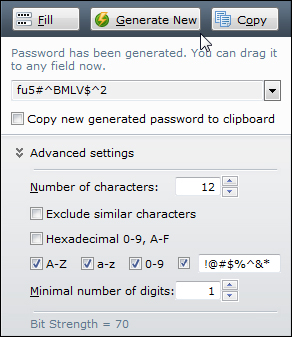 (You can use a password management tool like Roboform to generate unbreakable passwords)
For a simple step-by-step tutorial that shows you how to change your WordPress password, go here: How To Reset Your Password
Security Measure #5 – Protect Your WP Config File
The wp-config.php file contains information about your site’s database and is used to define advanced options for WordPress.
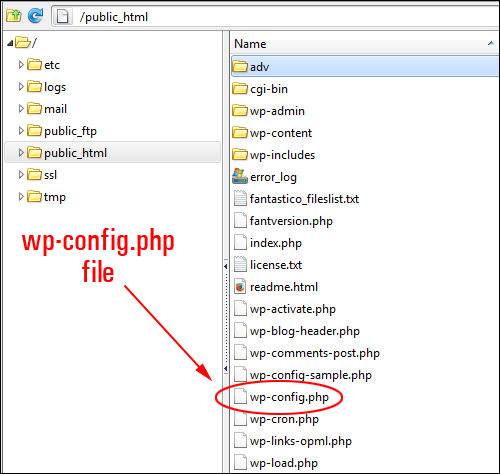
(wp-config.php)
If hackers break into your website, they will try to access the wp-config.php file, because this is the file that contains important information about your site’s database, security keys, etc. Getting access to this information would allow someone to change anything in your database, create a user account, upload files and take control of your site.
In order to protect your WordPress site from attacks and even being used as part of a bot net, therefore, you must prevent people viewing your wp-config.php file. This requires knowing how to edit database information, move files around in your server and changing access permissions.
Security Measure #6 – Delete Or Rename Unnecessary Installation Files
Rename or delete the install.php, upgrade.php and readme.html files from your server.
These files are not required after installation and can be removed. If you don’t want to delete these files, just rename them.
Security Measure #7 – Keep Your WordPress Blog, Themes And Plugins Up-To-Date
Hackers are always on the lookout for vulnerabilities in older versions of WordPress that can be exploited, including out-of-date versions of WP plugins and themes.
Make sure to always keep all of your installation files, plugins, themes, etc. up-to-date.
Security Measure #8 – Disable Your Theme Editor
WordPress comes with a built-in editor that lets you edit plugin and theme code inside the dashboard area.
You can access your WordPress Theme Editor by selecting Appearance > Editor in the main menu …
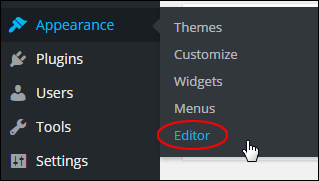
(The WordPress theme editor can be accessed via the dashboard menu)
This means that anyone logging into your blog can view and edit all of your WP theme templates, and cause havoc on your site.
If you want to prevent people from being able to access the WordPress Theme editor, you will need to disable it. This can be done by adding code to your wp-config.php file.
Security Measure #9 – Prevent Access To The Site’s Uploads Folder
The WordPress “uploads” folder stores all the media that gets uploaded to your website.
Normally, this folder is visible to anyone online. All someone has to do to view all of the contents stored in your “uploads” directory is visit your directory using a web browser …
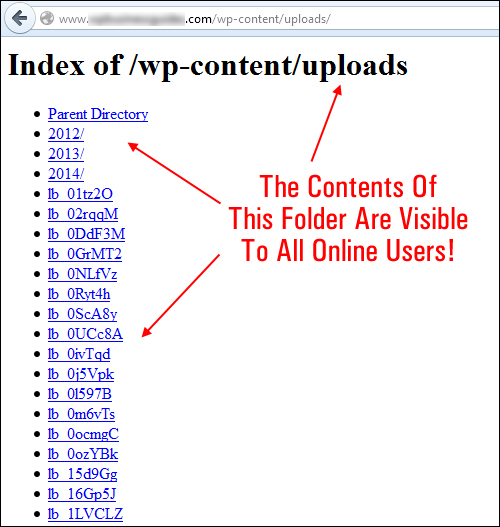
(WordPress uploads folder)
If any files stored in his folder have vulnerabilities that can be exploited by hackers or malicious users, anyone can upload unauthorized file types or compromise the security of your site.
Protecting your directories will prevent unauthorized people from viewing your ‘uploads’ folder and other important directories. This can be done using plugins, setting file permissions, adding a blank index.php file (this is literally a file with nothing in it called “index.php”) to your uploads directory, and so on. Again, it’s best to consult a professional if you are not sure about what to do.
Security Measure #10 – Install Security Plugins
There are a number of security plugins for WordPress available that will address most security issues WordPress site owners face, such as preventing hackers from accessing your site, protecting your files from malicious software, preventing injections of code into files, etc.
Most WordPress plugins address some but not all areas of WordPress security. One WordPress security plugin that seems to do a comprehensive job of scanning, fixing and preventing issues that could lead to hackers accessing your site files and damaging your site is SecureScanPro.
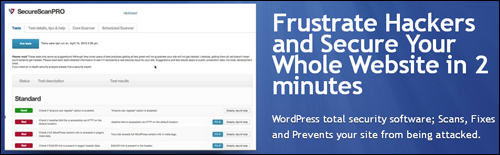
(SecureScanPro – security software for WordPress)
SecureScanPro is easy to install and easy to use, and addresses most of the security areas that WordPress users need to address.
Another security plugin you may want to look at using is BlogDefender.
Blog Defender Security Plugin
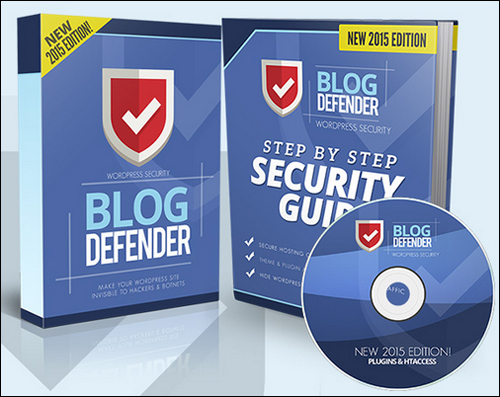 (Blog Defender)
Blog Defender is a package of WordPress security video tutorials, WordPress plugins and tools, plus WordPress security documentation in PDF and DOC formats.
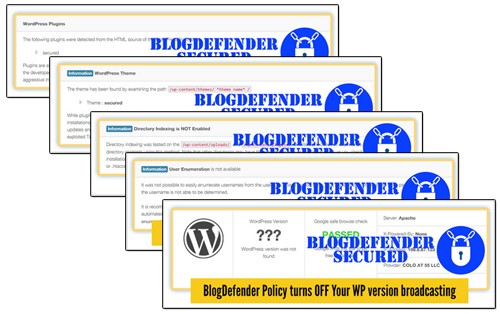
BlogDefender scans you web site for potential security weaknesses …
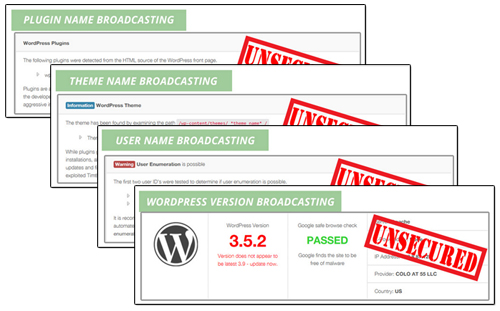 And then shows you how to fix these quickly, easily and inexpensively …
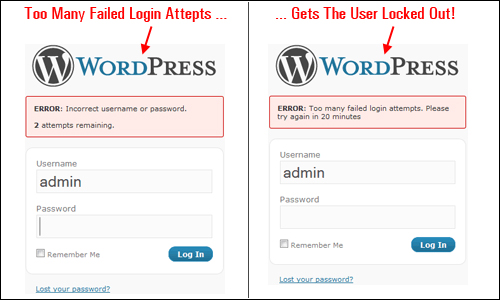
 If you don’t want to purchase a security plugin like SecureScanPro or BlogDefender, then use various free plugins, such as Limit Login Attempts …
WordPress is a very secure platform, but neglecting simple maintenance tasks like keeping your WordPress installation, plugins and WP themes up-to-date, tightening file and data security and taking other necessary precautions can have disastrous consequences.
Regardless of the type of business you run or plan to run online and how small you think your web presence is, web security is something you simply cannot afford to ignore.
As one last reminder, below is the advice given by an expert on web security to all WordPress users following the global brute force attacks on WordPress in April 2013 …
Owners of websites based on WordPress CMS must improve at least basic security settings and implement best practices such as the use of robust passwords and the accurate management of “admin” accounts.
Pierluigi Paganini, Chief Information Security Officer, Security Affairs
***
As you can see, WordPress security is of the utmost importance if you run a WordPress site. Hopefully, the above article has shown you what to do to prevent brute force attacks on your WordPress site. If you need any further help or assistance with WordPress security, please consult a WordPress security specialist, or search for a professional WordPress service provider in our WordPress Services Directory.
We also recommend subscribing to WPCompendium.org to receive notifications whenever we publish new tutorials on WordPress security and reviews of new WordPress security plugins and solutions.
***
"Learning WordPress has been a huge stumbling block for me. I've been looking for something that covers absolutely everything but doesn't cost an arm and a leg. Thank you so much ... you have just provided me with what I have been looking for! Truly appreciated!" - Tanya
***