 In 2013 a worldwide brute-force attack struck WordPress installations across almost every WP hosting server in existence around the world.
These attacks were caused by botnets (computers infected with viruses and programmed to attack other computers with security vulnerabilities).
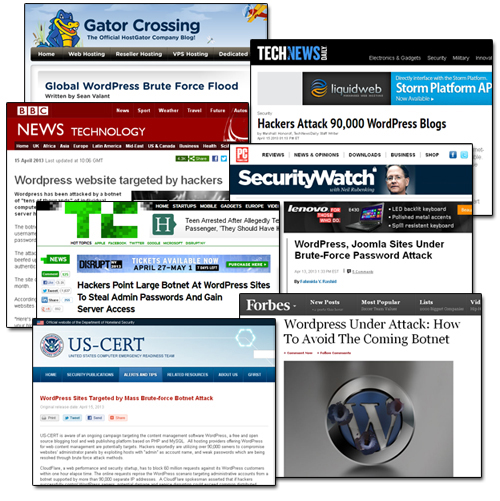
(Powering millions of websites around the world makes WordPress an obvious target for hacking)
On March 11, 2014, technology sites reported that over 162,000 WordPress-powered web sites had been hacked.
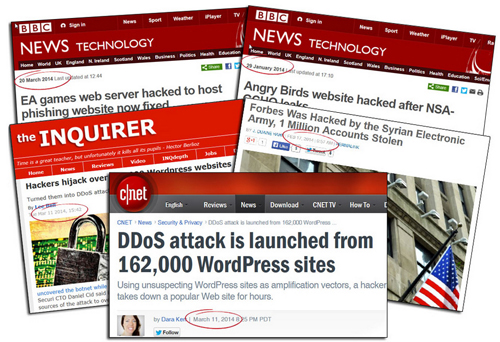
(Over 160,000 WordPress sites were attacked in a massive DDoS attack in early 2014. Source: Blog Defender)
According to the Cnet report,
“With some old-fashioned trickery, hackers were able to get more than 162,000 legitimate WordPress-powered Web sites to mount a distributed-denial-of-service attack against another Web site.”
(Source: cnet.com/news/ddos-attack-is-launched-from-162000-wordpress-sites)
As reported by security firm Sucuri, hackers had leveraged a well-known flaw to attack unsuspecting WordPress websites and direct a distributed-denial-of-service attack (DDoS) towards another popular website.
Whenever brute-force attacks on WordPress sites are reported in the media, it’s natural for people to start questioning just how safe and secure WordPress is as a platform for running an online presence.
WordPress powers millions of sites around the world, which makes it a natural target for hackers. But should you really be concerned about WordPress as being a secure web platform?
In this article, you will learn some of the main reasons why you should definitely choose WordPress if you are at all concerned about website security.
WordPress Security Explained
Let’s start with some facts …
Thousands of websites are hacked every year … not just WordPress sites!
The sheer number of attacks on websites and blogs worldwide is rising, and the situation is getting worse.
You can safely assume that if your website or blog hasn’t been hacked yet, then it’s only a matter of time before someone does attempt to hack into your site … regardless of the web platform you use!
Since it’s not a matter of if, but a matter of when before someone will try to hack your website, are there any advantages that WordPress can offer you in terms of security?
”Isn’t Open Source Software Extremely Vulnerable?”
Many people will often try to argue that WordPress is not a safe platform for building and running web sites because its “open source” code is freely available.
Open source CMS software like WordPress, Drupal and Joomla are free to use and anyone can have access to the underlying software code.
The argument, then, goes something like this: If everyone can examine the Open Source software code for WordPress, then hackers can also easily get hold of all of the code and go through every line in detail, looking for security vulnerabilities in the code that could be exploited …

(It’s not a matter of if, but a matter of when before your website is targeted by hackers … WordPress or no WordPress!)
While it’s true that WordPress is a free application and hackers can easily go through the code looking for security vulnerabilities or weaknesses they can exploit (hackers can do the same with any program), the fact that WordPress is a free, open software platform actually makes it more secure in many ways.
This is because WordPress is supported by a global community of thousands of people such as software programmers, plugin developers and theme designers who constantly help to improve the software and make WordPress more secure …
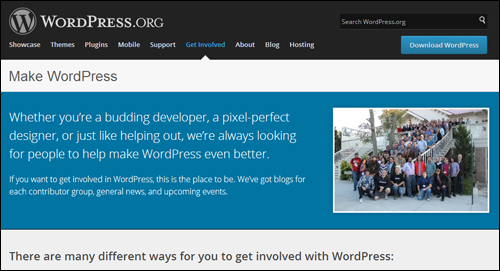
(With WordPress, the platform is built, maintained and updated by a large community of thousands of developers worldwide. Image source: make.wordpress.org)
WordPress evolves largely through the effort of a huge community working around the clock to fix any issues detected by users. Everyone benefits from thousands of minds who are dedicated to improving the software and making it safer for every user …
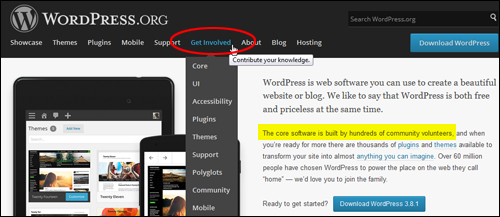
(WordPress is built and maintained by a global community of WordPress users. Image source: WordPress.org)
As soon as security holes are identified by developers or users, these are then reported in user forums and addressed by the WordPress core development team …
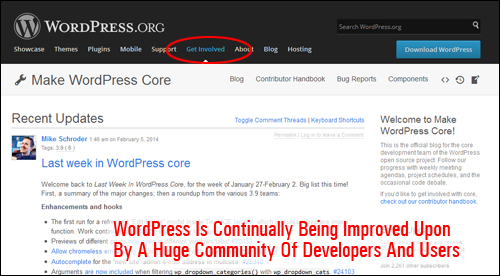
(WordPress is continually being improved by an open community of developers and users. Screenshot source: make.wordpress.org)
The WordPress community support system is solid and formidable and anybody can help contribute to the process of fixing security issues.
For example:
- If you come across bugs and security holes, you can report these by sending an email to security@wordpress.org.
- If you find issues in a plugin, you can also report these by emailing plugins@wordpress.org.
This is the reason why the core development team releases new security updates so frequently, and why you need to keep your site frequently up-to-date …
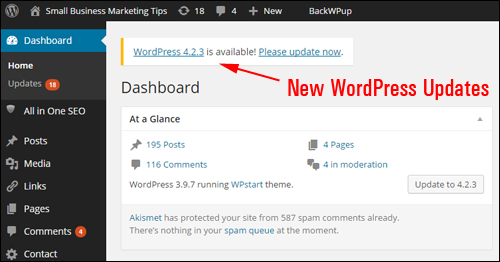
(WordPress continually releases new updates to plug security vulnerabilities)
WordPress CMS Vs Proprietary CMS Applications
We’ve just seen that one of the security advantages of using an ”open” technology like WordPress is that users benefit from a large community of developers who continually contribute to improve platform security. By contrast, a proprietary or “closed-source” software application would normally be developed by a small team of developers with limited time and resources to provide continuous security monitoring, support, bug fixes and updates.
WordPress is free to download, use and modify, and thousands of volunteers and expert developers work on improving the technology. Can a proprietary CMS company afford to employ as many developers and programmers and still deliver users a free platform that they can download, use and modify as they wish?
WordPress CMS Vs Other Open Source Applications
(CMS Platforms)
Whilst on the topic of Open Source content management applications, there is valid research showing that the WordPress CMS is actually safer than other Open Source CMS platforms such as Drupal and Joomla.
For example, the chart below shows how many security vulnerabilities were found in each of these open source platforms during a certain period …
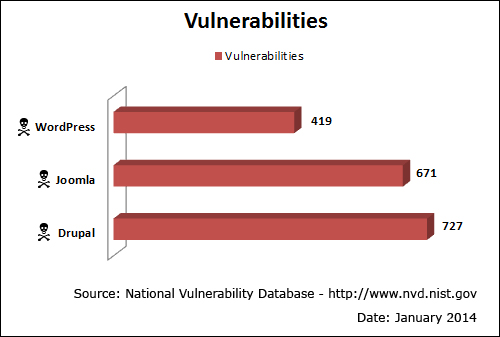
(WordPress has fewer security vulnerabilities than other leading CMS applications. Image: National Vulnerability Database)
Other research indicates that, because WordPress is easy to use and keep updated, when sites across different CMS platforms were tested for security exploits, sites built with WordPress had less exposure to risk …
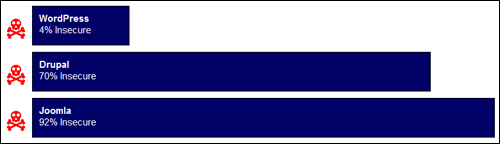
(WordPress users are less exposed to security vulnerabilities than other CMS platform users. Image: BlogDefender.com)
It’s Not WordPress’ Fault
If someone compromises the security of your WordPress site, don’t be too quick to blame the WordPress CMS platform.
According to a report called “Compromised Websites: An Owner’s Perspective,” published by security vendor Commtouch and StopBadware, a nonprofit organization that helps webmasters identify, remediate and prevent website compromises, most website owners have no idea about the security threats their websites are exposed to, how to secure a website, or how to deal with security compromises.
In fact, over sixty percent of webmasters surveyed for the report didn’t know how their sites had been compromised after an attack …
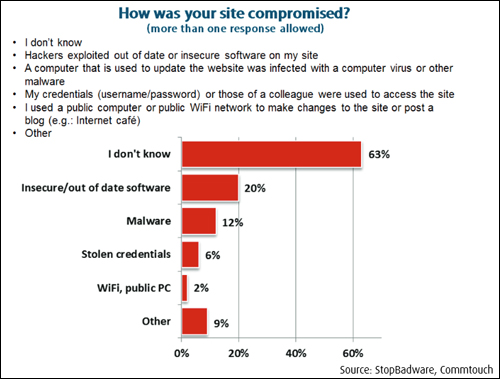
(Many webmasters don’t even know how their sites get hacked. Image source: StopBadware.org)
Of immediate concern is the fact that most security-related issues come from website owners running sites with an outdated version of WordPress …
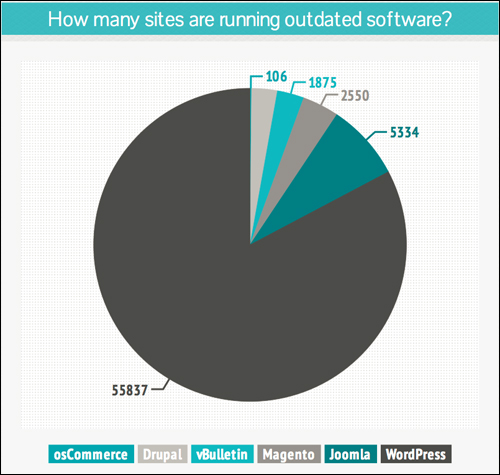
(Many WordPress sites are running on outdated versions. Image source: Sucuri.net)
When WordPress security issues were looked at in more detail, it was found that only between 20% – 30% percent of vulnerabilities discovered in third-party code are actually found in the WordPress CMS core, while 65% – 85% percent of all security issues are found in plug-ins and developed externally …
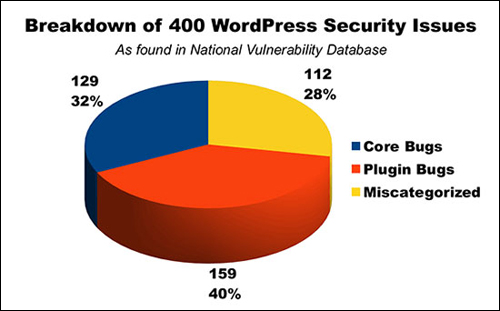
(WP Security Issues. Image: WebDesign.org)
Like many modern software applications, WordPress is regularly updated in order to address new security threats that may arise. Improving software security is always a concern, and to that end, you should always keep your WordPress software, themes, and plugins up-to-date.
WordPress Is Secure – Even Banks Use It!
The amount of misinformation about how secure WordPress is has even caused the co-founder of WordPress, Matt Mullenweg, to chime into the online debate.
In an article entitled “A Bank Website on WordPress” published on April 15, 2015, Matt wrote the following about WordPress …
There’s a thread on Quora asking “I am powering a bank’s website using WordPress. What security measures should I take?” The answers have mostly been ignorant junk along the lines of “Oh NOES WP is INSECURE! let me take my money out of that bank”, so I wrote one myself, which I’ve copied below.
I agree there’s probably not a ton of benefit to having the online banking / billpay / etc portion of a bank’s website on WordPress, however there is no reason you couldn’t run the front-end and marketing side of the site on WordPress, and in fact you’d be leveraging WordPress’ strength as a content management platform that is flexible, customizable, and easy to update and maintain.
Matt then goes on to provide a couple of security tips, before stating the following …
For an example of a beautiful, responsive banking website built on WordPress, check out Gateway Bank of Mesa AZ. WordPress is also trusted to run sites for some of the largest and most security-conscious organizations in the world, including Facebook, SAP, Glenn Greenwald’s The Intercept, eBay, McAfee, Sophos, GNOME, Mozilla, MIT, Reuters, CNN, Google Ventures, NASA, and literally hundreds more.
As the most widely used CMS in the world, many people use and deploy the open source version of WordPress in a sub-optimal and insecure way, but the same could be said of Linux, Apache, MySQL, Node, Rails, Java, or any widely-used software. It is possible and actually not that hard to run WordPress in a way that is secure enough for a bank, government site, media site, or anything.
Millions of businesses, including banks, global corporations and e-commerce sites choose WordPress to build their websites, not just bloggers.
Other Areas Affecting WordPress Website Security
Other issues that can affect blog security include areas like:
- No platform is completely safe from hacking. As many as 90% of all websites across all platforms are vulnerable to attack, mostly due to software that is out of date.
- The biggest security vulnerability in all content management systems seems to be the users themselves. For example, many users ignore strong password security practices.
- Lack of constant system monitoring. All security systems require frequent monitoring, testing, updating and improvement.
- Server setup. For example, websites on shared webhosting are only as secure as the least secure site on the grid, so if another user has a weak FTP password on your shared server, then every site on your shared server becomes vulnerable to being hacked also.
There’s No Reason Why You Should Not Use WordPress
As this article has hopefully shown, WordPress is a secure web platform. As long as you remember to implement basic security measures (which all website owners should do) and keep your WordPress software (and themes, plugins, etc.) regularly updated, there’s really no reason why you shouldn’t choose WordPress.

WordPress Security – Practical Tips
To learn about ways to protect your WordPress site from brute-force attacks see this article: Protecting Your WordPress Website From Brute Force Attacks
A vulnerable blog offers malicious users with a platform to launch denial of service attacks, spread malware and engage in information theft. Blog Defender makes your WordPress site invisible to bot and hacker attacks. Go here to learn more:
If you are using older WordPress versions make sure to back up everything before updating your software to benefit from the latest security updates. This way, if things don’t go as planned, you can always restore.
If you don’t want to perform manual backups, there are many free and paid WordPress plugins you can use. Learn about a WordPress backup plugin that can automate your site backups here: Backup, Clone And Keep Your WP Web Sites Protected With Backup Creator Plugin For WordPress

References
The statistics quoted in this article were referenced from various sources, including those listed below:
- ITProPortal.com
- National Vulnerability Database
- BlogDefender.com
- UpAndUpStudios.com
- StopBadware.org
- Sucuri.net
- WebDesign.org
- Quora.com
- Ma.tt
Hopefully, now you have a better understanding of issues that can affect your website and how WordPress can help you improve your business online. To learn more about using WordPress please click on links to visit other articles we have published on this site or subscribe to receive updates and notifications when new content is published.
***
"This is an awesome training series. I have a pretty good understanding of WordPress already, but this is helping me to move somewhere from intermediate to advanced user!" - Kim Lednum