 What began as a blogging tool in 2003 has grown in less than a decade to become the most popular self-hosted Content Management System (CMS) platform in the world, used to power millions of websites and seen by tens of millions of people every day.
To learn more about why WordPress is the most widely distributed content management system technology in the world, go here:
A Brief History Of Websites
Pre-CMS / Static Websites
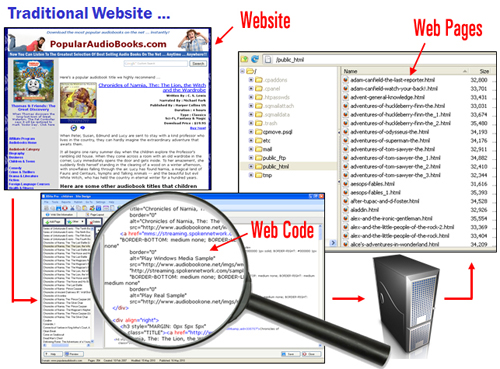
Traditionally, websites were a collection of separately linked static pages where every element of the page (e.g. navigation menus, layout, page content, etc) …was created using web code (e.g. HTML) by a web designer or website developer using a web editor application tool (e.g. Dreamweaver).
These separate pages were then uploaded to a web server and accessed online by typing in the page URL associated with the page file into a web browser …
Then, something called a Content Management System, or “CMS”, came along.
What Is A CMS?
In simple terms, a content management system (CMS), is a website maintenance tool for non-technical users. It is a web application designed to make it easy for non-technical users to add, edit and manage content on their website.
A Content Management System not only helps site owners with your content creation and editing, it also takes care of a number of “behind the scenes” management functions like:
- Generate website navigation elements automatically
- Store web content in an organized way
- Make web content easily searchable and indexable
- Keep track of registered users, including user permissions, logins and security settings
- Allows multiple users to collaborate, edit and publish content easily
- And more.
A content management system stores all of your documents, images, videos and any other type of online content in an organized way, allowing you to quickly and easily add, retrieve, edit, delete and publish content on your site. A content management system also allows multiple editors and authors to access, manage, and work on your site’s content and publish it on different sections of the website.
CMS-Driven Websites Empower You

The introduction of content management systems was a pivotal step in allowing non-technical users to take charge of their own web presence.
Before CMS applications became widely available, businesses depended entirely on the technical skills of professionals like web designers, website developers and web marketers to get a website designed, built and promoted online.
Specialized technical knowledge was not only required to design and create a website but also to set up and configure the site, add new features and functionality, customize pages and make layout changes, as well as manage, maintain and update the site.
And, because knowledge of editing web code was also required to modify the content on their web pages, business owners also relied on the technical expertise of web marketers for implementing various online marketing strategies like search engine optimization (SEO), improving sales copy, adding banners and tracking online advertising codes to pages, adding opt-in forms, etc.
Without this technical knowledge of web languages and web coding and the skills to use web editing applications and tools, most business owners had little to no control over their own web presence.

(Before Content Management Systems, businesses had little to no control of their own web presence)
CMS-Based Websites
When CMS-based websites became available, website owners started gaining control over aspects of their digital presence, such as the ability to add, edit, publish and manage their own content.

(After Content Management Systems, businesses had more control of areas like content publishing)
With many types of CMS-driven websites, website owners have a greater degree of control over managing their digital content, but many aspects of building, managing and marketing a website are still handled by web services providers and technically-savvy experts.
When deciding on an online vehicle for your digital business, it’s important to remember that you are the one who needs to be in control. If you are a “tech dummy,” consider choosing a content management system designed for non-technical users. Otherwise, you will be stuck with an online vehicle that you can’t drive unless you are being chauffeured everywhere, continually spending money on outsourced services, and waiting around for other people to help you get even the simplest of things done.

(Choose a CMS that you can drive!)
WordPress Puts You In Charge Of Your Websites
The WordPress Content Management System puts you 100% in charge of your online business presence …

(The WordPress Content Management System puts you 100% in charge of your digital presence)
As explained in our WordPress Guide For Beginners, WordPress allows non-technical users to be in complete control of their digital business presence and makes the need to outsource most technical areas of your website management to technical experts optional.
Let’s take a look then, at some of the benefits of using WordPress as a CMS.
Benefits Of Using WordPress As A Content Management System
So … what exactly is it that makes WordPress the world’s most popular CMS?
1 – WordPress Is Free
Well, for a start, WordPress is completely FREE to use! In fact, you can download the full WordPress software application free of charge, and host it on your own domain without having to pay any software license fees whatsoever.
To learn more about why WordPress is “free”, read the articles below:
2 – WordPress Is Easy To Use
One of the reasons why WordPress has become so popular so quickly is that it requires no technical or programming skills to use or manage.
Once WordPress is installed and configured, almost everything else, from using and running it, to redesigning and restructuring it, can be easily managed using simple interfaces and menus that require little to no web skills.
For example, WordPress has a built-in visual editor that allows anyone to create, format and publish content online quickly and professionally just by clicking on a few menu buttons. If you have ever used Microsoft Word, then you would have no problems at all managing your WordPress content.

(WordPress Content Editor)
3 – WordPress Is Powerful
WordPress provides users with a framework that is extremely flexible and scalable, making it almost infinitely extensible. One of the core principles of the WordPress philosophy (apart from developing it as an Open Source project), is to keep the core code as light and fast as possible while providing a rich framework that allows the growing community of WordPress software developers and web designers to keep expanding what WordPress can do with applications that enhance its core functionality (called Plugins) and flexible web design templates (called Themes) that allow you to instantly change the look and feel of your entire website in just a few mouse clicks.
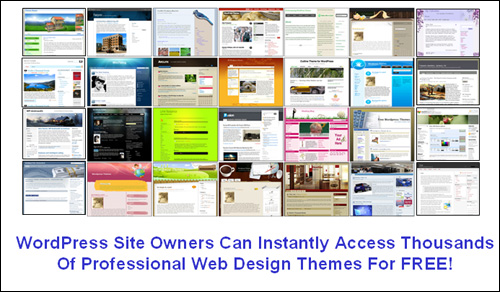
(WordPress site owners have instant access to thousands of professional web templates for free!)
What this all means, is that you don’t have to spend thousands of dollars on web development and web design costs. You can start building a web presence with a basic, simple WordPress site, and then get almost anything you want done by adding a few of the tens of thousands of WordPress plugins available, or completely change the look and feel of your site as often as you need to with WordPress Themes.

(Expand the functionality of your website or blog with thousands of free WordPress plugins)
With plugins, for example, you can add e-commerce, social-media sharing buttons, SEO optimization, integrate your visitors’ Facebook comments, make your site fully optimized for mobile devices, add custom videos and audio players, add newsletter forms and surveys, animated graphics and fading image galleries, make your pages printable, add sitemaps for visitors and search engines, block spam, and much, much more. And best of all, you can expand your WordPress site with thousands of plugins that will cost you absolutely nothing to download!
This is the same with WordPress Themes. You can choose the look of your site from thousands of professionally designed themes that are available at no cost to you.
4 – WordPress Keeps Your Content Organized
WordPress provides management tools to help keep different content types such as text and media fully organized and easily accessible from your laptop or mobile device.
The WordPress CMS structure assigns sections for managing different content types (e.g. Posts, Pages, Media, Themes, Plugins, Widgets, etc…) on your site, and provides easy access from a central dashboard menu. Other CMS features include sortable table lists, upload folders on your server for storing media content such as videos, audios, pDF files, etc., assigning unique URLs to each individual content item, and a visual media library.
WordPress also allows you to add, edit and assemble all of your content using integrated visual content editors, publish it with a click of the mouse, and then stores all of your data for easy retrieval and future editing on a single server database.
WordPress not only makes managing and organizing your content easy, but its unique CMS even extends to managing aspects of your site such as your site’s web design templates and functionality, making WordPress a truly powerful and complete content management system.

(WP Media Library)
5 – WordPress Is A Great Collaborative Tool
With WordPress, you can allow users to register on your site and be assigned roles such as authors, editors, and administrators. You can also allow multiple authors and editors to collaborate and contribute to the creation and management of content on your site.
WordPress currently allows multiple editors to take over one another’s editing work, and is moving towards expanding the software’s capabilities to provide true collaborative editing (this is where two or more people can be working on the same post at the same time).
Additionally, as WordPress continues to grow in popularity and usage, its technology will further expand to provide collaborative functions focused on helping you share videos, images, music, links, and documents with other contributors.
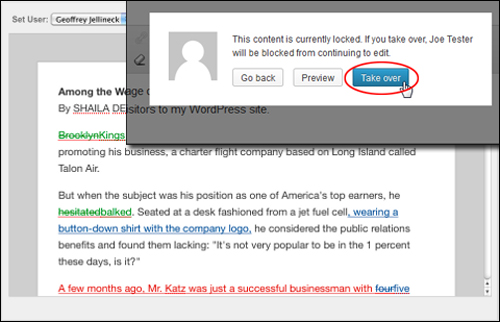
(Composite image source: NYTimes.com Blogs)
6 – WordPress-Powered Websites Costs Very Little To Run And Maintain
Generally, free plugins and free themes don’t offer much in the way of support for users. In most cases, this is not a problem, as some of the most popular free plugins and themes are quite robust and their developers do provide regular upgrades to keep up with new WordPress upgrades. If you want support, however, there are many amazing and feature-rich “premium” plugins and themes you can purchase for a ridiculously low price (many great premium plugins and themes retail for between $10 – $100).
All you need, in addition to the WordPress application itself (which, as we’ve already mentioned, is Free to download), is a domain name and web hosting. These can cost as little as about $120 – $150 per year.
Instead of spending thousands of dollars on web development and web design, therefore, you can start running a professional web presence on your own domain with a very minimal outlay …

7 – WordPress Puts You In Complete Control
With WordPress, you don’t need to spend a great deal of money to have a professional web presence, you don’t need technical skills or programming knowledge to run a web site, and you don’t need to depend on webmasters, web developers or web designers to manage your content or your site.
Once your WordPress site is up and running, all you need to do is learn how to use all of the powerful features and functions that WordPress makes available, so you can achieve anything that you envision doing with your site.
As you can see, WordPress is not only great for powering your website and getting your content published online, it can also help keep your content organized and managed too!
With WordPress, you can be in complete control of your own digital presence!

***
"I was absolutely amazed at the scope and breadth of these tutorials! The most in-depth training I have ever received on any subject!" - Myke O'Neill, DailyGreenPost.com