 Are you missing out on business because of a poorly-designed site? Regardless of how professional your company is, a poorly-constructed website could lose you valuable business.
In a world where beautiful design sells, your website’s design can contribute significantly to the success of your business. Your website is the first thing that your prospective client sees and this can influence their decision to purchase.
Think about how most people research services nowadays. Even if we’re only doing preliminary research, we still jump online and go browse a website before deciding what to do next.
Now, try to see things from your visitor’s viewpoint. How does your web presence appear to visitors? Does your site invite them to enter and explore things further, or does it make them confused and cautious about what to do next?
The way your site looks is only the tip of the iceberg. There are so many other things than can influence your web visitors’ experience and their decision to ultimately buy from you.
Can WordPress Help Fix Bad Web Design?
Let’s review some of the more important design problems that can affect your web site:
Web Design Problems
Some of the most common web design problems that can affect your prospect’s perception about your website include some following:
- Color – Bad color schemes affect your results. This also applies to using text and background color. There are tools to choose web colors correctly and even safe web colors to help ensure that the palettes you choose will display correctly across various devices. If in doubt, seek the services of a web design professional.
- Design Elements – Web pages that contain unappealing, outdated or just plain old ugly graphics can easily result in users quickly losing interest in off your site. Visitors can also be affected by inconsistent graphic elements or excessive use of design elements.
- Layout – The way your pages are laid out can impact the way visitors interact with your site. Layout considerations also include how your navigation menus, links, and other useful objects.
- Responsiveness – As websites are now viewed using a range of devices with different-sized screens, it’s vitally important that your website’s design be responsive. If your web pages do not resize automatically to work on all devices, browsers, and platforms, you may incur potential loss of customers.
Functionality Problems
Some common website functionality issues include the following:
- Too many website errors – A huge turn-off for visitors is arriving on a website where hyperlinks don’t work, videos don’t play and graphics are missing. Subpar functionality is no longer acceptable in a website, especially when you are trying to come across as a professional and dependable business. Your digital presence is a reflection of your business. It’s important to ensure that all your links, videos, and graphics are up and running all the time. Sometimes, these issues could be related to factors like your web hosting, or they may even be unbeknownst to you, but it’s important to make sure that remain proactive and that you get problems addressed as soon as possible.
- Feature limitations – If your web site offers visitors certain functionalities, then make sure that these are not limited. For example, if you want to sell products on your site, make sure that you provide customers with full e-commerce functionality that allow them to choose and add products to a shopping cart, apply discounts, complete their orders using credit cards or PayPal, receive purchase notifications, invoices, and confirmations, etc.
Poor Web User Experience
Invariably, where your business suffers most noticeably because of a poorly-designed site is the “user experience”.
Anything less than a great user experience can leave a bad taste in people’s mouths and lead to sharing their frustrations in social networks, forums, review sites, comments, etc., bringing you negative attention.
Here are just some of the more common issues that can create a poor user experience:
- Ease Of Use – Your website must be user-friendly. Your service information should not be hard to find. Your web visitors want user-friendly features and they want to find what they are looking for quickly and with minimal hassle. Make your content searchable and if you plan to add downloadable information to your site (e.g. presentation slides), make sure that users are given instructions on how to download and access your information.
- Organization – If your website isn’t cleanly organized and user-friendly, you run the risk of losing not only prospective buyers but also existing customers. Things such as search engine-friendly links, product and service categories and sections where your content is grouped or linked together provides users with a good experience.
- Stimulating Website – Users want websites that are easy to use, easy to navigate, and that are eye-catching. To achieve this you need to find a balance between attractive, modern web design and compelling website copy that engages your website users. For example, draw attention to links pointing to product pages with professionally-taken graphics with well-crafted descriptions. This can be very effective and will help you improve not only the user experience on your site, but can also lead to more sales and conversions.
- User Interactivity – Another thing that helps customers decide to stay longer on your site is to provide interactive features that engage your customers, such as allowing them to leave comments, share, like, download and recommend your content, interact with your support staff via a responsive help desk, support forum, live chat, schedule appointments, make reservations, etc … You also want users to be able to navigate quickly around your website and access your data without waiting around for pages to load, so having your site optimized for page loading speed is important.
- Compliance – One of the most important and often most neglected aspects of creating a great user experience is to ensure that users feel comfortable interacting with you online. To reassure your prospective customers that your company is credible, trustworthy, secure and professional to deal with, make sure that your site includes legal pages such as a business contact page, privacy policy, terms and conditions of usage, security information, earnings disclaimers, etc.
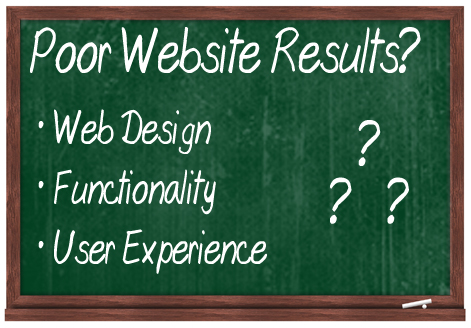
(Web site design issues)
As you can see, there are many areas that can contribute to a poor user experience and impact your business success online. If your web site is poorly designed, you run the serious risk of not only losing potential paying customers but also existing clients too.
Now … what if you have arrived found this article because you have an existing site with design problems that are affecting your business?
First, be aware that getting a website overhaul can take some time and can end up being fairly costly depending on the problem and what kind of website you operate, especially if it requires editing web code extensively.
If you are currently considering having a new website built or upgrading an existing website, then we suggest that you seriously consider using WordPress.
(WordPress can help you improve your website results!)
We currently publish more posts about the benefits and advantages of using WordPress on this site, but here are just a few key points to keep in mind about why you should use WordPress:
WordPress – Unique Web Design Features
WP themes are unique web site design templates that enable you to immediately modify the look of your site without touching the website’s content or modifying the core software.
There are thousands of great-looking themes available that can be easily downloaded. Many of these are either free, or are extremely well priced, saving you hundreds, even thousands of dollars on the cost of web design.
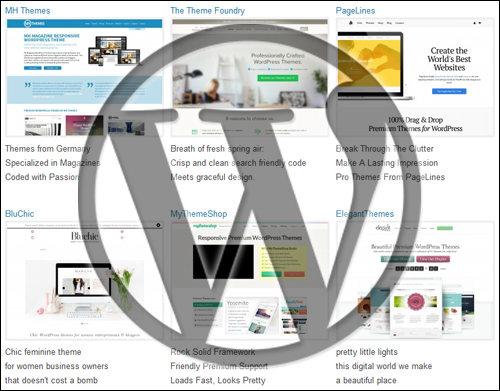
(WP Themes)
Most WP themes are responsive and provide you with highly customizable options for changing the design of your website like color, template elements like headers and footers, page layouts and more. Themes are just part of what makes WordPress such a powerful tool for helping you create a design for your website that works for your business.
You can learn about WordPress themes here:
Plugins – Virtually Unlimited Functionality
Another compelling reason to build your site using WordPress is that WordPress provides users with expandable features through add-on applications called “plugins.”
Plugins, like WP themes, integrate with your website to provide you with almost unlimited features.
Earlier in this post we talked about areas like subpar functionality and feature limitations as part of the reason why a poorly designed web site could end up losing you customers.
Plugins can help you overcome these issues and limitations quite easily and inexpensively. If there is a feature that you need to add to your site, just install a WordPress plugin that does what you want to get things done.
Need a plugin that will let you know about any issues detected on your website like hyperlinks not working, videos not streaming, graphics that aren’t showing or even tell you if your whole web site is down? No problems … there are plugins that can help you fix that, or notify you about issues so you can correct these immediately!
Need a plugin that will transform your website into an online store or provide you with a complete e-commerce system? Again, no problem! There are several inexpensive plugins that will help you sell goods or services online and provide your users with full e-commerce features that allow them to select and add products to a cart, apply discounts, purchase with credit card or PayPal, receive purchase notifications, receipts and email confirmations, etc.
And just like themes, there are literally thousands of fantastic plugins that you can install on your website and are freely available, or can be bought quite cheaply and will save you thousands of dollars on the cost of website development.
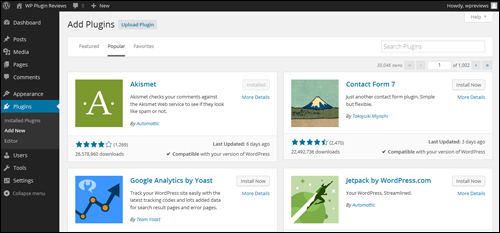
(WordPress Plugins)
You can learn more about WP plugins here:
WordPress – An Enhanced User Experience
In addition to being able to address issues caused by a poorly-constructed web site, WordPress can also help you provide your visitors with a great user experience.
WordPress provides beautiful, professional and exciting themes that cover all kinds of uses and feature-rich plugins that allow web users to contact, engage and interact with you. With the right combination of a WordPress-powered website, WP themes, plugins and great content, you can create a rich user experience that will keep visitors returning for more.
As stated earlier, consumers will do extensive research online before making a purchasing decision. If your website isn’t designed with customers in mind, consumers will not return and simply move on to another business with a better website and better website experience.
Hopefully, this post has given you a better understanding of problems that can affect your web site and how WordPress can help you get better results online. To learn more about using WordPress please click on links to visit other posts we have published on this site.
***
"I was absolutely amazed at the scope and breadth of these tutorials! The most in-depth training I have ever received on any subject!" - Myke O'Neill, DailyGreenPost.com
***