 Social interactions like +1s on Google+, Facebook comments, shares, and likes, etc. are called social signals.
With the growth of social sites like Facebook and Twitter, search engines like Google and Bing now take into account various social signals when determining website ranking.

Note: Google encourages website owners to build their social media presence as a long-term investment to drive qualified traffic, rather than aiming for short-term benefits like search ranking placement. Matt Cutts, the head of Google’s web spam team has stated that Google takes a cautious approach when it comes to assessing social media signals, as so many things change quickly on social media. Without a reliable ‘map,’ Google is understandably reticent to assign too much importance to social signals over other aspects of their search algorithm. In short, Google’s strategy is to “wait and see” how things develop over time, as sites that provide value develop longevity, trust and authority, and these are the websites that Google naturally wants to rank higher in its search listings.
Social Signal Sources
Social sites that search engines like Google look to for measuring social signals include:
With almost 2 billion active users, Facebook is the largest social media community in the world. It has been estimated that a single post on Facebook can reach up to 150,000 users, so even if it seems like Facebook is not driving a massive amount of sales on your website, you should not be quick to dismiss Facebook as an important part of your business strategy, as Google uses social data and information from Facebook to help determine your search rankings. In fact, research shows that Facebook seems to have the most influence on website rankings of all social media sites, like Twitter orGooglePlus.
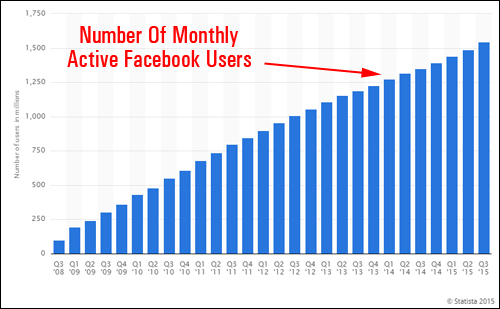
(Number of monthly active Facebook users. Source: Statista.com)
After Facebook, Twitter is the second biggest social media site in the world, with over 500 million tweets sent out every single day. Twitter has a significant amount of influence online and places great importance on the authority of tweets posted to readers over the volume of tweets sent …
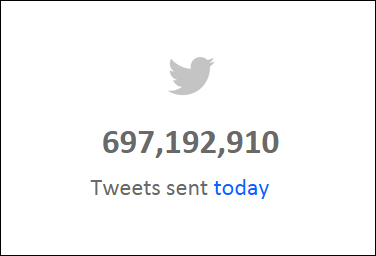
(Over half a billion tweets are sent every single day. Source: Internet Live Stats)
Google Plus
Google’s own social media site naturally carries great authority online, even if it has not reached the same level of growth and take up as Twitter and Facebook.
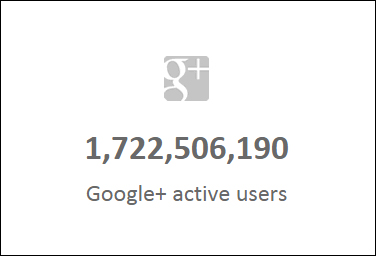
(More people are interacting on Google+ each week. Source: InternetLiveStats.com)
In addition to the big three listed above, there are a number of other social sites that should not be ignored, such as Pinterest, LinkedIn, StumbleUpon,Reddit, and Digg.
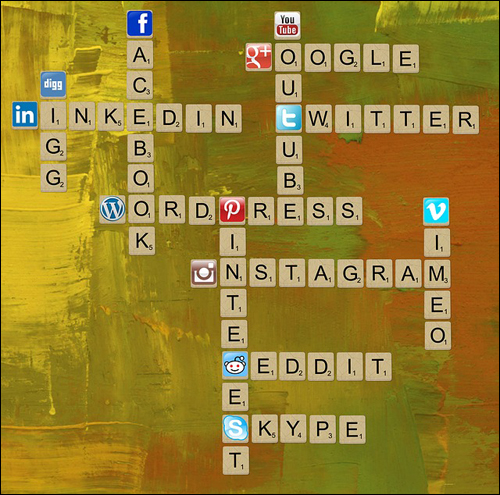
(A number of social media sites provide important signals that could affect your search engine rankings)
Which Social Signals Should You Be Paying Attention To?
Social signals tracked by search engines like Bing and Google include the following:
- Facebook – e.g. how many Facebook likes, shares, and comments you have, growth rate of shares and likes, etc.
- Twitter – e.g. how many tweets and retweets your site has, the number of people sending a tweet, trending topics, etc.
- GooglePlus – e.g. who is following you (influential users), how many people follow you, amount of adds and shares, etc.
- Other sites – e.g. growth rate of Pins and re-Pins on Pinterest, comments on Digg, etc.
- Other signals – In addition to the above, there are other not so obvious signals that can indirectly influence search engine rankings and traffic. These include desirable and negative factors, such as links from authority sites (backlinks) (not as important as they once were, but still a factor) [positive], and whether your site is deemed to be of low quality by visitors [negative].
As a website owner, it’s not only important to develop your social media presence, but also to be able to monitor, measure and analyze your social signals in order to improve your business results.

(Using social media can help improve your results online)
Social media monitoring allows you to find insights into what people are saying about your products, company, or brand on social media, spy on your competitors, measure the impact of your marketing campaigns, avert crises, and spot opportunities for engagement. Additionally, monitoring social media can also provide vital data about emerging trends and what clients and consumers think about specific businesses, brands, products, or topics.
As a tool for business intelligence, social signal monitoring is invaluable. Using social media monitoring as a form of business intelligence, however, is a complex undertaking, typically carried out by a cross-section of groups that include marketing teams, market researchers, online reputation management (ORM) agencies, professional sales reps, social engagement and community personnel, and agencies. Typically, small businesses don’t have the budget to pay a social media monitoring service to continually track their coverage in the media.
Fortunately various technology companies have developed affordable tools that facilitate the tracking of a variety of social media channels, enabling companies to track what is being said online about their brands so they can react to conversations and interact with online users in various social media platforms.

We have created a detailed article listing many social media monitoring tools that will help you manage, measure, and analyze your social media marketing initiatives. Go here for more details:

(Are you searching for an effective tool that can help you monitor your social signals?)
This article explores a simple, yet effective social media monitoring tool for WordPress and increasing your social media exposure online.
Our Featured WordPress Plugin …
SocialMetricsPro – Social Media Analytics WordPress Plugin
Description
Social Metrics Pro is an easy-to-use social media analytics plugin for WordPress that is designed to make growing your social media influence online uncomplicated. It is built on a simple concept – Social Metrics Pro measures and tracks how each signal is performing and displays either a red or green indicator. The user’s job is to turn all red squares into greens.
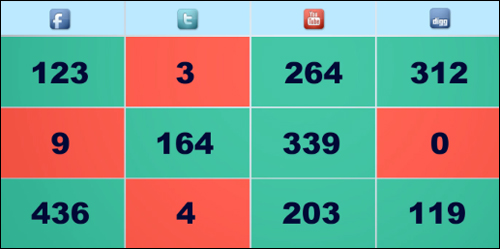
(SocialMetricsPro provides a system that anyone can follow … simply turn reds into greens!)
Colors indicate relative popularity. Posts with highest number of shares display green. Posts with low social media activity show up amber and red.
The developers of SocialMetricsPro tested their plugin on a network of 2,000+ sites over a period of three months. During this period, all they focused on was turning the “reds” to “greens” and then keeping everything “green”. From these tests, they were able to notice that their top 10 best performing sites saw an improvement of up to 360% more traffic, 410% more keywords ranked in the first page of Google and they also experienced a 310% increase in revenues.
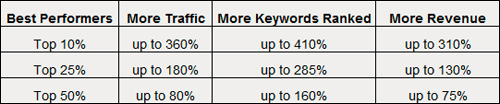
(According to Social Metrics Pro developers, improving your social marketing can dramatically impact your search engine rankings, web traffic and revenue!)
Learn more here:
Plugin Benefits
Below are just a few of the benefits and advantages of using Social Metrics Pro to track Tweets, Likes, +1s, Pins and more right from your WordPress Dashboard on your website:
Fast And Easy To Install And Use. Ready To Start Using In Very Little Time.
SocialMetricsPro installs like any other plugin. Simply upload the plugin file to your Plugin folder via your administrator login and activate.
Really Simple To Use
As mentioned earlier, the user’s job is to turn more red squares into greens. Social Metrics Pro tracks and measures social media signals the way Google sees it so you know which social campaigns require more effort and which campaigns need to be better optimized.
Track The Social Signals You Care About
Social Metrics Pro lets you centrally track and monitor social activity from social media networks like Twitter, Facebook, GooglePlus, Digg, StumbleUpon, Pinterest, and LinkedIn.
SocialMetricsPro helps you get answers to questions like:
- Which social networks work best for my site?
- Which social campaigns are performing the best on these social networks?
- Which are my most popular posts?
- And more …
With Social Metrics Pro, all this information is available on-demand, with just one click.

(Social Metrics Pro actively tracks the sites that you care most about!)
SocialMetricsPro Features
Social Metrics Pro provides many great features to web site owners. Below we have listed just a few of these:
- Quick and easy to install and implement. Be up and running in no time.
- Widgets And Extensions Ready. You can extend its functionality with built-in and external widgets. SocialMetricsPro displays updated stats right on your WordPress admin bar, display socially popular content on your sidebar or anywhere on your site using point-and-click widgets.
- One-click upgrading. You can update SocialMetricsPro with one click via the WordPress Updates page, or update the manually manually. You can also opt to be notified via email when new plugin updates are released.
- Low server resource consumption. Reporting is in seconds, using very little hosting resources. Reports also include the amount of time it took to retrieve information and the server resources consumed when gathering data.
Additional features include:
- Sorting, Searching And Filtering Features: Social Metrics Pro lets you sort, search and filter data as you like. You can perform keyword searches to study posts related to certain topics, and even filter the results by category, post type, post authors, or by publishing date.
- Export Data: You can export data to Excel for further analysis. Data can be exported in tab-delimited and comma-separated file formats, and imported to Excel or the spreadsheet application of your choice.
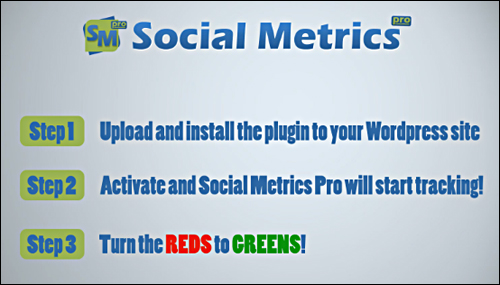
(SocialMetricsPro is really simple to use … just convert red squares into greens!)
User Testimonials
Here are some of the testimonials that plugin users have provided for the SocialMetricsPro plugin:
“Social Metrics Pro is the essential plugin we use to monitor how our content performs on social networks such as Twitter and Facebook. It’s simple, neat and works precisely as you would expect it. When we work with our clients such as T-Mobile, the .Me domain name registry and others, Social Metrics Pro is the plugin we use to create reports as well as keep track on each bit of content to optimize it for future performance.” Ivan Brezak Brkan, Editor of Netokracija.com, TechCrunch EU Contributor
***
“Social Metrics Takes WordPress Stats to the Next Level.” Lorraine Ball, Creative Director, Roundpeg
Plugin Tips
A practical guide containing useful advice on how to optimize your site for social media success (i.e. turn reds into greens) is also included.
Product Support
Social Metrics Pro is well-supported, and comes with free lifetime updates and support, backed by a no-risk, 60-day, 100% money-back guarantee.
Software Cost
SocialMetricsPro plugin is available in two editions:
- Single Site License Edition – This enables you to activate SocialMetricsPro on one domain only. Includes free lifetime upgrades and support. Cost = $27.00 (one-time).
- Unlimited Sites License – This enables you to use SocialMetricsPro on all the domains that you own. Pricing includes free lifetime updates and support. Price = $47.00 (one-time).
Note: Price details for SocialMetricsPro can vary, depending on whether there are any promotions or limited-time special offers. Presently, the software sells for the pricing shown above. This may or may not be the actual pricing charged by the plugin author when you visit the product website and you may be shown additional upsells or one-time offers after you’ve purchased.
Check the plugin’s website for the current pricing here:
Additional Info
Social Metrics Pro requires a self-hosted installation of WordPress and can be instantly downloaded after purchase.
Download This Product
As mentioned earlier, with the rise of social media sites like Twitter and Facebook, search engines like Bing and Google have started taking into account a range of social signals to help determine a site’s ranking.
No website owner can afford to ignore how important social media is to their online success. SocialMetricsPro solves the problem of how to find a simple, time-saving solution that gives you immediate feedback on the success of your social media marketing strategy and shows you where to direct your efforts in order to improve your results.
SocialMetricsPro is ideal for beginners and advanced users alike. It tracks Tweets, Likes, Pins, +1s and more right from your WordPress dashboard.
We recommend this plugin if you own or manage WordPress sites and would like to measure your social media marketing results professionally.

For more details, visit the plugin website here: SocialMetricsPro – Social Analytics Plugin For WordPress
***
***