 Do you currently run or plan to run events that need handling bookings or registrations, such as workshops, training classes, not-for-profit fundraisers, networking functions, or even a big event such as an arts & crafts, a sporting or religious event, or any kind of event where people need to register to attend?
Managing event bookings can be a complex process. You will probably need to manage calendar schedules, event dates, participant numbers, data processing and storage, payment processing and invoicing, confirmations and reservations, reminders, cancellations … perhaps even accommodating special needs and delivering tickets to attendees.
There are a number of advantages to setting up a web-based event registration system. It can streamline your business processes, save time and lower costs, help you easily duplicate repeat events, give event managers more control, create a more enjoyable customer experience and grow your sales.
The problem is that setting this up can be costly.
Fortunately, if you run a WordPress-based website, you can easily install an inexpensive and professional web-based event booking solution.
Introducing …
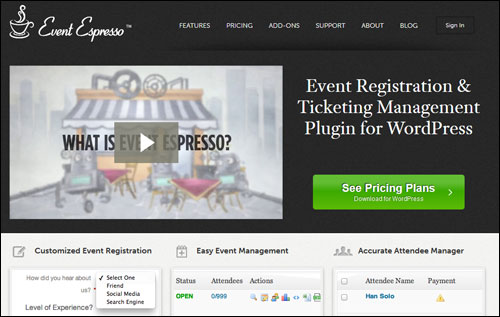
Event Espresso – WordPress Event Registration And Ticketing Management Plugin

Plugin Description
The Event Espresso online event registration plugin for WP allows you to easily schedule multiple events and start accepting registrations in just a few minutes.
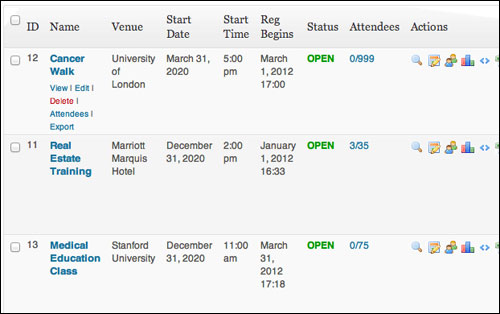
(Event Espresso lets you set up multiple events and accept online event registrations)
Event Espresso is a versatile and feature-rich plugin that gives you full control of your event registration management process.
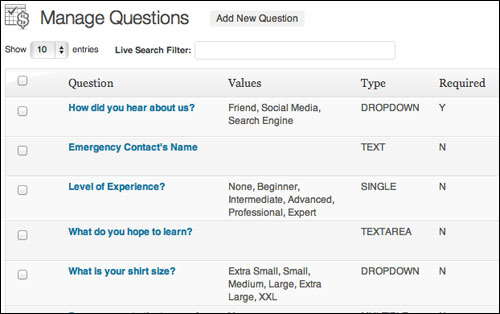
Create custom registration forms
You can employ a number of event registration strategies, from simple online registration and straight up ticket-selling, to setting up custom registration forms in order to better understand your attendees, or integrating your event bookings with social media and autoresponders.
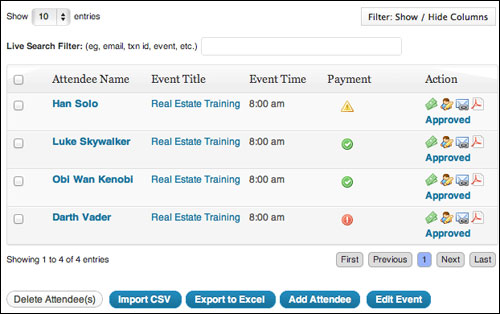
View detailed information about your event attendees
Note: At the time of writing this review, Event Espresso offers two different versions of their plugin: EE 3 and EE 4. The new EE 4 is significantly different than the older Event Espresso 3, as the platform is being redeveloped using a different structure to accommodate future growth. The EE 4 plugin platform has different features, user interface, data structure, coding method and price. The company plans to eventually move completely to EE 4, so keep this in mind as you learn more about this plugin.
For more details, visit the plugin site here:
Plugin Benefits
Here are just some of the benefits and advantages of using Event Espresso to manage event registrations on your website:
Automated Event Registration Management And Ticketing Solution
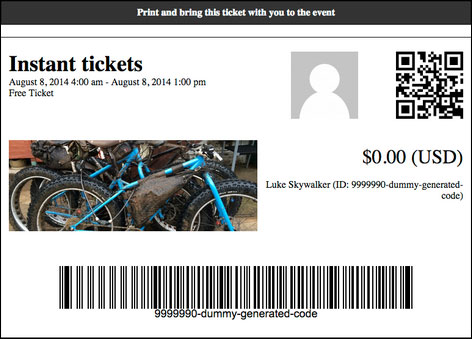
Event Espresso provides you with everything you need to turn your existing website or blog into a feature-rich and professional event management site … from custom registration forms and automated emails, to maximum seating limits, multiple price options and discount codes, to printable tickets and even seating charts.
Better Business Productivity
By using a web-based event registration system like Event Espresso, you save time and increase your business productivity by virtually eliminating the need to process registrations manually.
Basically, you are making it easier for attendees to enroll on their own.
Allowing your enrollees to do all of the data entry frees you up from doing administration and lets you focus more energy on organizing a memorable event.
More Control Over The User Experience
As you will soon discover, Event Espresso gives you full control over the event management and registration process that you want your users to experience.
Some additional benefits of the plugin include:
- Reduced Costs: The Event Espresso plugin provides you with a very low cost online event registration management solution compared to developing your own software or using a 3rd-party provider. This is made possible by using a model where you purchase the core plugin (which suits the needs of most users) and then buy addons only when you need extra features.
- More Sales: Event Espresso lets you accept new event bookings outside traditional business hours. Not only that, but, Event Espresso social and marketing features and add-ons (see below) let people who are interested in attending your event share your information with friends who may be interested.
- Green Event Registration Process: With Event Espresso, your event sign up process can remain entirely in digital form, eliminating typical paper consumption from tasks related to admin and record-storage.
- Own Your Data. You control all the data collected from your event attendees.
Features
Event Espresso delivers functionality to end-users through built-in features (these come with the software) and optional features that users can purchase, called add-ons.
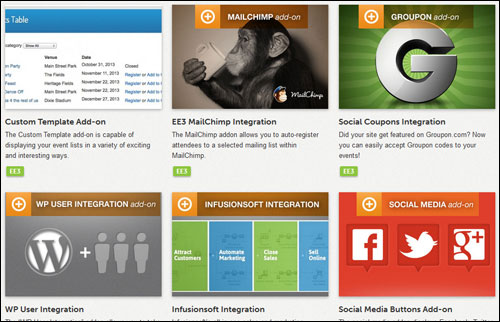
Event Espresso provides many built-in to WordPress users. Here are just a few:
- Fast and easy to install and configure. Be up and running in minutes.
- Multiple Dates and Times Per Event. In EE 4, events can have many dates and times (datetimes), which these can be managed from one single event.
- Customizable Event Designs. Create the look and feel you want for your events and signup page using Event Espresso’s template options and components, as well as HTML and CSS.
- Tax Administration. Event Espresso 4 gives you a number of options to handle taxes for your event and provide reports of tax fee components to customers who purchase tickets. Event managers can administer taxes globally and on a ticket-by-ticket basis.
- Smart Single Page Checkout. The Event Espresso 4 checkout process is smart, fast and intuitive. Registrants are given the option to automatically copy the primary registrant’s information for any additional attendees.
- Default Prices. Create events fast with pre-configured system-default ticket prices.
- In-App Documentation Systems. Event Espresso 4 comes with three detailed in-app documentation systems: Help Tours, Help Tabs and Tool Tips.
- Event Check-In List. Generate an exportable list of event registrants and confirm those who attend.
- No Ticket Events. Create events without requiring registrants to select tickets. Event Espresso can be used for all kinds of events, not just those that require tickets.
- XML RSS Event Feeds. Provide automatic updates to your customers, bring in more visitors and widen your content reach with the built-in XML RSS events feed.
- SEO Friendly URLs. Keyword rich event page URLs take advantage of your Permalinks configuration settings. Search engine friendly permalinks that include topic-relevant keywords enhance the context of your content and improves your search rankings, helping you get a more targeted audience to your website.
- 15+ Languages. Event Espresso is currently available in more than 15 languages, with more translations planned.
- Default Tickets. If you create similar tickets for most of your events, you can automatically set one of those tickets as your default ticket for the next time you create an event simply by ticking a checkbox.
- Venue Manager. The venue manager feature in Event Espresso 4 lets information about a venue to display throughout the Event Espresso admin and the public areas of your website to inform registrants of the location of your event. The venue profile has many of the standard WordPress settings such as tags, categories, discussion settings, comments, etc., but also displays venue details like venue seating capacity, venue site URL, telephone number, physical and virtual location, Google map, etc. You can also display all of your event venues in specific locations of your theme and on a venue archive page on your site where you can set up and reuse venue profiles for multiple events or display every event you have listed for a particular venue.
- Attendee Records. Manage your registrant’s profiles and payment history and keep all of their information organized and easily within reach.
- Invoice Payment Reminders. Follow-up potential event participants who have not paid in full for their admission with a standard but personalized invoice with just one click. Your invoices will address pre-registered attendees who have not paid their registration yet by name, display the balance owing, and include a link to the event, a payment url and a link where they can download the invoice.
- Accurate Event Attendee Manager. You have control of your participants’ details; who has enrolled, which event they have booked and how much they paid. With the attendee manager, you can get an overview of registered participants and their payment status, easily add/edit attendee records and payments, export an attendee list to an Excel spreadsheet for additional uses, send custom payment reminders and receipts and send messages to your participants individually or collectively.
Extra features include:
- Define Extra Meta Information. This allows you to have more control and options over the content of your events and how the information displays to prospects.
- Full Logging & Remote Logging. Event Espresso 4 lets you generate a log file with debugging data that can be useful for web developers who are diagnosing errors.
- Autonomy, Flexibility And Value: Event Espresso states on their website that their mission is to “empower business and organization leaders with the event registration, ticketing and management tools that maximize the success of events.” To achieve their goals, the software has been built using a modular that provides users with great autonomy and flexibility and delivers value for money in the process.
The premium version of Event Espresso also provides you with over 40 additional features, including:
- Duplicating events – limits the work of re-entering event details when adding new events.
- Default surcharge (similar to applying a service tax to every ticket).
- Option to skip the confirmation page in the registration process.
Add-Ons
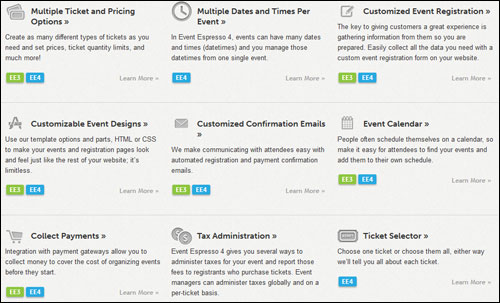
As mentioned earlier, Event Espresso provides “addons”, which allow plugin users to further enhance the functionality of managing an event.
Some of these addons include:
- Events Vector Maps Template Add on: The Vector Maps custom events list template lets you display upcoming events by location. There are four maps available: USA, UK, Canada and Australia.
- Recurring Events Dropdown Custom Template Add on: The Recurring Events Drop-down custom template organizes many datetime events into a dropdown list.
- Events Category Accordion Template Add on: The Category Accordion template shows event categories as a simple list. Clicking a category name displays the events related to that category and closes previously open categories.
- EE4 Events Social Sharing Add on: This add-on adds social sharing features to the end of your Event Espresso “thank you” page that lets your attendees to share a message about their event registration on Twitter and Facebook after registration.
- Custom Files Add on: The Custom Files addon provides PHP files that let you bypass certain aspects of the plugin.
- Roles And Permissions Basic & Pro Add-on Editions: This add on lets you include other staff in the event management process and give new users permission to create events or regional managers permission to manage events. The Roles and Permissions Basic add-on allows you to manage & customize the WordPress users roles and assign them different permissions with different capabilities, so others can help you manage your events or the events that other people create. You can customize roles so that users do not have access to certain sections of your WP dashboard and/or certain sections of your Event Espresso settings. If you’d like to create geographic regions for other people to manage events, use the Roles and Permissions Pro addon.
- Multiple Event Registration Add-on: The Multi-Event registration add-on gives your potential customers the ability to book multiple events at once. In each event listing registrants will be given the option to either register for a single event or add multiple events to their shopping cart. With the Multi-Event Registration add on, attendees can register for several events at once and even add additional attendees to any of the same events in the same checkout process.
- Events Calendar Add-on: This WordPress events calendar displays events and event categories using an attractive graphical calendar.
- JSON API Add-on: The new Event Espresso JSON API add on allows other applications, web sites, mobile applications, etc… to access your Event Espresso information through an API (Application Programming Interface).
Note: The Event Espresso development team is continually adding new features and improvements to its software, including new addons.
For more information about the latest Event Espreso features and add ons, visit the plugin website here:
Customer Feedback
Here are just some of the many testimonials that satisfied plugin users have posted about Event Espresso:
”Tri-South, Inc is using Event Espresso to manage the course catalog, event ticketing, and class registration. [As their developer] I have customized a few items to make the site and plugin a seamless integration. The client is very pleased!” Jenifer Design
”You can tell that the Event Espresso team is really passionate about their work, and that they care and spend a lot of time helping people work with their plugin and use it with their events – it’s something every WordPress service should aim for.” Ryan Imel, WPCandy
”Loving the functions and support from Event Espresso. One of the best plugins I’ve ever bought!” Nathan

Plugin Tips
Whether you are an education services provider, teacher, show promoter, or event management consultant, there are just unlimited possibilities of what you can do with the Event Espresso software.
After purchasing your copy of the plugin and becoming a registered owner, go through the support forum for new ideas and practical suggestions to streamline your event management process and improve the experience of your customers.

Product Support
Event Espresso works with with all WP plugins and WordPress themes that follow standard WordPress coding guidelines. If you experience issues with the plugin, however, you will find that Event Espresso provides great user support, as so many of its end-users confirm:
”By far, the customer service experience with Event Espresso has been the best of any WordPress Theme or Paid Plugin that I’ve used in the past two years!” Megan Murray, Boys & Girls Club of Lake Tahoe
The software provides comprehensive support that includes access to support forums, in-depth online documentation with faqs, knowledgebase and how tos, premium support and even a monthly VIP member pass giving you access to community of developers, designers, event managers, publishers and webmasters that use Event Espresso tools, plus faster support response times.
In addition, Event Espresso boasts a well-staffed team of experienced web developers with a proven track record of support, so this is definitely software you can depend on to run your events.
Software Cost
Event Espresso is available in different plugin editions, including a FREE basic edition (referred to as Event Espresso Decaf). For personal support and advanced plugin functionality, however, you need to consider using one of the paid plugin versions below:
- Personal Licensing – This license enables you to configure Event Espresso on one domain only. Price includes 51+ Premium features, (add-ons sold separately) and one year of upgrades and support. Cost = $69.95.
- Everything Licensing – This license enables you to set up Event Espresso on one domain only. Pricing includes 51+ Premium features, 29 Premium add ons and 1 year of upgrades and support. Price = $279.95.
- Developer Licensing – This enables you to run Event Espresso on five sites. Includes 51+ Premium features, (add ons sold separately) and one year of upgrades and support. Cost = $249.95.
The cost of purchasing the Event Espresso plugin can vary, depending on whether there are any promotions or limited-time specials being offered. When we last checked, the software is being retailed for the prices shown above. Check the plugin’s website for the latest price: Event Espresso – Event Management And Registration Software For WordPress
Note: The pricing above was current at the time this review was written. This may or may not be the actual pricing charged by the plugin seller when you visit the site.
Event Espresso – Additional Info
The Event Espresso development team is continually adding new features and improvements to the software. Make sure to register for their newsletter when you visit their site to receive the latest information and updates.
Search the plugin’s online documentation pages for answers to common questions about setting up and using Event Espresso, and visit the support forums for questions related to your specific situation, or to report errors and share feedback.
For detailed documentation, demos, downloads, videos, tutorials, FAQ and more, visit the Event Espresso product web site.
We Recommend
Event Espresso is the leading WordPress event registration and ticketing management software, used by thousands of users.
If you are a WordPress site owner and you currently run any event that involves scheduling dates, times and venues (offline and online), enrolling participants, or reserving tickets, then you will probably not find a more suitable WP plugin for your needs than Event Espresso.

For complete details, check out the plugin here: Event Espresso – Event Registration & Ticketing Management
***