
Online reputation management should not be avoided if you want your business to grow in the web economy.
In this article, you will learn about a simple plugin for WordPress users that lets you legally and ethically manage customer reviews.
Announcing …
Power Online Reviews – WordPress Plugin For Easy Management Of Client Reviews
Power Online Reviews – Plugin Description
Power Online Reviews is a simple to install, easy-to-use WordPress plugin that fast, easy and simple way to generate more positive reviews on third-party review sites like Yelp, TripAdvisor, etc, and give your online reputation a boost.

According to a study by eVoc Insights, a company known for researching and measuring user experience, 63% of users indicate they are more likely to purchase from a site if it has ratings and reviews.
Power Online Reviews will ensure that positive reviewers are prompted to add reviews to third-party review sites like Yelp, Trip Advisor, Yell.com etc. Bad reviews are sent directly to your business website back-end for attention by the business owner.
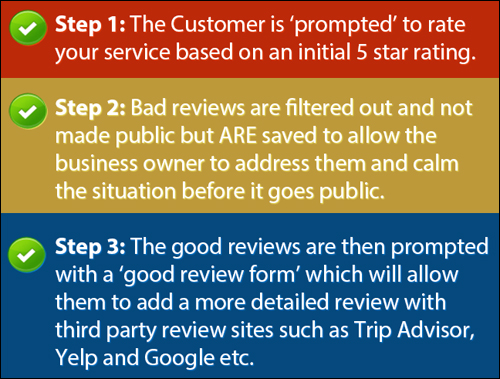
This process helps to generate more 3rd-party reviews that are positive and improves customer satisfaction where the service may have been below par.

According to a recent study by Michael Luca, a professor at The Harvard Business School, “a one-star increase in Yelp ratings leads to a 5-9% increase in business revenue”.
(Source: Yelp.com)
How The Plugin Works
Upon installation and activation, the plugin automatically creates a review form on your site.
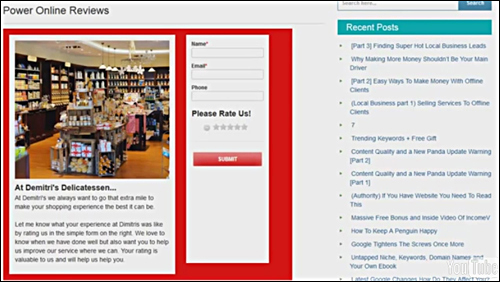
Ask users to rate your services. (Screenshot: Power Online Reviews )
The form is very simple for visitors and customers to fill in. Users enter their name and email address (phone number is optional). The customer is then asked to provide a rating of your products or services.
What Happens When Users Leave Good Ratings?
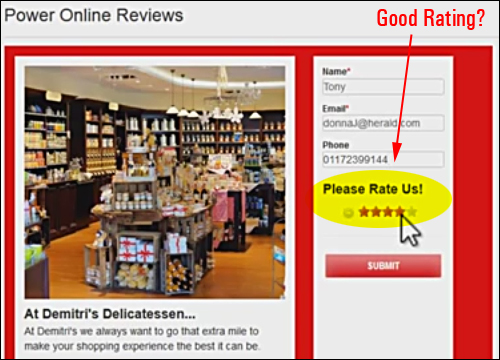
Visitors rate your services or products using a simple 5-star system. (Source: Power Online Reviews website)
Customers who submit positive ratings are then invited to add a review to one or more 3rd-party review sites (you can specify which 3rd-party review sites to display) …
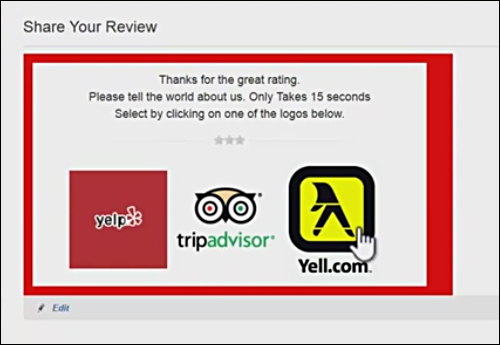
Users who leave good feedback are asked to provide a review on a 3rd-party review site. (Image: Power Online Reviews website)
Clicking on the icon or logo takes your customers to the 3rd-party review site where they can then leave a positive review …
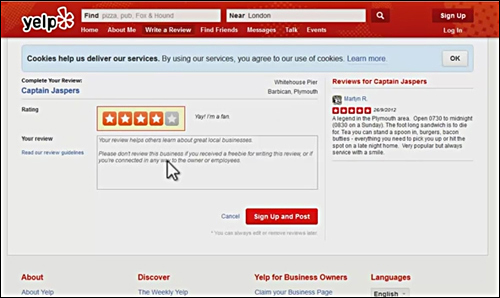
The plugin sends visitors who leave good ratings to your third-party review pages. (Source: Power Online Reviews website)
What Happens When Users Submit Poor Feedback?
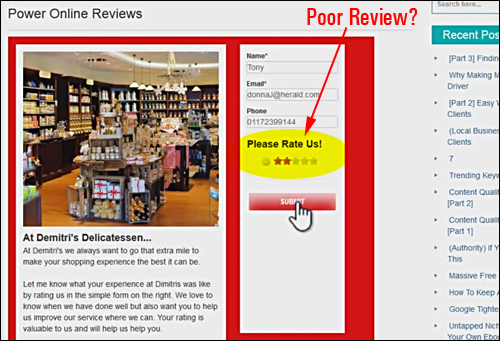
Negative ratings can have a serious impact on your business if issues are not immediately addressed. (Source: Power Online Reviews website)
When customers submit poor ratings, they are not sent to 3rd-party review sites.
Instead, the comments are saved locally, giving you the option to contact the user and also help avoid the venting or posting of negative remarks on Facebook, forums, or other review sites.
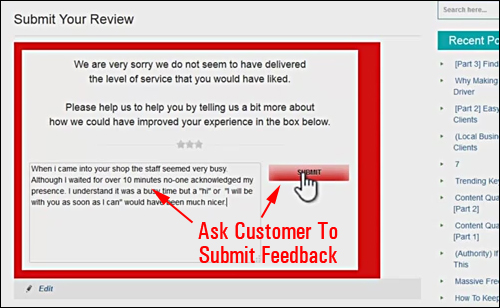
The plugin stores poor comments from visitors on your site. (Image: Power Online Reviews )
More info: Power Online Reviews
Plugin Benefits
Here are just a few of the benefits and advantages of using Power Online Reviews to manage customer reviews from your website:
Very Easy To Install
Power Online Reviews is quite easy to install. Just upload it to your Plugin folder via your dashboard and activate.
Very Simple To Use
As shown in the previous section, Power Online Reviews automatically generates a review form on your site upon installation and activation. All you need to do after that is customize your form settings and you’re good to go.
Early Prevention
Poor reviews can seriously kill your reputation. Good feedback can grow revenues.
If, for whatever reason, your service has fallen below acceptable standards, you want to know about it a.s.a.p., so you can fix any problems before things get worse.
Some additional benefits include:
- Repair Any Existing Damage: If you have any existing poor reviews, you can start to repair the damage legally and ethically by increasing the number of positive reviews being made to third-party review sites and preventing harmful reviews from growing.
- Increase Campaigns For Customer Reviews With Confidence: Once you put a process in place for filtering poor visitor feedback and promoting only positive content about your business, products or services, you can confidently begin increasing your campaigns and customer requests for feedback about your business on your site.
Features
Power Online Reviews offers many features to WP users. Here are just a few of these:
Features For Business Users
- Collect customer feedback easily.
- Customer feedback is centrally managed on local business website.
- Manage good and negative reviews ethically and legitimately.
- Good reviewers are automatically prompted to review at 3rd-party review sites.
- Poor reviews are captured locally for the business owner’s attention.
- All forms are fully responsive and can be used on all computers, tablets, and portable devices.
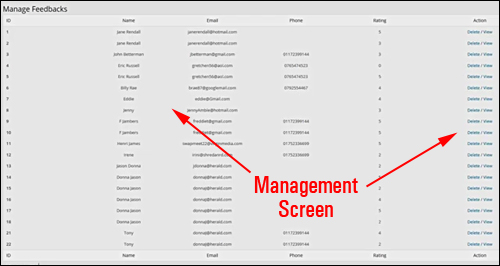
All customer feedback is centrally stored in the Feedback Management area. (Image source: Power Online Reviews website)
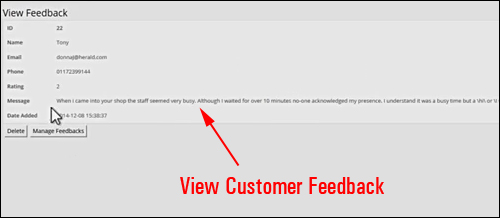
Click on an entry to view customer comments. (Source: Power Online Reviews website)
Administration Settings
- Forms are automatically created when plugin is activated.
- Completely editable review forms.
- Main Review Form: Edit business image, default text title, default text, form background color, submit button background color, submit button text color.
- Follow Up Review Form- Add in your 3rd-party review site names (e.g. Yelp, Epinions, Yellow Pages), logos, user account URLs (i.e. the URLs visitors go to leave a review about your business) and specify whether to display these on your form or not. You can store up to 5 review sites.
- Good Review Form – Add custom text to review form. Change submit button background and text color
- Bad Review Form – Add custom text to review form. Change submit button background and text color
- Ratings Section – Select which rating option or above constitutes a “good” review (e.g. “3″). Everything below this number will be categorized as a “bad” review and stored in the plugin management section, so your visitors will not be asked to continue to the 3rd-party review sites). Other editable features in this section include the submit button background colour, and submit button text colour.
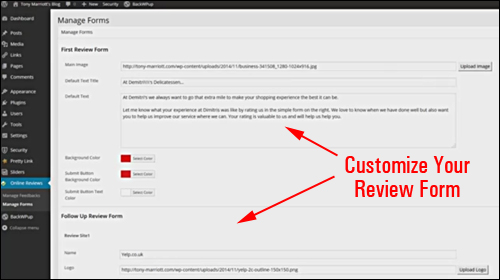
Customize your review form. (Screenshot sourced from Power Online Reviews website)
Useful Tips
The plugin was developed for WordPress users. If you do not have a WordPress site as your main website, you can still benefit from the plugin by installing WordPress and the plugin on a subdomain or subfolder of your domain (e.g. “mydomain.com/feedback”) and linking to this “feedback” section from your main website.
Plugin Support
This plugin was developed and is supported by Tony Marriott, an experienced WordPress plugin and software developer, and is sold with a no-risk, thirty day, complete money-back guarantee.
Plugin Price
- Single User Licensing – Install the plugin on one of your own sites. Price = $9.75
- Multi-User Edition – Can be installed on multiple of your own sites. Cost = $29.00.
- Developer Licensing – Install the plugin on all sites that you own. Can be installed on any client site as part of a paid service. Can include for sale with site installation (transferring single user license). Price = $37.00.
Note: Pricing for the Power Online Reviews software depends on whether there are any promotions or limited-time specials being offered. Presently, the product retails for the amounts shown above. This may or may not be the actual price charged by the software developer when you visit the site and there may be additional upsells or one-time offers after your purchase.
Check the plugin’s website for current pricing details:
Additional Info
For ”how-to” videos showing plugin usage, including installation instructions and tutorials, FAQs, customer help desk, contact details and more, visit the Power Online Reviews website.
Download This Plugin
Businesses are currently ignoring opportunities to attract new customers and grow their business because they are still ignoring their online reputations. Power Online Reviews offers a simple, easy and affordable solution to manage your online reputation.
For full details, visit the plugin website: Power Online Reviews – Easy Client Reviews Management For WordPress
***
***