 Does your business currently run or plan to run events that need co-ordinating registrations, such as seminars, group classes, non-profit fund raisers, social conferences, or even a large-scale event such as a festival, a sporting or religious event, or any kind of event where people need to register to attend or participate?
Co-ordinating event sign-ups is a time-consuming process. You have to co-ordinate scheduling, event dates, registration numbers, data processing and storage, payments and sending invoices, confirmations, reminders and alerts, cancellations … perhaps even accommodating special requests and delivering tickets to event registrants.
There are many advantages to setting up a web-based event registration system. It can make your business more efficient, save time and lower costs, help you easily duplicate similar events, give you more control, create a better customer experience and grow your sales.
The problem is that this can be expensive.
The good news is that if you own a WordPress-based digital presence, you can download and install an inexpensive and professional web-based event booking solution.
Presenting …
Event Espresso – WordPress Event Registration And Ticket Management Software

Plugin Description
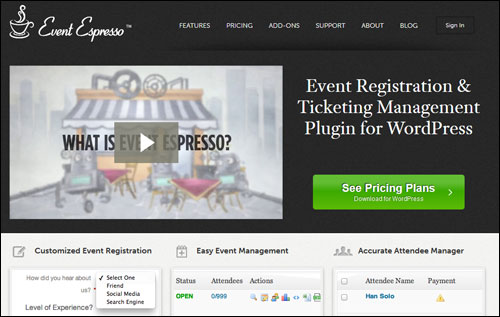
The Event Espresso online event registration plugin for WordPress lets you easily schedule an event and begin accepting registrations literally in minutes.
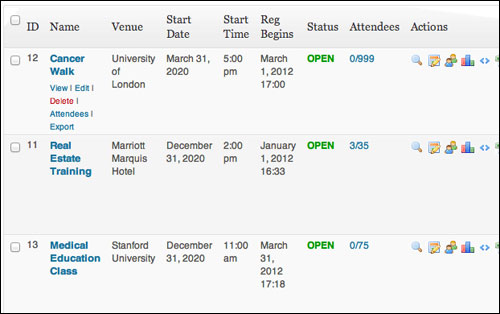
(Event Espresso lets you set up multiple events and take online registrations)
Event Espresso is a versatile and feature-packed software that gives you full control over your event registration management process.
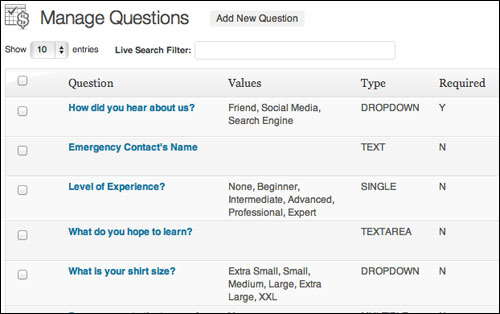
Customize registration forms
You can employ a range of event registration strategies, from simple online enrolments and straight up ticket sales, to setting up custom registration forms for collecting detailed information about your event attendees, or integrating your event bookings with an autoresponder system for ongoing updates.
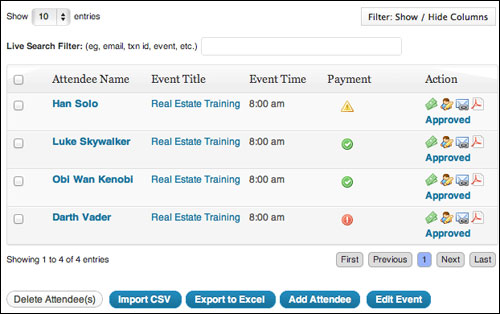
View detailed information about event attendees
Please Note: Currently, Event Espresso is transitioning between two different versions of their software: Event Espresso 3 and Event Espresso 4. The new Event Espresso 4 is considerably different than the older Event Espresso 3, as the platform has been rebuilt using a different structure to enable future expansion. The Event Espresso 4 plugin platform has different features, user interface, data structure, coding method and price. The developers aim to eventually retire Event Espresso 3, so keep this in mind as you read more about this plugin.
More info:
Benefits
Here are just some of the many benefits and advantages of using Event Espresso to manage event registrations on your web site:
Automated Event Registration Management And Ticketing Solution
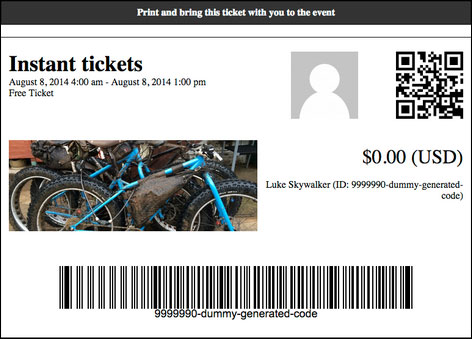
Event Espresso provides you with everything you need to turn your existing digital presence into a fully-featured event management website … from custom registration forms and automated emails, to maximum seating limits, multiple pricing options and discount codes, to printable tickets and even seating charts.
Better Business Productivity
By using a web-based event registration solution like Event Espresso, you save time and improve your business productivity by literally eliminating the need to process registrations and sign-ups manually.
Essentially, you are facilitating attendees to enroll on their own.
Letting your clients to do all of the data themselves frees you up from doing administration and lets you spend more time on planning a more unique event.
Complete Control Over The User Experience
As you will see in a moment, Event Espresso gives you more control over the event management and booking process that you want your clients to experience.
Some additional benefits and advantages include the following:
- Reduced Costs: Event Espresso provides you with an inexpensive online event registration management solution compared to other options or using a third-party provider. This is made possible through a model where users buy the core plugin (which suits the needs of most users) and then buy add-ons when you need added features.
- Higher Sales: Event Espresso allows you to accept online event bookings 24/7. In addition, Event Espresso social and marketing features (see below) let people who are interested in attending your event share your information with others who may be interested.
- Paperless Event Registration Process: With Event Espresso, the event signup process can be kept entirely online, reducing typical paper waste from tasks associated with admin and record-keeping.
- All Data Belongs To You. You control all the information you acquire from event participants.
Plugin Features
The Event Espresso software provides functionality to end-users via standard features (these are included with the software) and additional features that you can purchase, called add-ons.
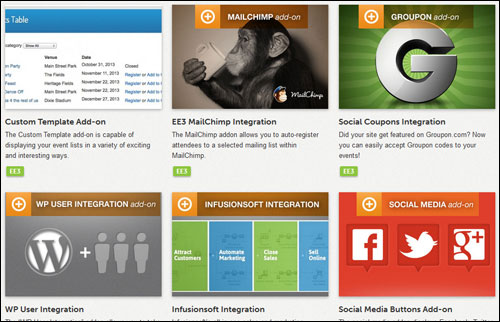
Event Espresso provides a number of great features to web site owners. Here are just some:
- Fast and easy to install and configure. Ready to start accepting registrations in very little time.
- Multiple Dates and Times Per Event. In EE 4, events can have multiple dates and times (called datetimes), that these can be managed from one single event.
- Customizable Event & Registration Page Designs. Customize your events and enrollments page using Event Espresso’s template options and parts, plus HTML or CSS.
- Ticket Selector. Present multiple ticket options to registrants so they can choose the ticket(s) that will best fit their needs.
- Intelligent Single Page Checkout Process. The Event Espresso 4 checkout process is fast and intuitive. Registrants are given the option to automatically copy the primary registrant’s information for any added participants.
- Spam Protection. Reduce the likelihood of spammers and bots making fake registrations with reCAPTCHA option to provide human authentication.
- Discount Codes. Leverage promotion and multiple discount codes to incentivize people to take action now, or simply make your offers more affordable for price-sensitive prospects. Also useful if you want to sell out events close to deadlines.
- Contact Profiles & Contact List. EE 4 provides you with the tools to know who your customers are and how they’ve done business with you.
- No-Ticket Events. Set up events without the requirement for participants to get tickets. Use Event Espresso for any kind of event, not only when tickets are for sale.
- Public Commenting. Add social engagement to your events by encouraging potential prospects to interact with you online via commenting and past customers to post feedback that can help others choose whether or not to sign up. Moderation settings for public commenting are set using the WordPress default commenting admin area.
- Keyword-Rich Event Page Web Links. Keyword-rich event page Web links take advantage of your Permalinks configuration settings. “Pretty” permalinks with relevant keywords add to the context of your pages and is favored by search engines, helping you get a more targeted audience to your events.
- Country-specific Settings. Event managers can configure the country and currency settings that will be used for events, including currency, currency symbols, decimal signs, characters and places, country codes, regions, etc.
- Exportable Data. You can output all of your data collected from event attendees into Excel or CSV format for compiling reports, implementing marketing strategies, reviewing attendee statistics, and so on.
- Venue Profiles. The venue manager in Event Espresso 4 allows details about a venue to be made available throughout the Event Espresso admin and the front end of your website to inform registrants of your event’s location. The venue record displays many of the standard WP settings such as tags, categories, discussion settings, comments, etc., but also lets you reuse details like venue capacity, venue web address, venue phone number, venue address, directions map, etc. You can also display all of your event venues on different parts on your theme and on a venue archive page on your site where you can set up and display venue profiles for multiple events or display all the events for a specific venue.
- Registrant Records. Manage your customer’s profile information and payment history and keep all of their information organized.
- Invoice Payment Reminders. Follow-up potential event clients who have not paid in full for their registration with a standard but personalized PDF invoice with just one click. Your invoices will reference registered participants who have not paid their registration yet by name, display the amount owing, and include links to the event details, a payment link and a link to download the invoice.
- Categorize Events. If you have several different types of events such as free and paid, conference speakers and mastermind sessions, different types of programs and program modules, etc. you can categorize them to make it easier for event registrants to locate what they’re searching for. You can list all the events in a category on an event category page, make the events searchable by category, and color-code events on the Event Espresso events calendar to make these easier to find, in addition to suggesting other events in the categories that appeal to your existing customers.
Additional features include:
- Hooks, Actions & Filters. These allow web-based software developers to implement safer and more reliable customizations and extensions to the Event Espresso software that are completely compatible with WordPress.
- Full Logging & Remote Logging. EE 4 lets you output a log file with debugging data which can be useful for developers when troubleshooting.
- Autonomy, Flexibility & Value: According to the mission statement on their site, Event Espresso’s aim is to “empower business and organization leaders with the event registration, ticketing and management tools that maximize the success of events.” To achieve their goals, the software has been built using a modular and highly efficient model that provides users with great autonomy and flexibility and delivers value for money as a result.
The premium edition of Event Espresso also provides you with 40+ additional features, including:
- Live-filtering when searching for events within the Event Espresso admin.
- Question groups that make it easy to reuse a group of questions for similar events.
- Category titles and descriptions on event listings.
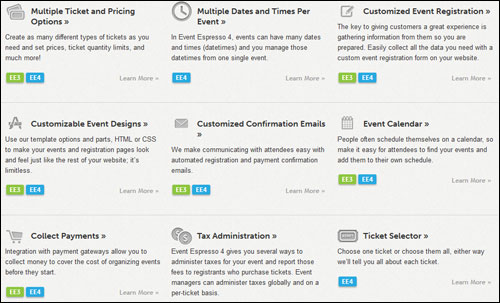
Event Espresso Add-Ons
In addition to an amazing array of features, Event Espresso provides “add-ons”, which allow you to further expand the capabilities of the event management system.
Some of these add ons include:
- EE4 Events Grid Template Add on: Displays events in a pure CSS grid-like structure using the featured image. Hovering over the image will display further information. If the event does not have a featured image available, a default image will be used instead.
- Recurring Events Manager Addon: The Recurring Events management add on enables you to put your events on autopilot by scheduling repeated events weeks or months … even years in advance. You can create as many future events as you want. Event Espresso will automatically open and close bookings for all recurring events.
- Events Date Range Template Add on: The Date Range custom event list template allows your users to search for events that take place within a certain date range.
- Social Coupons Integration Add-on: If your site uses Groupon.com you can easily accept Groupon codes to your events. You can even specify whether events accept the social coupons or not.
- WP User Integration: The WP User Integration add-on lets you take advantage of the WordPress user system. With the WP User Integration add-on you can give users a special incentive by offering member pricing and overriding event prices when members are logged in. You can even set up member-only events where only registered users of the website will have access to these special events. Members can also add personal data into their profile page allowing them fast registration for events by auto-filling in the personal information on the event booking form. Your users can also look up previous events and make payment for future events.
- Roles And Permissions Basic & Pro Add on Versions: This add on lets you include staff in your organization to help manage your events and give new users permission to create events or regional managers the ability to manage events. The Roles and Permissions Basic add-on allows you to manage & customize the WordPress users roles and allow them different permissions with different privileges, allowing others to help you manage your events or the events that others create. You can customize roles so that users do not have access to certain sections of your WordPress dashboard and/or certain areas of your Event Espresso settings. If you’d like to allow users to have geographic responsibilities for events and users, use the Roles and Permissions Pro add on.
- Multi-Event Registration Add-on: The Multiple Event registration add-on gives potential customers the ability to register for multiple events at once. In each event listing registrants will be given the option to either register for a single event or add multiple events to their shopping cart. With the Multiple Event Registration add-on, attendees can register for several events at once and even add additional attendees to any of the same events in the same checkout process.
- EE4 Events Table View Template Add-on: The Events Table Template add-on gives you an easy-to-use system that allows you to edit the look and feel of your event lists. It comes with a simple table template with category filters, table search, table paging and more. It also enables developers to design their own custom templates using one of the included templates as a source template.
- EE4 Infusionsoft Integration Add-on: With the Event Espresso 4 Infusionsoft integration all-in-one sales and business marketing software add on, you can easily automate your customer relations and email marketing campaigns to seamlessly capture customer data, track registrations, and accept payments from your web site.
Note: Event Espresso regularly adds new features and improvements to its plugin, including new addons.
For more information about the latest Event Espreso features and add-ons, visit the plugin website:
User Testimonials
Here are some of the testimonials that satisfied plugin users have written about Event Espresso:
”EventEspresso saves us money, saves our secretary 16-24 hours and looks so professionally done that people ask us how we do it; which we happily tell them, “Event Espresso, and be sure to get the ticketing add-on.”” David, House of Prayer
”I have been using Event Espresso to run my festival and have been very happy with how it has worked out. They have provided tremendous support and their iPhone app is amazing and easy to use. I suggest using it for your event.” Alex Grant, Byron Spirit Festival
”Thank you, we just did 2 sell out seminars of 50 attendees in 48 hours using Event Espresso and it was awesome. My wife was able to pick up on the processing backend with ease. You have done a great job on getting this system together – very simple, clear and well laid out With powerful functionality. I am so glad I dumped the old booking application we had and gave Event Espresso a go. Just wanted to say thanks, and thanks for the very patient, friendly and speedy assistance in helping me to get it all set up at the start. Many thanks to you and your team. A grateful customer.” Nicholas de Castella, Emotional Intelligence Trainings

Plugin Tips
Whether you are a motivational speaker, trainer, festival planner, or event management professional, there are simply countless possibilities of what you can do with the Event Espresso software.
After purchasing your copy of the plugin and becoming a registered user, visit the user forum for new ideas and practical suggestions to improve your event management workflow and improve the experience of your event attendees.

Support
Event Espresso works with with all WordPress plugins and themes that follow WordPress coding standards. If you have problems with the plugin, however, you will find that Event Espresso provides excellent technical support, as many of its satisfied end-users confirm:
”These guys are right on any problem or issue or even general questions. You can’t really put a value high enough on the kind of support these guys offer.” Mark Wigston, Muskoka Graphics
The Event Espresso plugin provides robust support with access to support forums, comprehensive online documentation with faqs, knowledge base and how tos, one-on-one support and even a monthly VIP member pass that gives you access to community of developers, designers, event managers, publishers and webmasters that use Event Espresso tools, plus faster support response times.
In addition, Event Espresso boasts a well-staffed team of experienced WordPress web developers with a solid track record of support, so this is definitely a plugin you can depend on to run and manage your events.
Software Cost
Event Espresso is available in a range of editions, including a FREE basic edition (named Event Espresso Decaf). For personal support and advanced software options, however, you need to consider downloading one of the ”Pro” plugin versions below:
- Personal License – This option allows you to run Event Espresso on one site only. Includes 51+ Premium features, (addons sold separately) and 1 year of upgrades and support. Cost = $69.95.
- Everything Licensing – This lets you configure Event Espresso on one site only. Cost includes 51+ Premium features, 29 Premium add ons and one year of upgrades and support. Price = $279.95.
- Developer Edition – This allows you to run Event Espresso on five sites. Includes 51+ Premium features, (addons sold separately) and one year of upgrades and support. Price = $249.95.
The cost of purchasing the Event Espresso plugin can vary, depending on whether there are any promotions or limited-time special offers. Currently, the software is selling for the amounts shown above. Check the plugin’s website for current pricing details: Event Espresso – Event Espresso
Note: The pricing above was current at the time this review was written. This may or may not be the actual price charged by the plugin developer when you visit the site.
Event Espresso – Additional Information
Event Espresso regularly adds new features and improvements to the plugin. Make sure to stay subscribed to their customer update list to receive the latest information and updates.
Use the plugin’s documentation tools to find answers to common questions about setup and using Event Espresso, and visit the support forums for questions related to a specific use-case, or to report issues and share feedback.
For detailed installation and support documentation, demos, downloads, videos, tutorials, FAQ and more, visit the Event Espresso web site.
We Recommend
Event Espresso is the leading WP event booking and ticketing management plugin, used and trusted by thousands of companies.
If you own a WordPress website and you currently run an event that involves managing dates, times and venues, enrolling participants, or selling tickets, then you will probably not find a better solution for your needs than Event Espresso.

To learn more, visit the plugin website here: Event Espresso – Event Registration & Ticket Management
***