
Thanks to the internet, thousands of entrepreneurial businesses and individuals are finding new opportunities to profit from in areas like providing teaching and training courses online and e-learning.
Electronic training, or “etraining,” is based on the concept of distance learning, where students do not interact face-to-face with the teacher or trainer.
The eTraining Industry Is Growing
e-Learning marketplaces like Udemy.com are indicative of the massive growth of the e-Learning industry.
Udemy.com currently offers 30,000+ ecourses on every subject imaginable, from office productivity and personal skills, to courses on parenting & relationships and making better lifestyle choices, etc …

(Udemy currently offers 30,000+ ecourses covering every topic imaginable!)
This is not only great for people looking to learn new skills, but also for individuals that have unique and valuable information to share.
eTraining – Opportunities & Drawbacks
The internet provides benefits and opportunities for developing training courses online, but there are also significant challenges and drawbacks.:
- Figuring out methods of delivering training,
- Employing easy-to-use tools and technologies that do not require investing additional effort, money or time in a new learning curve,
- Ensuring consistency of standards delivered across content design, course branding, etc.
- Measuring learning outcomes,
- Assessing scores,
- Generating reports, certificates of completion
You also need to take into account important factors such as lack of face-to-face interaction, student boredom, loss of focus, etc.
Online Learning – Unlimited Possibilities
If you are a digital product creator, creating etraining courses that help people gain practical knowledge is a great way to grow a list and develop an online stream of revenue. Product creation is, after all, one of the best ways to attract customers, as well as establish authority and credibility online and position yourself as a leader in your niche or industry.
There’s a ton of opportunity. Just about anything can be taught online.

(Got knowledge, skills or an interest in fashion photography, landscaping or technical writing? Turn it into an online training course!)
The problem is that creating “how to” ebooks and training courses from scratch takes a lot of time. If you have been marketing your business online for a while, however, you probably already have content on your blog or website that can be leveraged into a new digital product.
If you’re searching for a cost-effective way to develop training courses and your site is built with WordPress, there’s a powerful solution that can help you.
Announcing …
WPCourseware – Online Course Creation Software
Plugin Description
WPCourseware is a leading WordPress learning management system plugin.
(WP Courseware – WordPress Learning Management Plugin)
WP Courseware is used in over 7,000 WordPress websites and makes creating courses in WordPress simple.
A course in WP Courseware includes modules and training modules contain units, quizzes, etc.
WP Courseware fully integrates with WordPress. The plugin adds an “options” menu that lets you create new training courses, add or edit modules and units, add quiz questions, edit plugin, import/export your course information, edit training certificates, access training documentation, etc …
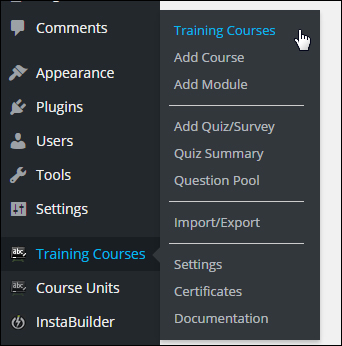
(WP Courseware plugin menu)
WP Courseware also lets you add a widget in the sidebar, giving users access to information about their course progress …
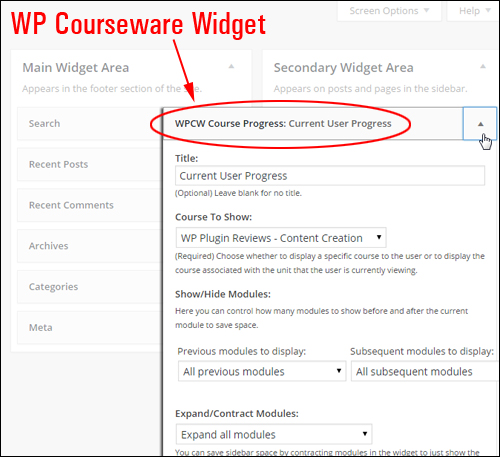
(WPCourseware Widget)
You can completely customize and configure all courses.
For example, you decide whether learners need to complete a course unit before they are allowed to advance through to the next section …
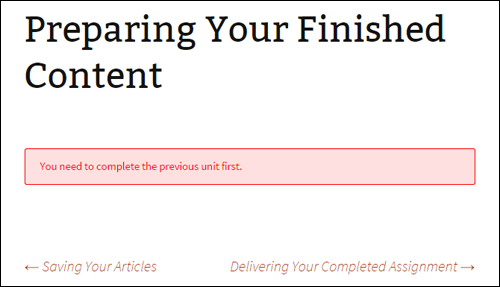
(Courses can be fully configured to suit your needs)
You can view details about all courses “at a glance” and perform a number of actions (e.g. edit course settings) …
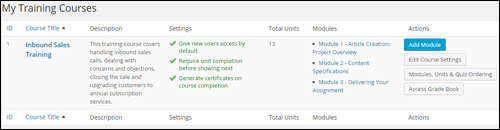
(View training course details inside your dashboard)
If you already understand WordPress, you can create training courses quickly using familiar interfaces and functionality.
For example, you can add and edit the course title and description, set user access, customize messages and user notifications, provide course completion certificates and fine tune other course settings simply by clicking tabs, entering data into fields, checking radio buttons, choosing options from drop-down menus, rearranging elements around screens using drag and drop, etc …
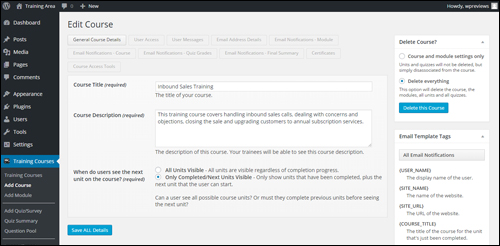
(Edit course options easily)
Adding modules and units is as simple as creating and editing a WordPress post. You can include text, images, embedded media, and any other type of content that you would normally add to a post.
You can reorganize the order of your content by dragging and dropping units inside modules inside the ”Order Course Modules & Units” settings area …
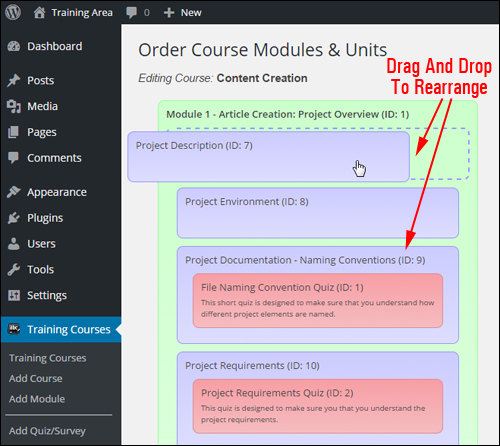
(Order Course Modules & Units settings area)
When you are done adding content to your unit, simply publish it like any other WordPress post or page.
All of your course units will be listed in a table in the “Course Units” area …
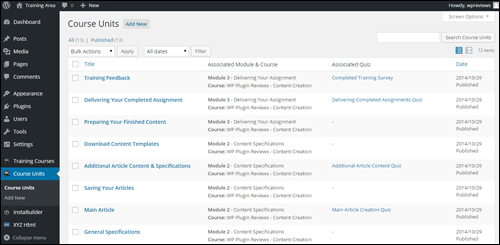
(Course Units table)
Placing your course and training modules into pages is simple. WP Courseware allows you to use the plugin’s built-in shortcodes to insert course and module information into pages …
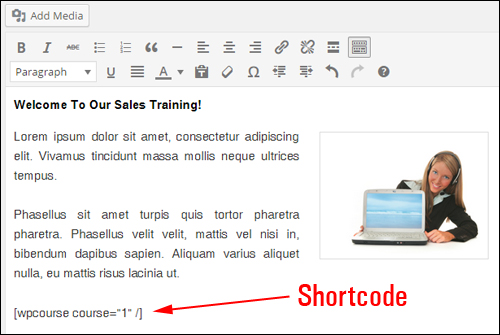
(WP Courseware shortcodes)
After publishing your page, your training course will display to users with all of the content you have added …
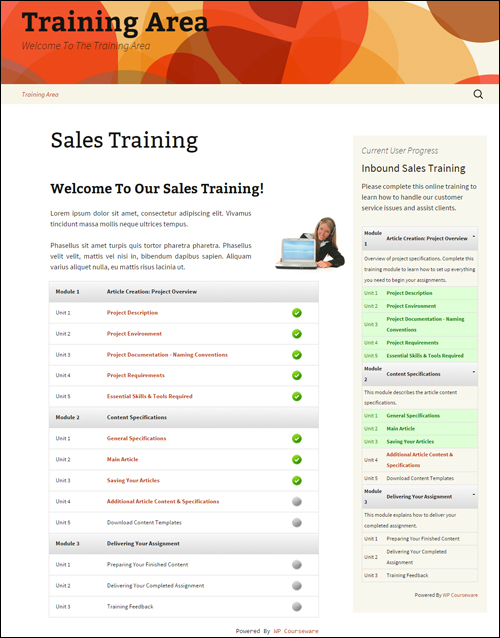
(Training course created with WPCourseware)
Once your training course is published, members must be logged in and have permission to view your training content …
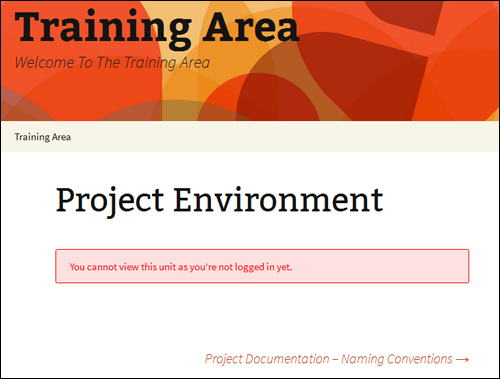
(Members must log in and have permission to view your training content)
Go here to learn more: WP Courseware
Product Benefits
Below are just a few of the benefits and advantages of using WP Courseware to create professional training courses online on your WordPress web site:
Be Up And Running In Minutes
WP Courseware installs just like every WP plugin. Simply upload it to your Plugins folder via your administrator login and activate.
Really Simple To Use
As mentioned earlier, if you already understand how WordPress works, you can quickly create training courses using familiar WordPress interfaces and functionality.
Simply create a new course, module, or course unit with content, and optional quiz or survey. Drag and drop to organize the content and create a course outline using the plugin’s shortcodes or widget.
Unlimited Capacity
WPCourseware allows you to create unlimited courses, modules, lessons, quizzes, surveys and add an unlimited number of students to courses.
Use Different Content Formats
A course unit uses WordPress custom types, which enables you to add anything you would normally insert into a WordPress post or pageWordPress pages or posts besides text, like video, audio files, graphic elements, hyperlinks, downloadable files, etc.
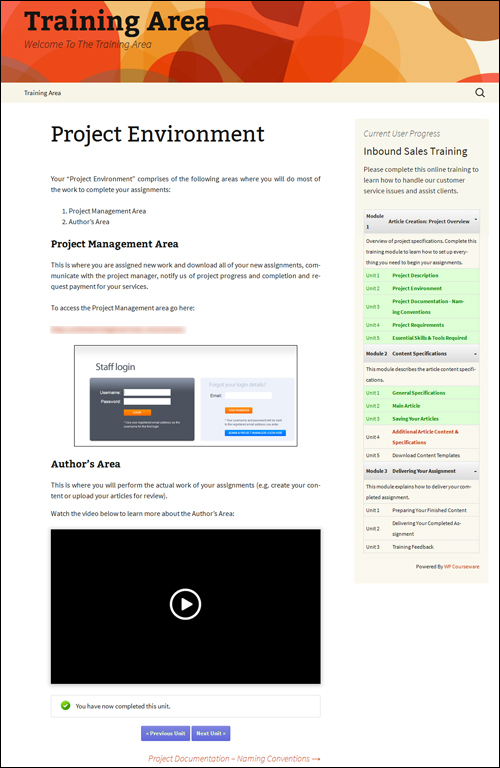
(Use different content types to create your training courses)
Additional plugin benefits include:
- Works with all WordPress themes: The plugin integrates with all WordPress themes.
- Use on all devices: The plugin works on all devices.
Product Features
WP Courseware offers a number of features to website owners. Below we have listed just a few of these:
Course Outline
You can create a course outline or course progress page via shortcodes. The course progress shortcode is dynamic and displays all the courses students are enrolled in while also displaying their current progress.
Track Student Progress
Students can also view their course progress using a dynamic custom sidebar widget.
As a course administrator, you can also track a student’s course progress inside your dashboard …
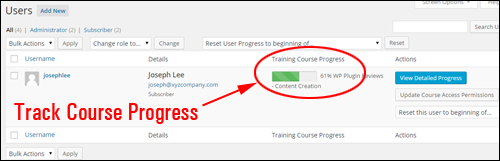
(Progress-tracking features)
Automatically Enroll Course Members
Set up courses to allow automatic enrollment of new course students.
Certificates
Students can receive a training course certificate. You can add a custom background, logo, and signature …
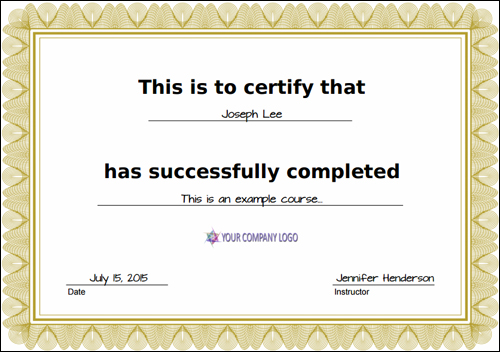
(Customized training certificates)
Import/Export Functionality
The export/import functionality lets you transfer your course to other sites.
User Notifications
WP Courseware lets you create custom user notifications to congratulate trainees upon module and course completion and for communicating course-related administrative matters. You can also customize quiz result emails so your students can be congratulated after passing training quizzes. Additionally, you can also send out mass emails to your students with their final grades with one click …
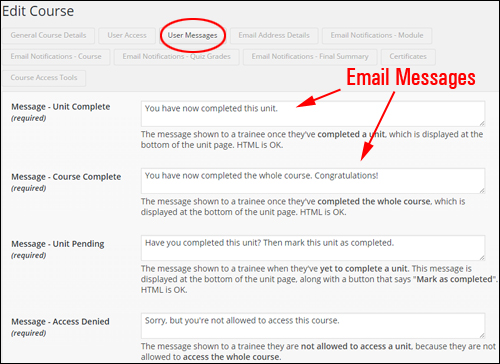
(Email Notifications – WPCourseware)
Add Quizzes And Surveys
Add quizzes and surveys to course content …
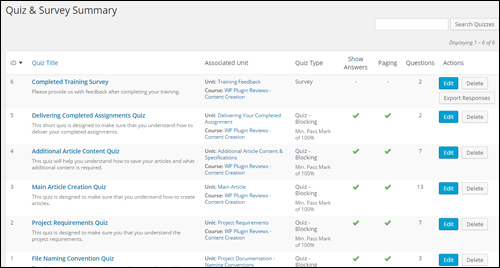
(Add Quizzes & Surveys)
- Depending on how you choose to build the course, you can use course progress blocking or non-blocking quizzes.
- Quizzes can be timed, paginated, and include customized feedback based on question tags.
- Results can be downloaded in PDF format. You can also download a CSV file with the survey results.
- The course grade book helps you track your student’s progress …
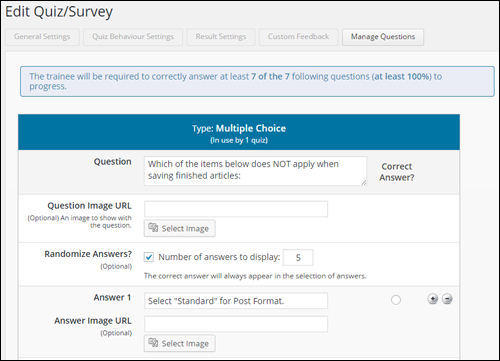
(Edit Quiz/Survey Section – WPCourseware)
Works With Membership & e-Commerce Sites
WP Courseware can be used with many WordPress ecommerce and membership plugins …
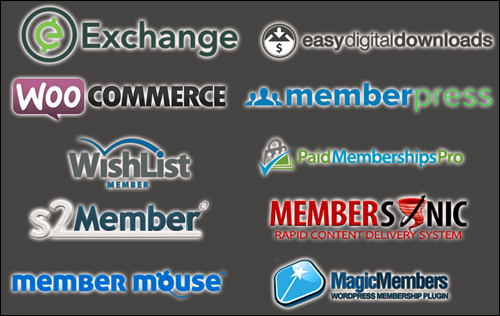
(Membership Site And e-Commerce Plugin Integration)
Feedback From Users
Below are a couple of the testimonials users have provided for the WP Courseware plugin:
“No e-learning solution for WordPress compares to the ease and speed that WP Courseware offers people when setting up online courses.” Chris Lema, Author, Speaker, and E-Learning Expert
***
“Nate contacted me about checking out WP Courseware. I did… and I was impressed. Today, I have WP Courseware integrated into the delivery side of Blog Marketing Academy itself.” David Risley
WP Courseware – Tips
As mentioned earlier, if you have been online for a while, you already have training content on your website or blog that can be leveraged into a digital training product.
WP Courseware lets you convert any any WordPress page or post into a course unit, so if there are a number of “how to” articles and tutorials have already posted on your website, you could already have a partially-created product …
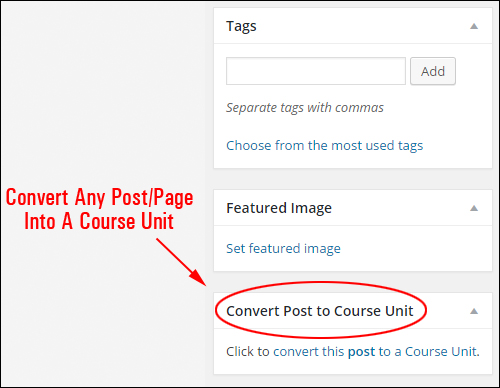
(Convert any post or page into a course unit)
You can use the export/import feature to create and sell completed training courses to other WordPress site owners.
Apart from using the plugin to create sellable courses, you can also use WP Courseware to train new staff, or document instructions for outsourcing tasks.
Support
WP Courseware is well-supported and backed by a risk-free, thirty day, 100% refund guarantee. Users get free access to all integrations and one year of support and upgrades with their purchase.
The plugin’s “Documentation” screen inside the plugin’s options and settings menu explains how to use the shortcodes …
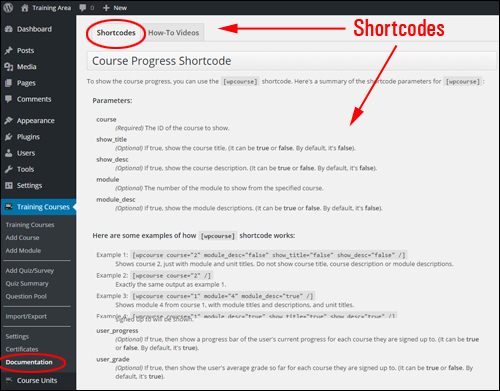
(Plugin Documentation – Shortcodes)
And access to complete training step-by-step tutorials …
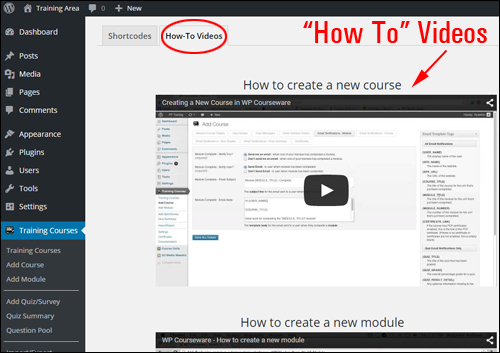
(Plugin Documentation – Plugin Tutorials)
Plugin Cost
WPCourseware is available in the following options:
- 2-Site Licensing – This license option allows you to run WP Courseware on a single website. It includes 1 year of free upgrades and support. Cost = $99.00.
- 10-Site License – This option enables you to activate WP Courseware on ten WordPress websites. Includes 1 year of free upgrades and support. Price = $125.00.
- 25-Site License – This license option allows you to run WP Courseware on 25 WordPress sites. Includes one year of free upgrades and support. Price = $175.00.
Note: The cost to purchase WPCourseware can vary, depending on whether there are any promotions or limited-time special offers. The price above was correct when this review was published. This may or may not be the actual price set by the software developer when you visit the site and you may be shown additional upsells or one-time offers after you’ve purchased.
Check the plugin’s website for the current price here:
Additional Info
For ”how-to” videos showing how the plugin works, including installation instructions and tutorials, FAQs, customer helpdesk, contact details and more, visit the WPCourseware website.
Download This Product
WP Courseware helps you develop and sell learning products quickly and easily. This is a powerful courseware plugin that you should definitely download.

For more details, visit the plugin website here:
***
***