 Does your organization currently run or plan to run events that require managing bookings, such as seminars, group courses, not-for-profit fund-raisers, corporate conferences, or even a large-scale event like a concert, a sporting or religious event, or any kind of event where people need to register to attend?
Co-ordinating event registrations is a complicated and time-consuming process. You will probably need to manage calendar schedules, date availability, participant numbers, data collection and admin, payment processing and sending invoices, confirmations, reminders and alerts, refunds and cancellations … perhaps even accommodating special needs and delivering tickets to participants.
There are lots of advantages to setting up an online event registration system. It can streamline your business processes, save time and reduce expenses, help you easily replicate recurring events, give event managers more control, create a more enjoyable user experience and increase your sales.
The problem is that setting up a web-based event registration system can be costly.
The good news is that if you own a WordPress-based website, you can easily install an inexpensive and professional web-based event registration system.
Introducing …
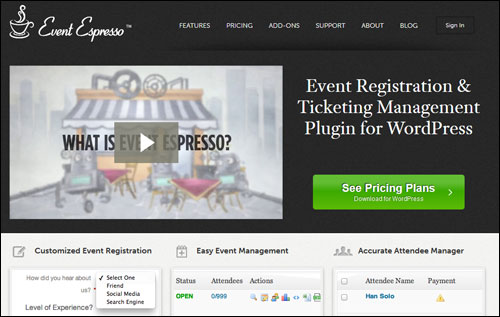
Event Espresso – Event Registration & Ticket Manager

Plugin Description
The Event Espresso online event registration software lets you easily create multiple events and start receiving registrations in just a few minutes.
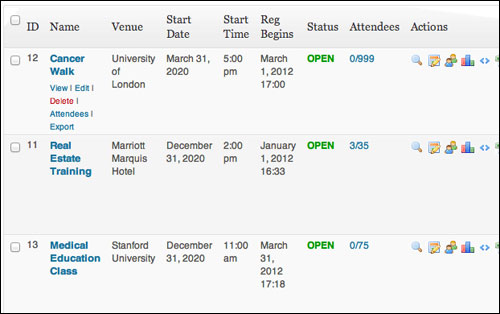
(Set up multiple events and accept online registrations with Event Espresso)
Event Espresso is a versatile and feature-packed plugin that gives you complete control of your event registration management process.
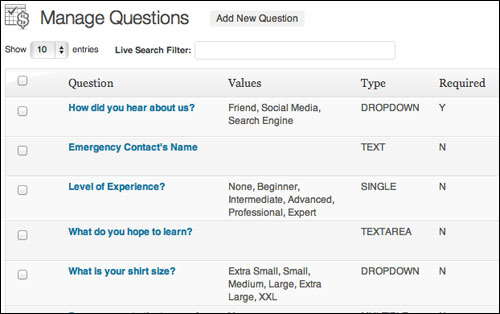
Customize registration forms
You can employ a number of event registration strategies, from simple online enrollments and straight up ticket sales, to setting up custom registration forms in order to better understand your event participants, or integrating your event bookings with social media sites like Facebook.
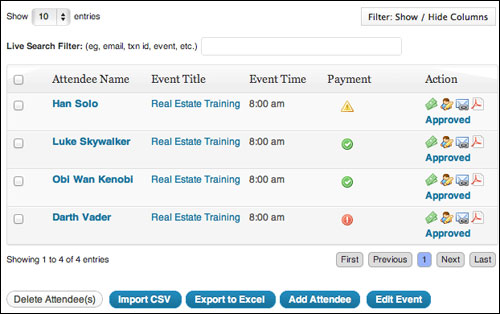
Access detailed information about your event attendees
Please Note: At the time of writing this article, Event Espresso offers two different versions of their plugin: EE 3 and Event Espresso 4. The new Event Espresso 4 is impressively different than the older Event Espresso 3, as the platform has been redeveloped using a different structure to accommodate future growth and expansion. The Event Espresso 4 plugin software has different features, user interface, data structure, coding method and price. The developers aim to eventually retire EE 3, so keep this in mind as you read more about this plugin.
Go here to learn more:
Benefits Of Using Event Espresso
Here are just some of the many benefits and advantages of using Event Espresso to manage event registrations on your site:
Automated Event Registration Management
Event Espresso provides you with everything you need to turn your existing online presence into a feature-rich and professional event management website … from custom registration forms and automated response emails, to attendee limits, multiple pricing options and discount codes, to printable tickets and seating charts.
Better Business Productivity
By using an online event registration solution like Event Espresso, you save time and improve your business productivity by virtually doing away with the chore of processing registrations manually.
Basically, you are facilitating participants to enroll themselves.
Allowing your clients to do all of the data themselves frees up your time and lets you concentrate more of your attention on delivering a more enjoyable event.
Full Control Over The User Experience
As you will learn in a moment, Event Espresso gives you full control over the event management and booking process that you want your attendees to experience.
Additional benefits and advantages include:
- Significantly Lower Costs: Event Espresso provides you with a very low cost online event registration management solution compared to building your own software or using a 3rd party service. This is made possible through a model where users purchase the core plugin (which suits the needs of most users) and purchase add ons only if you need added functionality.
- More Sales: With Event Espresso you can accept new registrations 24/7. Not only that, but, Event Espresso social sharing features and addons (see below) let people who are interested in registering for your event share your information with friends who may also be interested.
- Paperless Event Sign Up Process: With Event Espresso, the event booking process remains wholly online, eliminating traditional paper waste from tasks associated with enrollment.
- Own Your Information. You control all the information gathered from event participants.
Features
Event Espresso provides functionality to its customers through built-in features (these are included with the software) and additional features that you can buy for an extra cost, called add-ons.
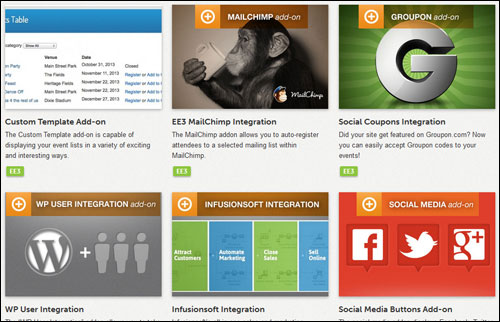
Event Espresso provides a number of features to WP users. Here are just some of these:
- Fast and simple to install and use. Be up and running in minutes.
- Multiple Ticket And Pricing Options. Event Espresso lets you create as many kinds of tickets as you need and specify different pricing options, ticket quantity limits, and more.
- Custom Confirmation Email Message. Easily set up custom automatic registration and payment notification email messages to communicate with event attendees.
- Tax Administration Options. Event Espresso 4 provides a number of options to administer taxes for an event and report tax fee components to customers who purchase tickets. You can administer taxes globally and on a per-ticket basis.
- Custom Post Types. You can Event Espresso into your WordPress theme and reuse events data throughout other areas of your site.
- Default Price Types. Price types let you create new prices that adjust the default ticket pricing for your default ticket.
- In-App Documentation Systems. Event Espresso 4 comes with 3 useful in-app documentation systems: Help Tours, Help Tabs and Tool Tips.
- Manual Registration Option. you have the option of booking event participants at the door, or sending in paper forms for manual inputting later.
- Ticketless Events. Set up events without requiring registrants to get tickets. Use Event Espresso for all kinds of events, not just when tickets are required.
- Event RSS Feeds. Keep your customers up-to-date about your events, drive quality traffic and widen your content reach with the built-in XML RSS events feed.
- Optimized For The Most Up-To-Date WordPress Version. The Event Espresso 4 user interface follows all WordPress guidelines to help you create beautiful event pages that are easier to use and mobile-friendly.
- Your Organization Settings. you can configure your organization’s profile to display throughout Event Espresso and your WP themes. Your organization data include: company name, address, city, state, country, zip code, primary contact email address, telephone, tax number, your logo, Facebook profile URL, Twitter URL, LinkedIn URL, Pinterest profile URL, Google+ profile URL, Instagram profile URL.
- Exportable Data. You can export all the data collected from your event attendees into Excel or CSV format for producing reports, planning marketing strategies, analyzing attendee statistics, and so on.
- WP WYSIWYG Editor. Event Espresso uses the default WordPress Visual editor, allowing you to quickly and easily add graphic images and write your content without knowing HTML or CSS, just like any WP post.
- Automatic Plugin Updating. Event Espresso provides simple one-click upgrading to make sure that you have the newest features and to keep your plugin installation up-to-date with the latest version of WordPress.
- Staff Management. Save time and stay organized by reusing staff profiles for multiple events or displaying profile information such as staff member’s contact information, resume and photo using a shortcode in any event description.
- Attendee Reporting. Quick-view event reports gives you data of all registrations and transactions, enabling you to analyze the performance of your events with the aggregate number of people who have registered and amount of revenue has been collected.
Extra features include:
- Define Extra Meta Information. This feature allows you to have more control and options over the content of your event page and how your information displays to visitors.
- Full Logging, Remote Logging. Event Espresso 4 allows you to generate a log file with debugging data that can be helpful for developers when diagnosing problems.
- Flexibility, Autonomy & Value For Money: According to the philosophy stated on their web site, Event Espresso’s goal is to “empower business and organization leaders with the event registration, ticketing and management tools that maximize the success of events.” To achieve their mission, the company operates on a model that provides users with great autonomy and flexibility and delivers value for money as a result.
The premium edition of Event Espresso also includes over 40 added features, including:
- Duplicating events – reduces the work of re-entering event details when adding new events.
- Default surcharge (similar to applying a service tax to tickets).
- Option to skip the confirmation page in the registration process.
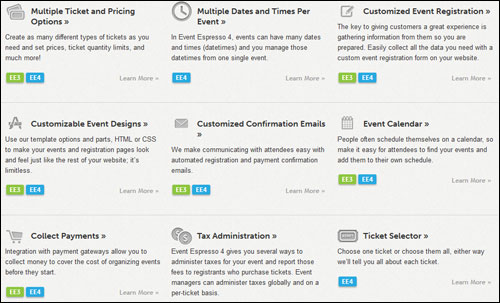
Event Espresso Add-Ons
In addition to an incredible number of features, Event Espresso provides “add ons”, which allow users to significantly enhance the functionality of your event management process.
Some of these addons include:
- Events Vector Maps Template Addon: The Vector Maps custom events list template lets you display scheduled events by location. There are four maps available: USA, UK, Canada and Australia.
- Recurring Events Manager Add on: The Recurring Events manager add-on lets you put your events on autopilot by scheduling recurring events weeks or months … even years in advance. You can create as many events in the future as you like. Event Espresso will automatically open and close bookings for all recurring events.
- Events Date Range Template Add on: The Date Range custom event list template allows your users to browse for events that occur in a certain date range.
- Social Coupons Integration Add on: If your website uses Groupon.com you can easily accept Groupon codes to your events. You can even specify whether events accept the social coupons or not.
- WP User Integration: The WP User Integration add-on allows you to take full advantage of the WP user system. With the WP User Integration add-on you can give users a special incentive by offering member prices and overriding event pricing when your members are logged in. You can even set up member-only events where only registered site users will have access to these special events. Members can also input personal data into their profile page allowing them fast registration for events by auto-filling in their personal information on the event booking form. Users can also view event history and make payment for events.
- Seating Chart Add on: The seating chart add on is great for venues and events that sell and reserve seats for attendees in advance. This is ideal for venues and events such as theaters, concert halls, play houses, sports arenas and stadiums. The Seating Chart add on lets you offer reserved or assigned seating to your events and venues from your WordPress website. The Seating Chart add on lets you control the environment for your attendees and design assigned seating charts and attach single pricing to every seat.
- Multiple Event Registration Add on: The Multiple Event registration addon gives your potential attendees the ability to book multiple events at once. In each event listing attendees will be given the option to either register for a single event or add multiple events to their shopping cart. With the Multi-Event Registration add-on, attendees can register for several events at once and even add additional attendees to any of the same events in the same checkout process.
- EE4 Events Table View Template Add on: The Events Table Template add on provides you with a simple and easy-to-use system that allows you to modify the design of your event lists. It comes with a simple table template with category filters, table search, table paging and more. It also enables developers to design custom templates using one of the templates included as a source template.
- JSON API Addon: The new Event Espresso JSON API add on enables other software applications, web tools, mobile apps, etc… to access your Event Espresso information through an Application Programming Interface (API).
Note: Event Espresso regularly adds new features and improvements to its software, including new addons.
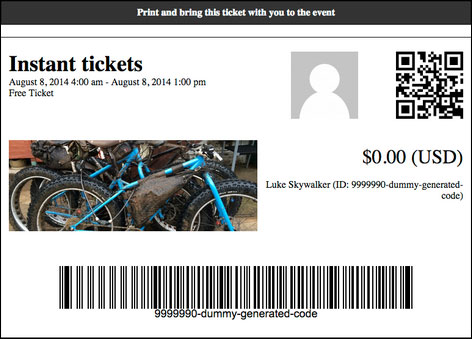
For more information about the newest Event Espreso features and add-ons, check out the plugin here:
Users – Feedback
Here are some of the many testimonials that customers have posted about Event Espresso:
”It’s been very comprehensive and covers exactly the aspects of event registration that we needed for our site plus some features that we didn’t even need but could still use in the future. Very Excellent Plugin!” Tristan Hall, Area 12:2 Youth Group
”Customizing an Event Registration plugin for WordPress by @EventEspresso. Love the pro version. Highly Recommended!” Joshua Garity
”At first we looked at CVENT for one of our clients and they wanted $16,000 per year for 3000 event attendees + fees totaling $22k. That is before Staff and Webinar fees. Worst of all we had to prepay the $16k amount even if we never used all 3000 attendees. That was when we looked at Event Espresso and we realized we could build our own event system for less than 16K. For the most part we have been very satisfied with our decision. The real ROI will come next year when they don’t have to pay another 16k-22K! Over the next 5-6 years we should be able to claim that we saved the company over $100,000 – Thanks Event Espresso!” David Waterman (Long Version), KT Benefits & InkItDigital.com

Useful Tips
Whether you are a motivational speaker, presenter, event planner, or event professional, there are simply endless possibilities of what you can achieve with the Event Espresso plugin.
After downloading your copy of the plugin and becoming a licensed owner, search the support forum for useful ideas and practical ways to improve your event management and registration workflow or improve the experience of your event participants.

Plugin Support
Event Espresso is fully compatible with all WordPress plugins and WP themes that follow WordPress coding standards. If you have problems with the plugin, however, you will find that Event Espresso provides great support, as so many of its plugin users attest:
”It’s magical. Support is amazing, plugin is simple to use, a 3 year old could use the iPhone app…it all is very impressive and professional.” David, House of Prayer
The Event Espresso software provides comprehensive support with access to support forums, comprehensive online documentation with faqs, knowledge base and how tos, premium support and even a monthly VIP member pass giving you access to community of developers, designers, event managers, publishers and webmasters that use Event Espresso tools, plus faster support response times.
In addition, Event Espresso boasts an established team of experienced WordPress web developers with a proven track record of support, so this is definitely a plugin you can depend on to organize and manage your events.
Plugin Pricing
Event Espresso is available in a number of plugin editions, including a FREE basic edition (called Event Espresso Decaf). For personal support and advanced software options, however, you need to consider purchasing one of the paid plugin versions below:
- Personal License – This allows you to run Event Espresso on one domain only. Pricing includes 51+ Premium features, (addons sold separately) and 1 year of upgrades and support. Cost = $69.95.
- Everything Licensing – This option allows you to run Event Espresso on one site only. Price includes 51+ Premium features, 29 Premium add-ons and 1 year of upgrades and support. Cost = $279.95.
- Developer License – This lets you install Event Espresso on five sites. Price includes 51+ Premium features, (add ons sold separately) and 1 year of upgrades and support. Price = $249.95.
Pricing details of the Event Espresso plugin can vary, depending on whether there are any promotions or limited-time specials being offered. Presently, the software is being retailed for the pricing shown above. Check the plugin’s website for the current pricing details: Event Espresso – Event Manager & Registration Software For WordPress
Please Note: The pricing above was current when this article was written. This may or may not be the actual pricing charged by the plugin author when you visit the site.
Event Espresso – Additional Information
The Event Espresso development team is continually adding new features and improvements to the software. Make sure to register for their newsletter when you visit their site to receive the latest information and updates.
Look up the software’s documentation pages to find answers to common questions about setting up and using Event Espresso, and visit the support forums if you have questions related to a particular use-case, or to notify developers about bugs and give feedback.
For detailed documentation, demos, downloads, videos, tutorials, FAQ and more, visit the Event Espresso website.
The Bottom Line
Event Espresso is the leading WP event booking and ticketing manager plugin, used and trusted by thousands of businesses.
If you own a WordPress web site and you intend to run events that require scheduling dates and venues, booking participants, or selling seating, then you will probably not find a more suitable software for your needs than Event Espresso.

For complete details, visit the plugin website: Event Espresso
***