Living and doing business in the Internet Age has many benefits. However, we also live in a world where we are continuously under the potential threat of having our websites and social media accounts hacked into and our business and personal data stolen, manipulated or even being completely erased.

If you manage any digital business assets like a website, then you need to always keep in mind website security and the urgency of creating a digital security and data recovery plan.
In addition to creating an online security and site recovery plan for your business, you will also want to prevent loss of important data from internal and external issues that can set your business back. Having a way to completely restore your site, files or data in extreme situations is something that can only be appreciated once it’s too late.
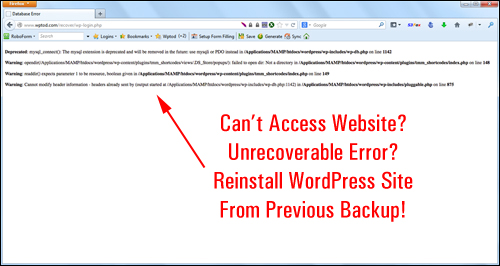
You may also just want to save time. If your business requires cloning multiple websites or blogs, having a simple way of copying site information from one site to another would be really convenient.
As the saying goes, “it’s better to be safe than sorry.” Backing up your WP website, therefore, is imperative. The truth, however, is that left to their own devices, site owners almost never do it, or don’t do it as often as it should be done.
Let’s face it … getting your site hacked, losing data, and accidentally installing programs that can ruin your site is all part of doing business online. If something this tragic ever happens to you, then you will need a quick and easy way to restore lost content, get back an earlier version of your site, or even complete reinstall your site and data.
Fortunately, if you use WordPress, then there’s a simple plugin that lets you create backups of your WP database and site files, clone your site to another location and restore your old site and data.
Backup Creator – Back Up, Clone & Keep Your WordPress Websites Protected
 (Backup Creator – Back Up, Clone & Keep Your WP Site Protected)
Plugin Description
The Backup Creator WP plugin is a “one-click” solution for scheduling and automating your site backups, duplicating all of your websites and blogs and keeping your WP sites protected.
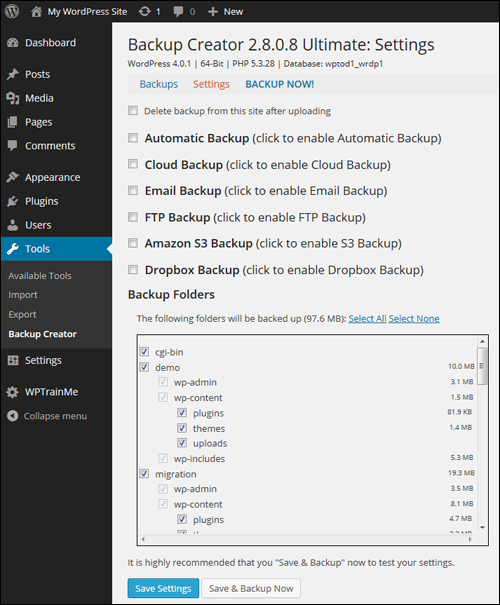
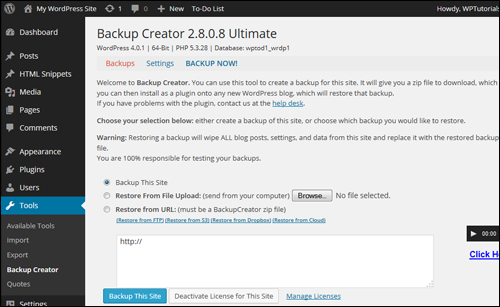 Once you have installed and activated Backup Creator on your website, your plugin settings can be quickly and easily configured. You can configure scheduled backups to run automatically, email backups, backups via FTP, cloud backups, or even remote backups using data hosting solutions such as Amazon S3, Google Drive, and Dropbox.
 For more details go here: Backup Creator
Benefits
Here are just a few of the benefits of using Backup Creator to schedule and automate WordPress backups on your website:
Really Easy To Install
Backup Creator installs like every other plugin. Simply upload the plugin file to your Plugin folder via your WP dashboard and activate.
Enter the license code emailed to you with your purchase receipt and the application will be ready to use.
Very Simple To Use
Backup Creator makes it very simple to instantly backup, restore and protect your blogs and web sites. It only takes a couple of mouse clicks. This makes Backup Creator an ideal backup tool for non-technical users.
Time-Saving Plugin
As well as saving time and the peace of mind of knowing that your information can be quickly restored if anything happens, Backup Creator is an especially useful and time-saving tool for anyone who needs to set up multiple WordPress sites with identical configurations.
Just set up your prototype and instantly create as many copies as you need. That’s a lot of valuable time saved setting up and configuring new websites.
Additional benefits include the following:
- Back Up Large Websites: Quite often, owners of very large websites can experience serious difficulties performing backups. Plugin customers report being able to easily perform backups of large sites. Note: the plugin’s ability to perform backups above certain sizes depends on your hosting service and your server configuration.
- Peace Of Mind: We’ve mentioned this point already, but it’s worth repeating again. Knowing that your information can be restored should any kind of disaster affect your site is a priceless benefit, especially if things depend on having your information available online.
Backup Creator Features
Backup Creator provides many unique features to site owners. Here are just some:
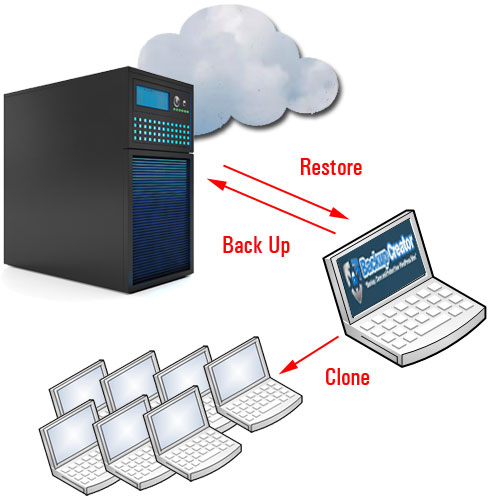
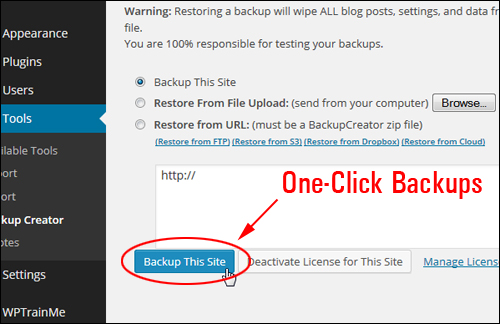
- Create Instant Site Backups. One button is all you need to click to backup your site. Once your site is backed up, you can then ship your backup files to the storage destination of your choice. Download your backup file to your hard drive, email it to yourself, or even FTP your backup to an offsite location.
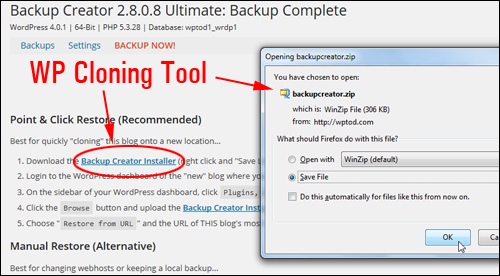
- Restore Backups Instantly To Any WordPress Installation. Instantly restore your site to any destination you like. You can copy it straight from another site, upload using your internet browser or even transfer remotely using FTP, Amazon S3, or Dropbox.
- Proprietary Server-to-Server Technology. Backup Creator’s proprietary “Server-to-Server” technology allows you to deploy any number of client sites pre-configured in seconds, without FTP.
Additional features include:
- Set Up Automatic Back Up Schedules: Set up your backup schedule one time and the software does the automatically. There are no cron jobs to set up or files to upload and no FTP is required. Simply choose your schedule and you’re done.
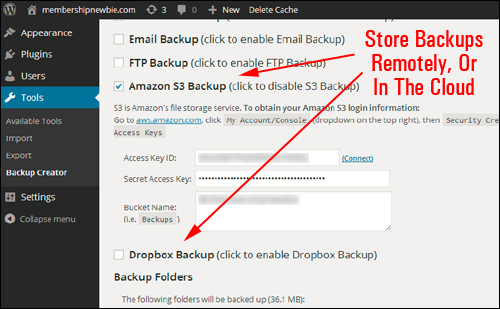
- Back Up With Remote FTP Or Cloud Storage Solutions Like Dropbox, Google Drive, And Amazon S3. Store, manage, and restore all of your data backups in a single offsite storage location and from any place around the world using remote FTP, Amazon S3, Google Drive, or Dropbox.
(Backup offsite to Amazon S3, Dropbox, Google Drive, or all of the above.)
With BackUp Creator, you can perform instant backups with just one click …
 Your site will be backed up in seconds …
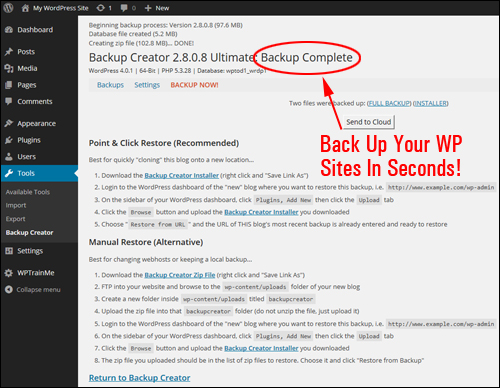 You can restore your backed up files easily any time you want using several methods …
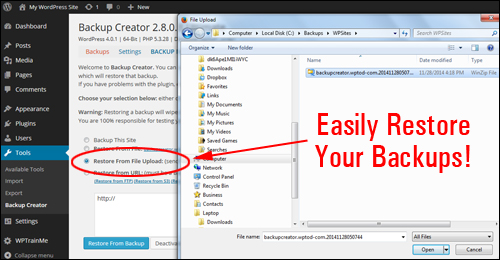 You can also store your backup files in different locations …
 User Feedback
Below are a couple of the testimonials that plugin customers have submitted regarding Backup Creator:
”I just want to say thank you for creating such a great & easy to use cloning plugin.” Steve Dougherty, WP3Guide.com
***
”I am using Hostgator, have backed up a number of wp sites at least three times with no problems. It’s amazing how fast this works. Twice when I backed up a pretty big site, the time on the back up file appearing in my email in box was within a minute to 2 minutes of when it was posted as backed up on my computer. Your manual was so complete and easy to follow I was able to figure it out and do the back up the first time with no problems at all. Often I find techies are not all that good with explaining the how to of their tools. Not you guys. It was so clear and easy to use, it was done before I knew it.” Pat Wiklund, TakeChargeAndMoveOn.com
***
”Now one of the 10 best software tools so far for WordPress!” David Povilaitis, SonomaRealEstate4U.com
***
Useful Tips
Here are some great uses for this plugin:
Real-Time Documentation Of Website Processes.
Instead of spending loads of time documenting all the steps necessary to make your website or blog work “just right”, or creating a blog setup manual, you can just set up your website or blog exactly how you want it, back it up|make an identical copy of site and then restore it somewhere else and you’ve now got an exact, “documented” copy of your blog setup.
For example, let’s say that you want to set up several blogs that include identical settings and configurations in other niches. This could be for a franchised retailer, or a real estate agency with branches in several locations, where each store will manage the content of their own separate blog. Think of all the time you’ve spent tweaking and finetuning your discussion settings, permalinks, configuring different plugins and navigation menus, creating the main content sections, customizing your theme, etc. You can now save loads of time and install a fully-functioning, perfectly configured site every single time with only a few mouse clicks.
Restore A Backup On A Different Domain With Correct Referencing Links.
Simply downloading WordPress files and uploading WP files won’t clone your blogs successfully. You also need to copy the WordPress database and make sure that the data references the new domain. Otherwise, your database data will be restored to another location, but still be referencing the old domain. That’s why you need to have a backup plugin that is specifically created for cloning. This allows you to perform a backup of site “A” and restore it to site “B” with all the theme customizations, plugins, settings and configurations intact, once again, saving you hours – even weeks of work, and ensuring that all internal links have been configured correctly.
Don’t Waste Time Fixing Serious Problems … Just Restore!
Here’s another useful time-saving tip: if your website ever gets hacked, or an unauthorized user somehow gets in and does any kind of damage to your site, don’t spend days or weeks trying to repair the problem, just make a backup of your broken site, delete your old site, and restore a previous working copy. Your site is now up and running again and you can send the damaged site’s backup files to an expert who can then try to understand how your site got broken into and how to repair or report any vulnerabilities.
Here’s one more great tip:
Keep A Record Of Your Web Site’s Changes.
Imagine in a few years that your business has grown and transformed into an online success. Wouldn’t it be great to show people how your digital presence began? Or maybe you’ve changed things around on your site so much and would like to return to a simpler place. Perhaps you’ve accidentally deleted a bunch of videos and other important content and want to get those back.
If you keep a weekly backup of your site, your chances of losing important content are almost negligible because you don’t need to worry about where everything is stored or organized. Just recall when you remember you had that file, restore your backup (note: your backup can be retrieved from anywhere, even on a test site) and retrieve the data you need.
Support
Backup Creator is a robust and well-supported plugin. It was created by Robert Plank, lead WordPress plugin developer for Double Agent Marketing LLC. Backup Creator support includes a detailed step-by-step online user guide, video tutorials, support helpdesk and one year of free software upgrades and new releases with their purchase, backed by a no-risk, 60 day, 100% refund guarantee.
Note: Check the plugin website for a list of webhosting companies that support the plugin and any known issues with these.
”Lance was super-quick with a download issue” Jenn Dize, DollhouseSales.com
Product Pricing
Backup Creator is available in the following editions:
- Express License – Backup Creator Express license lets you install the plugin on up to 5 personal URLs that you own. You can perform unlimited backups and restores only. Cost = $7.00.
- Ultimate – Backup Creator Ultimate edition lets you install the plugin on unlimited personal sites, as well as schedule automatic backups, email backups as an attachment, back up and restore over FTP, Amazon S3, Dropbox and Backup Creator Cloud, restore backups from browser uploads and choose which folders get backed up. Price = $47.00.
- Developer – Backup Creator developer edition lets you install the plugin on unlimited personal and client URLs. You can also flip websites with the plugin installed. Note: Developer edition is only available as an upgrade after purchasing one of the other editions. Price = $100.00 (+ the cost of purchasing either the Express or Ultimate plugin editions).
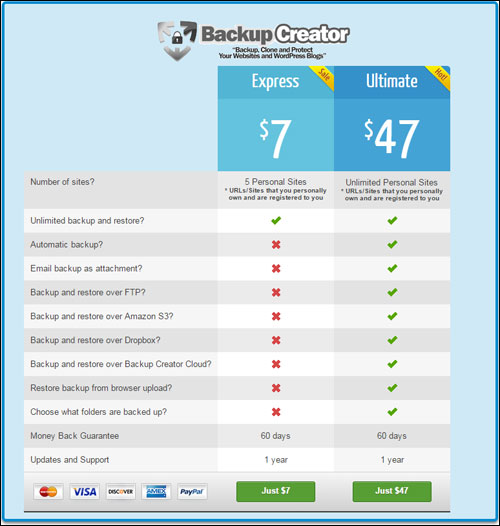 Please Note: The price of this product can vary, depending on whether there are any promotions or limited-time special offers. The above reflects the current price when this review was published. This may not be the actual pricing set by the product author when you visit the product site and there may be additional upsells or one-time offers after purchasing.
Check the plugin’s website for current pricing details:
Additional Plugin Info
For ”how to” videos of the plugin, including installation instructions and tutorials, FAQs, support help desk, testimonials, contact details and more, visit the Backup Creator website.
We Recommend
Performing regular backups of your WordPress website is an essential part of doing business online and ensuring that your data remains protected from disaster. There are many great WordPress backup plugins available, but BackUp Creator doesn’t just perform backups, it also allows you to fully duplicate your sites.
For this reason, we highly recommend using the Backup Creator plugin to backup, clone and protect your WordPress websites and blogs.
 For more details, check out the plugin here: Backup Creator – Backup, Clone And Protect Your WP Websites
 ***
***