 One of the worst things that can happen to you as a website owner is to break the law.
Your digital presence needs to comply with various federal, state and even local laws and regulatory guidelines, some of which you may not even be aware of.
Being non-compliant not only puts you at risk of suffering significant financial costs, but also the cost to your reputation. Why risk your money and your good reputation, when you can protect yourself so inexpensively?
In this article, we look at a simple and very inexpensive solution for WordPress users that can help make your website compliant in minutes.
Does Your Site Comply With The Law?
As the digital realm continues to grow at an extraordinary rate and the rules are constantly changing, it’s vitally important to stay on top of what’s happening and to make sure that your website or blog remains compliant with all laws and regulations, especially if your digital presence is a fundamental component of your business strategy.
Without legal pages on your web site (e.g. terms of service, privacy statement, legal disclaimers, etc.), many third-party sites like Google won’t let you advertise, digital marketplaces like ClickBank won’t approve your digital products for sale, PayPal could close down your account and withhold payment of your funds, Facebook and many other social sites could suspend your web applications, and you will not be accepted into a number of advertising and merchant networks.
If your online business is not compliant, you could also face a number of penalties, including fines, having your website shut down, even jail time!
At the very least, if your digital presence is not compliant, visitors could lose trust and confidence in your business.
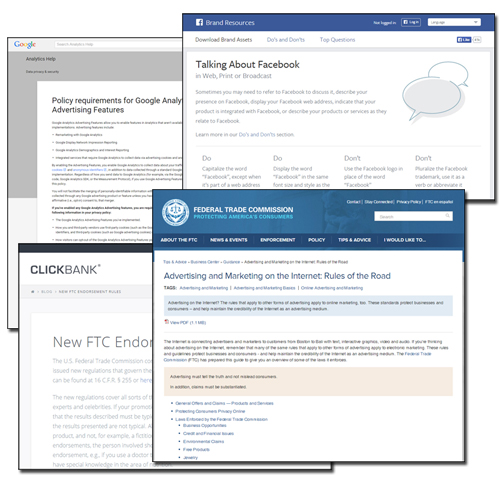
(In addition to legal and regulatory compliance, most third-party websites require you to comply with their terms of use and policies!)

Disclaimer: We are not lawyers and we are not offering legal advice in this article.
The purpose of this post is to make you aware that:
- Your website may be subject to various legal requirements in accordance with the laws and regulations that govern your business,
- The importance of maintaining compliance with the terms of service of third-party providers whose products or services you may be offering or endorsing online, and
- There are solutions for WordPress users that can help your site become compliant, such as the plugin that we review below.
In this article, you will learn about a simple plugin for WordPress-powered websites that provides a complete compliance & disclaimer solution for your online presence.
Presenting …
Compliance Bar – WordPress Plugin For Website Compliance
Plugin Description
Compliance Bar Plugin is an easy-to-use WordPress plugin with over 20 customizable compliance templates for your online business …
For more details, visit the plugin site here: Compliance Bar Plugin
Benefits Of Using Compliance Bar
Below are just some of the benefits of using Compliance Bar to instantly make your website or blog compliant:
Fast And Simple To Install And Implement. Be Up And Running In Minutes.
Compliance Bar Plugin installs like any WP plugin. Simply upload a zip file containing the plugin files to your Plugins folder via your WordPress dashboard and activate.
Templates Are Easy To Edit
Easily edit the pre-built compliance templates inside Compliance Bar from the settings menu using the WordPress visual content editor.
24/7 Plugin Support
The plugin developers provide a dedicated plugin support team to assist users with anything they need.
Some additional plugin benefits include the following:
- Customized Legal Pages: The plugin will create your legal pages in seconds and customizes them to your business and website.
- Full Video Training Library: Compliance Bar is not difficult to use and a complete library of training videos is available.
- Use In Every Country: As long as you consult a qualified legal representative to ascertain if the legal page templates provided in the plugin are suitable and satisfactory for your business, country and website, you can use the plugin wherever you are located.
- Can Be Used On All WordPress Sites: If your website or blog is driven by WordPress, you can use the plugin for all kinds of websites. Just select the legal pages you want to include in your site and ignore the unnecessary pages.
Compliance Bar Plugin Features
Compliance Bar Plugin offers many great features to website owners. Here are just a few:
- Quick and easy to install and implement. Ready to start using in minutes.
- Display Attractive Icons – Compliance Bar will display links to your legal pages in the form of attractive icons that can be placed on different locations on your pages. You can also upload icons of your choice.
- Show Restricted Content – If your website publishes content that may be restricted to certain age groups (e.g. content related to alcohol, ecigs, adult-related, etc.), the plugin can display pop-ups that require users to accept your terms and disclaimers.
- EU User Cookie Compliance – If you do business in Europe or display your content to EU visitors, you must be aware of EU compliance requirements. The plugin displays an attractive bar that notifies your users and protects your business from non-compliance issues.
- Record And Store IP Acceptance – Compliance Bar records and stores the IP addresses of your visitors for future reference, just in case a user accepts your terms or disclaimers and then claims otherwise.
- Shortcode Driven – Compliance Bar is integrated with shortcodes that populate the templates with your personal information. These shortcodes also allow you to place information anywhere on your website, (even in the popups).
- Works On Mobile Devices – Compliance Bar has individual settings for displaying on mobile devices or tablets and displays mobile optimized icons automatically depending on visitor mobile browsers.
Using Compliance Bar
After installing and activating the plugin, users will have access to a number of settings pages.
Let’s review these briefly …
User Profile
There are a number of default fields in this screen where you can input your business details into input (e.g. “Contact Name,” “Support Desk URL,” “Location Details,” “Refund Duration (Days),” etc.). Not all categories are compulsory, but some are (e.g. “Business Name,” “Support Email,” etc.)
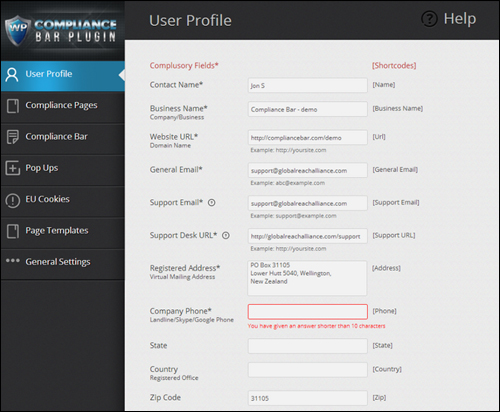
(Compliance Bar User Profile Section – Image sourced from plugin documentation)
The plugin uses dynamic shortcodes to dynamically insert the information in your legal pages …
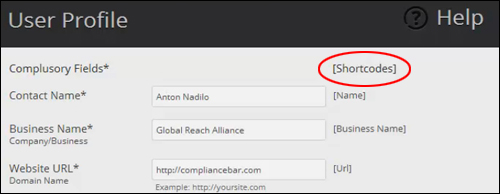
(Compliance Bar Plugin User Profile Screen: Shortcodes – Image source: plugin documentation)
Once the minimum required data has been input into the plugin settings fields, you can then access the other plugin section.
Compliance Pages
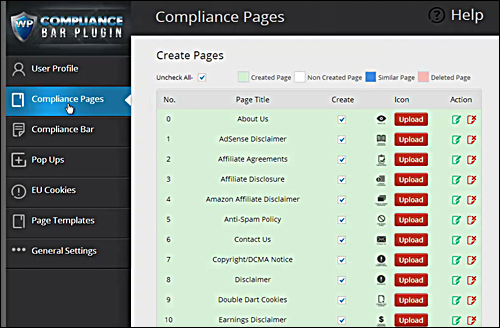
The “Compliance Pages” area contains all of the plugin’s compliance page templates …
(Compliance Bar Plugin: Compliance Pages – Image source: plugin documentation)
Here’s the complete list of legal templates made available by the plugin last time we checked their site:
- About Us
- AdSense Disclaimer
- Affiliate Agreements
- Affiliate Disclosure
- Amazon Affiliate Disclaimer
- Anti-Spam Policy
- Contact Us
- Copyright/DCMA Notice
- Disclaimer
- Double Dart Cookies
- Earnings Disclaimer
- External Links Policy
- FTC Statement
- Legal Disclaimer
- Linking Policy
- Medical Disclaimer
- Privacy Policy
- Returns/Refund Policy
- Support
- Terms
- Terms & Conditions
- Testimonial Disclosure
- XXX Disclosure
You can create legal pages for your blog or website quite easily simply by selecting check boxes and clicking the “Save” button in the “Compliance Pages” area …
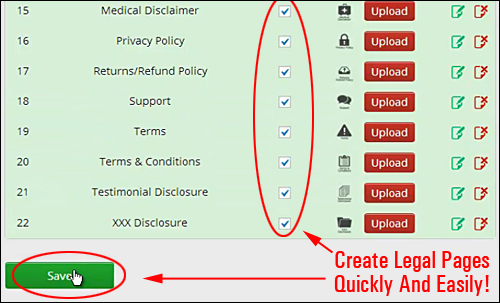
(Compliance Bar: Legal Page Templates – Screenshot source: plugin documentation)
Your legal pages will then be created and added inside your “Pages” section.
Compliance Bar Icons
The plugin is installed with a default set of icons for referencing your legal pages …

The icons are customizable. You can purchase additional icons from the plugin developer, or create/upload your own to match the style of your site’s design …
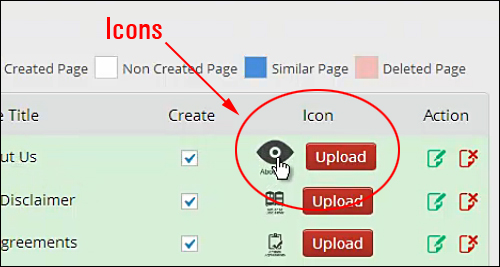
(Compliance Bar: Compliance Page Template Icons – Image sourced from plugin documentation)
Edit / Delete Legal Page Templates
You can edit and delete the compliance disclaimer templates in the “Compliance Pages” screen, just as you would any other page in WordPress …
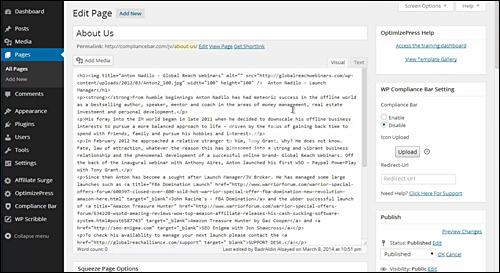
(Compliance Bar: Edit Compliance Pages – Image source: plugin documentation)

Notes
- Customizing is recommended, as the pages contain generic content.
- The plugin will notify you if it detects existing similar pages on your site (e.g. legal pages created before installing the plugin).
Compliance Bar
The plugin settings area provides various options to customize the Compliance Bar, including where to position the bar, whether to show links or icon images, background colors and images, image size, specifying which pages to include an icon for in the Compliance Bar, whether or not to display the Compliance bar on your front page, which pages the Compliance Bar will display in, mobile settings, and offset distance …
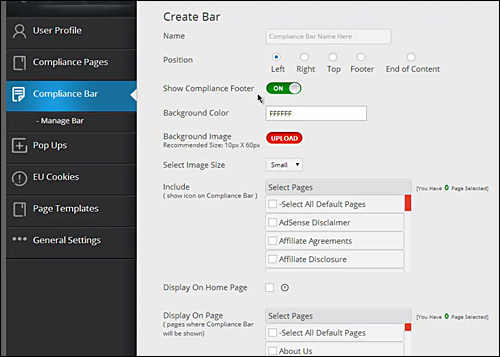
(Compliance Bar Screen: Create Bar – Screenshot source: plugin documentation)
Notes:
- You can create several Compliance Bars to display different icons on different pages, or to cover various uses throughout your website.
- The plugin allows you to display the Compliance Bar on the front page of your site, even if you are using a specific WordPress theme (like Genesis, Thesis or WooThemes), where the home page is configured through the theme itself as a built-in template, and not as a normal “static” page.
- Due to the smaller size of mobile screens, there is a limit to the number of page icons you can display if you turn Mobile Settings “on.”
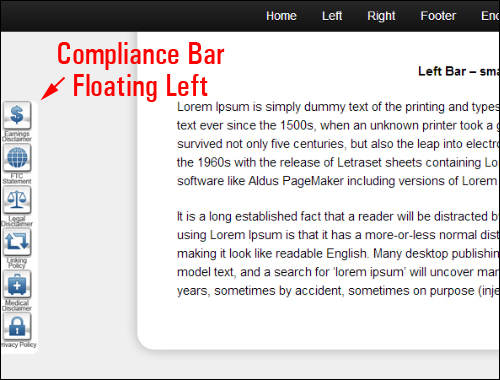
Once you have specified your Compliance Bar settings, it displays links to your compliance pages through a visually attractive icon bar on your site …
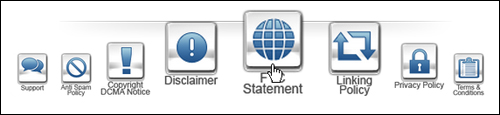
You have complete control over the location on your pages where you would like the compliance icons to display …
PopUps
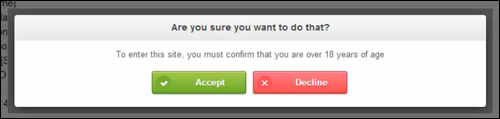
If your site contains content that may be restricted to certain age groups (e.g. content related to alcohol, tobacco, adult-related, etc.), you can display pop-ups that require users to accept your website’s terms or disclaimers.
The “Create Pop Up” tab lets you fully customize your pop ups …
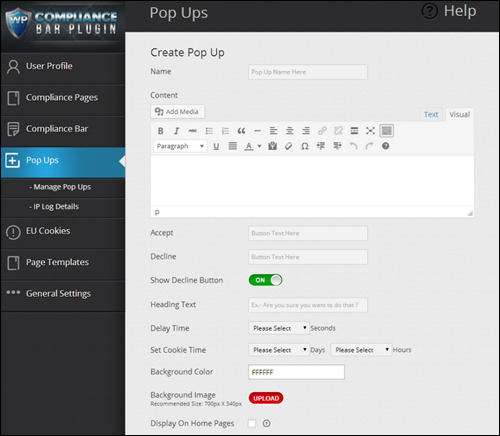
(Pop Ups Screen: Create Pop Up – Image sourced from plugin documentation)
You can create more than one Pop Up for different pages, or to cover a range of uses in other areas of your website …
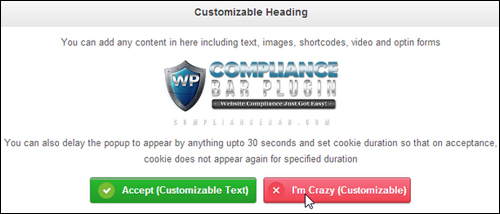
You can also specify a delay time to prevent Pop Ups from displaying immediately, set cookie durations to prevent Pop Ups from appearing again within a specific time period, and store the IP addresses of visitors who accept your terms and disclaimers for future reference …
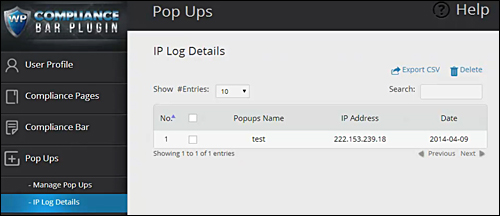
(Pop Ups Section: IP Log Details – Screenshot source: plugin documentation)
EU Cookies
If your business is based in the EU or display your content to EU visitors, you must make users aware of your user cookies and notify them of how you use them …
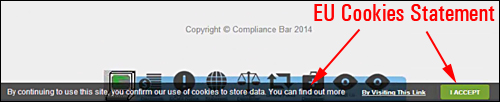
The Compliance Bar plugin lets you edit the settings for compliance with EU User Cookies requirements, including the wording of your notification message and link text in the “EU Cookies” area …
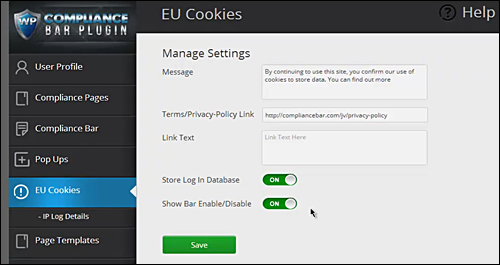
(EU Cookies Section: Manage Settings – Screenshot source: plugin documentation)
Compliance Bar has a non-intrusive way of notifying your visitors and covering you from non-compliance.
Page Templates
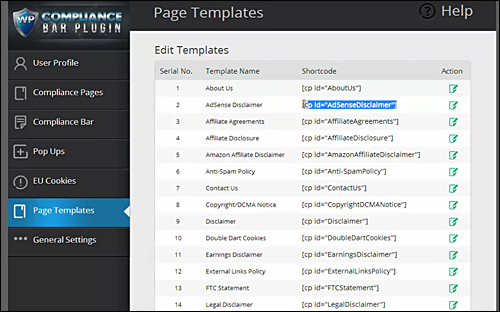
The “Page Templates” screen, lists all of your legal templates and shortcodes, and lets you edit their content …
General Settings
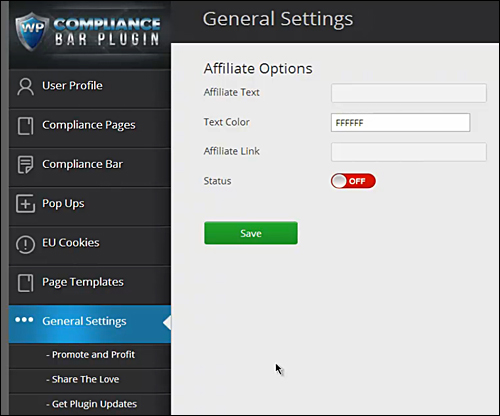
The “General Settings” area, gives you access to general information, such as promoting and sharing the plugin and getting plugin update notifications …
Feedback From Users
Here are a few of the testimonials and feedback that customers have submitted regarding Compliance Bar:
”WOW” Shon Chris – Director (JV Peer Group)
***
”Truly Amazing Product!” Patrick Mauchant – PT Enviromate Technology
Compliance Bar Plugin – Useful Tips
Here are some useful ways you can use Compliance Bar:
- Protection against content theft by spelling out terms of use of your website.
- Displaying compliance icons on specific pages of your site only.
- Minimizing refund disputes by clearly spelling out the refund terms before purchase.
- If you publish content that is considered inappropriate for minors on your site, you can force visitors to click to confirm that they are of legal age to access your content.
Product Support
Plugin Developers provide users with a dedicated support team to assist users. You also get access to a complete set of training videos.
Additionally, your purchase is backed by a no-risk, 30 day, 200% money-back guarantee. If your copy of Compliance Bar does not work within 30 days of purchase and it cannot be fixed within 48 hrs (Monday to Friday), your purchase price will be refunded in double.
Product Price
- Single Edition – Can be installed on 1 of your own domains. Cost = $37 (Normally $127)
- Business Licensing – Can be installed on 25 of your own sites. Price = $67.00 (Normally $197).
- Professional License – Can be installed on multiple of your own sites. Install the plugin on any client site as part of a paid service. Price = $97.00.
Note: The cost to purchase the product depends on whether there are any promotions or limited-time special offers. The above reflects the pricing when this review was written. This may or may not be the actual pricing charged by the software seller when you visit the product site and you may be shown additional upsells or one-time offers after you’ve purchased.
Check the plugin’s website for the latest price here: Compliance Bar
Compliance Bar Plugin – Additional Information
Templates Reviewed By Lawyers – The plugin developers assure users on their website that all legal page templates have already been reviewed and approved by a lawyer. Nonetheless, we strongly recommend that you get professional advice from a qualified legal expert in your area to ensure that your site is fully compliant.
For a demo video of the plugin in action, including installation instructions and tutorials, FAQs, customer helpdesk, contact details and more, visit the Compliance Bar Plugin website.
Install This Plugin
Compliance Bar is an easy-to-use, simple and cost-effective solution for WordPress-powered websites and blogs. We recommend installing this WordPress plugin if you want immediate peace of mind and legal protection.
For more details, visit the plugin website: Compliance Bar Plugin – Compliance Bar – Compliance Plugin For WordPress

Important: Once again, we are not lawyers and we cannot offer legal advice on this website. Do your own due diligence and consult a legal expert about the best way to ensure that your website fully complies with the law wherever your business is based.
***