 The days of passively talking “at” audiences online are well and truly over. To achieve business success in today’s highly connected world, you need to build an engaged social community around your company, products, and brand, based around actively “listening”.
Social channels create a direct line of communication between your company and your audience and give you immediate access to the latest buzz around your services or products.
Social media monitoring allows you to gain insights into what people are saying about your brand, company, or products on social media, measure the impact of campaigns, spot market opportunities, help you take preventative measures if you detect negative comments or feedback by disgruntled customers, and spy on your competitors. Additionally, monitoring social media can also provide valuable information about emerging trends and what clients and consumers think about specific brands, products, topics, or businesses.
As a business intelligence tool, social media monitoring is invaluable. Using social media monitoring as a form of business intelligence, however, is a complex undertaking, often carried out by various groups that include marketing teams, online reputation management (ORM) companies, market research, sales teams, social engagement and community staff, and social media marketing agencies. Typically, smaller businesses don’t can’t afford to pay media monitoring professionals to track their coverage in the and actively monitor their digital reputation.
Fortunately various providers have created affordable tools and solutions that facilitate the active monitoring of a broad range of social media channels, enabling companies to track what consumers are saying about their brands allowing them to respond proactively to conversations and interact with consumers in various social media platforms.
In this article, we explore a number of social media tracking tools and technologies that are worth checking out and knowing about.
What Makes WordPress An Ideal Platform For Social Media?
WordPress is not only a powerful, flexible and easy to manage content management platform used by millions of businesses worldwide, it also integrates fully with many social media applications, making it an ideal too for growing your online presence in the social realm.
To learn more about using WordPress for a business website please click on links to visit our related posts section.
With a WordPress site and some of the tools listed in the next section of this article, you will be able to explore full range of benefits offered by social media marketing.
Let’s take a look at some of the reasons why WordPress makes an ideal platform to market your business on social media.
Promote Your Products And Services To An Audience Of Buyers On Your Social Media Networks With WordPress
WordPress includes built-in social features, like interactive commenting and discussions. A range of WordPress plugins can add additional social features to your site that let you reach a wider audience on social networks like Facebook, Twitter, LinkedIn, YouTube and many others.
For example, there are plugins that can add social sharing buttons, forums, add images from Instagram, Twitter feeds, Facebook feeds, testimonials, surveys, polls … even optimize your content for social networkign sites.
The WordPress content management system (CMS) is not only great for social media as a content publishing tool, it can also be completely transformed into a full-featured social networking, using plugins like BuddyPress, WPSymposium, and others.
BuddyPress
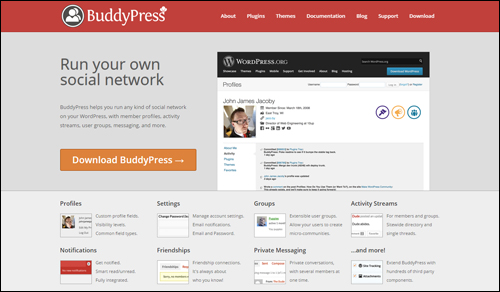
(Set up your own social network with BuddyPress WordPress plugin)
BuddyPress lets you add a suite of social networking components to your website, such as:
- Member Profiles
- Activity Streams
- Private Messaging
- Extensible User Groups
- Friend Connections
- Online Forums
- Notifications
- Many Add-On Features
BuddyPress is known as “social networking in a box.” You can turn features on and off to suit your needs and the plugin boasts an active community of plugin developers who contribute new plugins that greatly extend the application.
WP Symposium
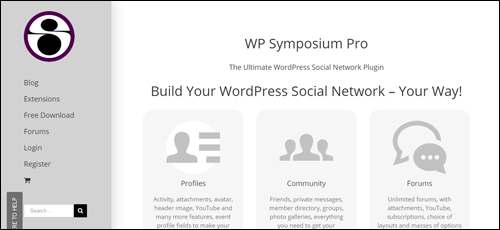
(WP Symposium WordPress social networking plugin)
WP Symposium provides a strong support community and assistance for users who need professional help. Social features of the plugin include:
- Friends
- Activity Wall
- Private Messaging
- Notifications
- User Directory
- Groups
- Forum
- Photo Galleries
- Chat
- RSS Feeds
WPSymposium lets you work with the theme you have. You can add features to posts and pages using shortcodes.
Share Your Content Across Multiple Social Channels
With most social media tools, sharing and syndicating your content is very easy. There are tools that let you compose, schedule and broadcast your content over many social channels simultaneously and manage your social marketing campaigns from one central location, saving you a considerable amount of time and money.
If you want to run most of your social marketing strategy from WordPress, you can. WordPress not only lets you publish content on your own domain, it also makes available a number of plugins that encourage users to easily share your content online on Facebook, Twitter, LinkedIn, Pinterest, etc. See the article we’ve written about WordPress social media sharing plugins and our comprehensive article series on how to automate web content syndication across various social channels with WordPress.
Market Research
Use social media tools and services to discover what consumers want, identify new opportunities and stay ahead of many competitors.
Once you have identified new content opportunities, you can post messages individually on each of the social networks you’d like to reach, or publish these on a WordPress site that’s been configured to automatically notify your social networking sites.
Also, many tools are available that let you run surveys online. Many of these applications and tools will integrate with WordPress.
Build Your Reputation And Brand Online And Establish Authority In Your Niche Or Area Of Expertise
Building and strengthening your reputation and brand, showcasing your talent, or establishing your expertise online requires commitment, patience and a robust social marketing strategy.
You are engaging with real people, and so your interactions must be meaningful and authentic. Put the needs of your audience first, and listen to their conversations to gain valuable insights.
Remember, we are born with two ears and one mouth as a reminder that we are meant to do twice as much listening as talking. What you post and how you respond to users online is very important. Everyday we hear horror stories of brands that handle a customer situation poorly and end up suffering heavy losses as soon as their response or behavior gets exposed online.
Although social media can make it easier for others to see you as an authority in your niche, it can also take up a lot of your time.
An expertly configured WordPress site can help establish your your expertise online, share great information with your customers and clients, and drive visitors to your business.
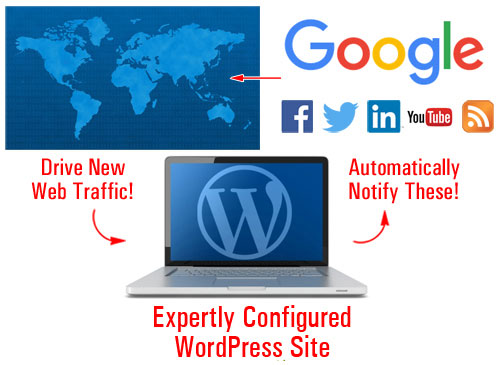
(Automatically syndicate your content across various social media channels with an expertly configured WordPress website.)
Study Authority Sites In Your Niche
Being able to listen to social conversations allows you to reverse engineer what the experts are doing right.
Explore Networking Opportunities And Joint Ventures, Find Affiliates, Recruit Talented Staff, etc.
Recruitment companies spend a lot of time nowadays researching social media and studying the profiles of individuals when looking for potential candidates to fill specific positions. As a business owner, you can do the same, and look for staff, network with other business owners, and connect with like-minded marketers and potential JV partners. Using social media can grow your revenue, get your brand seen, and lead to potentially lucrative new ventures.
Could Your Web Content “Go Viral”?
Many businesses would love to see their content or marketing campaigns go viral. “Going viral,” however, is quite difficult to achieve, as it relies on many factors that cannot be controlled. Throwing loads of dollars at a clever or cute campaign is no guarantee of viral success. Many ridiculous memes have succeeded virally while big-budget and well-funded campaigns have failed.
In many cases, the best you can do is study and research your audience, and provide content that users in your audience will find so useful, compelling, entertaining or even funny, that they will be naturally motivated to share with others.
Some of the tools listed in the next section of this article can help your content go viral, or at least help you set up relatively inexpensive marketing campaigns.

We provide a free email training course that shows you how to create useful and compelling content. In this course we also discuss many ways to create content that has the potential to go viral and help your business grow faster. To learn more, go here or subscribe using the form below:
Social Media Monitoring – Not Just For Large Brands

(Social Media Monitoring – Useful For All Businesses, Big And Small)
Social media monitoring activities can be divided into two main groups:
- Online Reputation Management (ORM)
- Tracking Online Trends
Online Reputation Management (ORM)
You have probably heard the term online reputation management. If you haven’t, you will be hearing it more and more as time goes on, because it is becoming increasingly more important for high profile and even general individuals and brands to track what is being said about them online – especially if what is being said is negative. No doubt you’ve heard the saying that when someone has a bad experience with a product or service they tell 10 more people about it. Real or imagined, bad news travels fast. People or competing businesses could be posting negative stuff online about you or your brand and if things go unchecked, this can do some serious damage to your reputation.
Originally an aspect of the work of PR firms, reputation management is now an issue that affects many companies and individuals online.
If you or your image, good name or good standing is being affected by negative material being posted online, you have to find a way of reducing the negative impact with positive content, or restoring consumer trust and confidence.
Before you can do this, however, you first have to find out about it. The sooner you can spot a negative comment, bad review, or misinformed opinion, the sooner you can begin to do something about it.
That’s where social media monitoring tools come in. If you Google yourself or your business and spot a negative comment or review, you can then do something about it, e.g. post a response, contact the website or person directly, etc.
Many businesses everywhere are currently ignoring opportunities to attract new customers and grow their business because they are not managing their digital reputations effectively.
Monitoring what is being said online extends beyond well-known brands, celebrities, movie stars, famous musicians, and security departments. The ability to monitor the reputation of of an average individual is also important. For example, consider these scenarios:
- A former spouse in the middle of an acrimonious divorce or child custody battle feels hard done by.
- A former employee feels disgruntled after being fired.
- A potential employer searches online for information about you. They may not find anything bad, but there may not be enough good, positive things published online either to help your case.
Even if you are just starting out, you can still create a “set and forget” social media alert system, so that if anything about you does come up online, you can act proactively and deal with the situation in a timely manner.

How good is your reputation online?
We’ve written an article about a simple yet effective plugin for WordPress users that can help you avoid the escalation of negative reviews about your business, products or services through effective user review management. To learn more, go here: Power Online Reviews – WordPress Plugin For Easy Customer Feedback Management
Analyzing Online Trends
Regardless of which niche or industry you operate in, there are always new things happening. New products get released, new services get launched, events get scheduled and promoted, influential people get mentioned in the news, companies publish useful research data, new presentations are published containing fantastic tips or ideas, an outdated fact gets updated and becomes relevant again, something becomes the next viral phenomenon on Twitter, yesterday’s must-have new thing suddenly stops trending and gets replaced with the new “new” thing, services get discontinued, people retire, and so on.
All of this can provide you with an endless source of new content and new content ideas (have you noticed how all news media broadcasters now incorporate a segment on what’s trending on social media?)
Social media content is topical content. Implementing a regular schedule of posting content with your useful comments or insightful opinions to your site not only can help drive more traffic to your business, but your blog or website could end up becoming an authoritative destination or resource for your niche or industry. People could end up referring you to others on social media, and who knows … your site or business could even end up becoming a topical, or newsworthy source of content that others will write about and post in their content.

This is the end of Section One
In the next section we explore social media monitoring resources for WordPress users. To continue reading this article, click here: 30 Social Media Measurement Resources For WordPress – Part Two
***
"I am beyond impressed with what you have put together. I can tell that you put a ton of hard work into building what you have. You have the absolute best content on WordPress I have ever seen!" - Robert T. Jillie