The Electronic Age has transformed the way we live and do business. However, it has also placed us in a situation where we are constantly under the potential threat of becoming a victim of online theft, having our business information hacked into and our business and personal data stolen and manipulated.

If you manage any business assets like a website for your organization, then you need to prioritize digital security and the importance of implementing a digital security plan.
In addition to having an internet security and site recovery plan for your business, you will also want to protect your files from human errors that can result in losing data and cause significant damage or disruption to your business. Having a way to completely restore your site, files or data in extreme situations is something that can only be appreciated after it’s too late.
You may also just want to save time. If you need to set up a number of websites or blogs, having an efficient way of copying site data from one website to another can be quite convenient.
As any experienced webmaster has learned, “it’s better to be safe than sorry.” Backing up your website data, therefore, is key. The truth, however, is that left to their own devices, very few people do it, or don’t do it as often as it should be done.
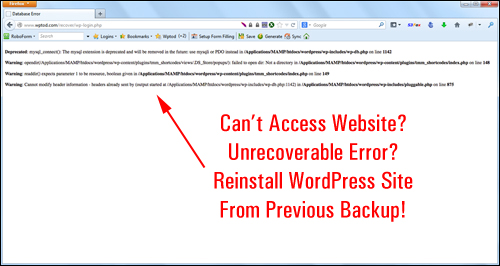
Let’s face it … getting hacked, losing data, and making errors that permanently damage your site is all part of running an online presence. If disaster ever strikes, then you will need an easy and quick way to restore old data, get back an earlier version of your site, or even complete reinstall your site and previous web content.
Fortunately, if you own a WP-powered website or blog, then it’s easy to create backups of your WordPress database and website or blog files, copy your website to another location and restore previous backups of your data.
Backup Creator – Back Up, Duplicate & Protect Your WordPress Web Sites
 (Backup Creator – Back Up, Duplicate And Keep Your WordPress Websites And Blogs Protected)
Plugin Description
Backup Creator is an easy-to-use WordPress plugin that allows you to back up your site files, copy your blogs and content and keep your WP web sites protected with just a few clicks.
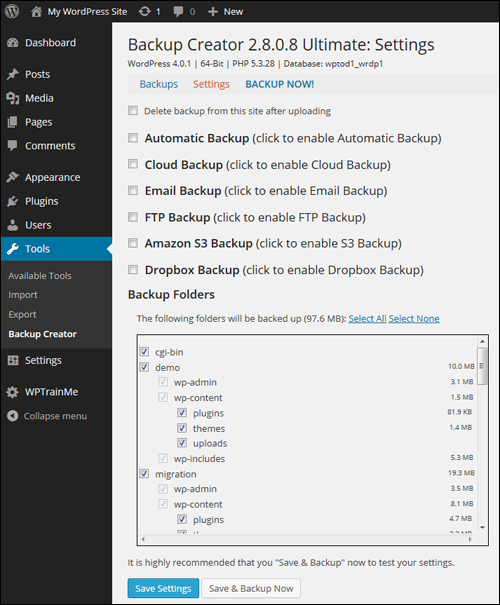
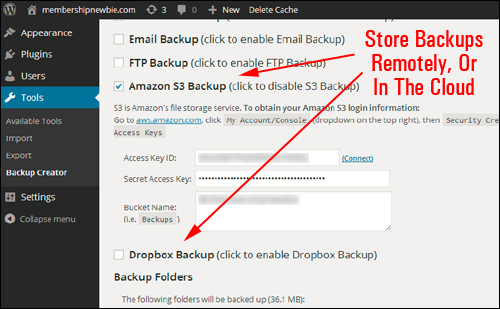
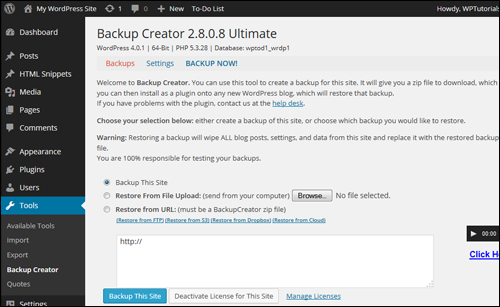 Once you have installed and activated the software on your website, it’s very easy to configure the settings for your plugin. The plugin allows you to configure backups to run automatically, email backups, backups using FTP, backups via the cloud, or even store backups remotely using data storage tools like Amazon S3, Google Drive, or Dropbox.
 For more details, visit the plugin site here: Backup Creator
Benefits Of Using Backup Creator
Here are just some of the benefits and advantages of using Backup Creator to schedule and automate WordPress backups on your website:
Quick Installation
Backup Creator installs just like any WP plugin. Simply upload the plugin file to your Plugins folder via your WordPress dashboard and activate.
Enter the license key required to unlock the plugin and Backup Creator is ready to use.
Very Simple To Use
Backup Creator makes it very simple to instantly back up, restore and protect your blogs and sites. It only takes a couple of mouse clicks. This makes Backup Creator a great backup tool for non-technical users.
Time-Saving Plugin
Apart from saving time and the peace of mind you will experience knowing that your site can be easily retrieved should anything happen, Backup Creator can be an especially useful and time-saving tool for anyone who needs to set up multiple WordPress sites with similar or identical settings.
Just set up your master and then create as many duplicates as you need. That’s a lot of valuable time saved setting up and configuring new sites.
Some additional plugin benefits include:
- Backs Up Large Sites: Often, owners of very large websites can experience serious difficulties performing backups. Many Backup Creator customers report being able to easily perform large site backups. Note: the plugin’s ability to back up sites containing large amounts of data may depend on your webhost and your server settings.
- Peace Of Mind: We’ve mentioned this already, but it’s worth repeating again. Knowing that your data can be quickly and easily recovered should anything happen to your site is priceless, especially if things depend on having a site that is always available to visitors.
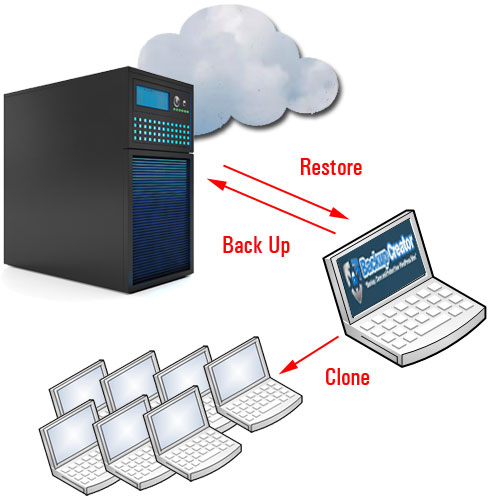
Plugin Features
Backup Creator provides a number of great features to web site owners. Here are just some of these features:
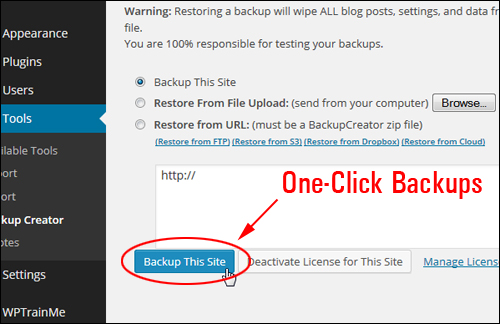
- Instant Site Backups. One button is all you need to click to backup your site. Once your site is backed up, you can then send it securely to the location of your choice. You can download the backup file to your hard drive, email it to yourself, or even FTP your backup to an offsite location.
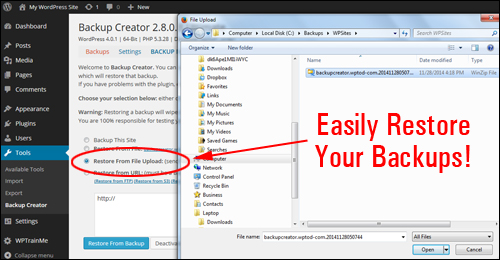
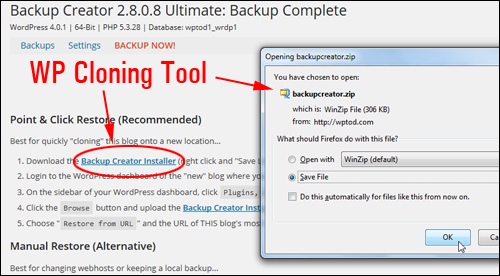
- Restore Backups Instantly. Instantly restore your data to any destination you like. You can copy it directly from another WordPress, upload using your internet browser or even transfer remotely from FTP, Amazon S3, or Dropbox.
- Proprietary Technology. Backup Creator’s proprietary “Server-to-Server” technology ensures that you can quickly and easily deploy unlimited number of client sites pre-configured in only seconds, without the use of FTP.
Additional features include:
- Set Up Automatic Back Up Schedules: Once you set up your backup schedule, Backup Creator takes over. No cron jobs or FTP is required. Simply select your schedule and you’re done.
- Back Up With Remote FTP Or Cloud Storage Services Like Dropbox, Google Drive, And Amazon S3. Manage, store, and restore all of your data backups in a single offsite storage location and from anywhere in the world using remote FTP, Amazon S3, Google Drive, or Dropbox.

(Backup offsite to Amazon S3, Dropbox, Google Drive, or all of the above.)
Once the plugin has been installed, you can perform “one-click” backups anytime you want …
 The plugin backs up your sites in seconds …
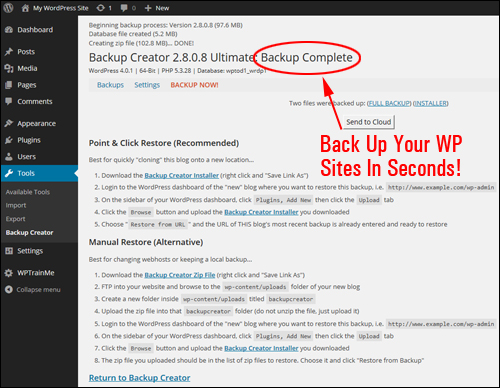 You can easily restore your backed up files whenever you want using different methods …
 You can also store your backups in several locations …
 User Feedback
Below are a couple of the testimonials that customers have written about the Backup Creator plugin:
”I am excited to get my sites off to a great start…backed up! As a newbie, every precious moment counts. Having the right tools is a plus, not to mention, the great business opportunities you have opened up for me!” Ann Moore, MomInternet.com
***
”I just cloned a site and restored via url. It was just magic. Amazing plugin … moved clients site to their hosting server in 5 minutes … this is … an essential plugin.” Haris Chechi, SocialMediaOnline.net
***
”What a fantastic piece of kit, so easy to use and looks to be the best out there, superb. So, thank you for such a great tool and at a very reasonable price.” David Manning, PluginMarketing.info
***
Useful Tips
Here are some great uses for this tool:
Real-Time Documentation Of All Your Site Processes.
Instead of spending loads of time documenting all the steps you would normally have to document when setting up new sites, you can just set up your website or blog exactly how you want it, back it up|recreate the site and then restore it somewhere else and you’ve now got an exact, “documented” copy of your site setup.
For example, let’s say that you want to set up multiple sites which include identical plugins, settings, and configurations in different niches. This could be for a franchised company, or a real estate agency with offices in different locations, where each office will run their own separate blog. Think of all the time you’ve spent tweaking and fine-tuning your discussion settings, permalinks, configuring SEO plugins and navigation menus, creating the main content sections, customizing the theme, etc. You can now save lots of time and install a fully-functioning, completely configured blog every time with only a couple of mouse clicks.
Restore A Backup To A Different Website With Correct Internal URLs.
Simply backing up WP files and restoring WP file backups won’t clone your blogs successfully. You also need to copy the WP database and ensure that the data references the new domain. Otherwise, your WP database data will be restored to another domain, but still be pointing back to the old site. This is why you need to have a WP backup plugin that was specifically created for cloning. This lets you back up site ”A” in seconds and restore it to site ”B” in minutes with all your theme customizations, plugin and site settings and configurations intact, once again, saving you hours – even weeks of work, and ensuring that all internal reference links have been configured correctly.
Don’t Waste Time Fixing Serious Problems … Restore!
Here’s another great time-saving tip: if your website ever gets hacked, or an unauthorized user somehow gets in and causes some kind of damage to your site, instead of spending days or weeks trying to repair or figure out the problem, just make a backup of your files and database, delete everything, then restore a previous working copy. Your site will be immediately returned to normal and you can then send the damaged files to an troubleshooting expert who can then try to understand how your site got broken into and how to repair or report any vulnerabilities.
Here’s one final tip:
Archive Your Site’s Changes Over Time.
Imagine that a few years from now your business has grown and transformed into an online success. Wouldn’t it be great to show people how your business online got started? Or maybe you’ve made your site so complex and would like to bring things back to a simpler place. Perhaps you’ve accidentally deleted a bunch of videos and want to get these back.
If you keep a weekly backup of your site, your chances of losing important content are almost negligible because you no longer need to worry about where you have stored or organized everything. Just recall the time when you remember you had that content, restore the backup (note: it can be located anywhere, even on a test site) and retrieve the file you need.
Backup Creator Plugin Support
Backup Creator is a robust and well-supported plugin. It was authored by Robert Plank, lead WordPress plugin developer for Double Agent Marketing LLC. Support for this plugin includes a detailed step-by-step online installation and user guide, video tutorials, support helpdesk and one year of free upgrades and new releases with their purchase, backed by a risk-free, 60 day, 100% refund guarantee.
Note: Check the plugin website for a list of web hosts that support the plugin and any known issues with these.
“Your service is fantastic!” Steve Dougherty, WP3Guide.com
Software Pricing
Backup Creator is available in the following editions:
- Express – Backup Creator Express allows you to install the plugin on up to 5 personal sites that you own. You can perform unlimited backups and restores only. Price = $7.00.
- Ultimate License – Backup Creator Ultimate allows you to install the plugin on unlimited personal domains, as well as perform automatic backups, send email backups as an attachment, back up and restore over FTP, Amazon S3, Dropbox, etc., restore backups from browser uploads and choose which folders to back up. Cost = $47.00.
- Developer – Backup Creator Developer allows you to install the plugin on unlimited personal and client domains. You can also flip websites with the plugin installed. Note: Developer license is only available as an upgrade inside your product download area. Price = $100.00 (+ the cost of purchasing either the Express or Ultimate plugin editions).
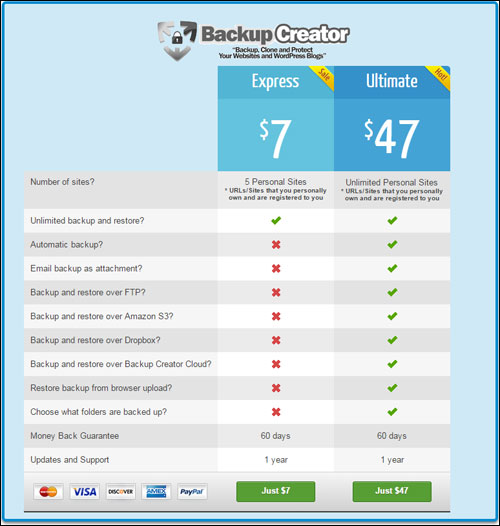 Please Note: The cost to purchase the product depends on whether there are any promotions or limited-time specials being offered. The above reflects the current pricing when this review was published. This may not be the actual price set by the plugin author when you visit the product site and you may be shown additional upsells or one-time offers after you’ve purchased.
Check the plugin’s website for current pricing details:
Additional Information
For a demo video showing plugin usage, including installation instructions and tutorials, FAQs, customer helpdesk, testimonials, contact details and more, visit the Backup Creator website.
We Recommend
Performing regular backups of your WP website is a vital aspect of doing good website maintenance and ensuring that your data remains protected from disaster. There are many great WP backup plugins available, but BackUp Creator doesn’t just perform backups, it also allows you to fully copy your sites and pre-configured WordPress installations.
For this reason, we strongly recommend using Backup Creator to backup, clone and protect your WP web sites.
 For complete details, visit the plugin website here: Backup Creator – Backup, Clone And Keep Your WordPress Site Protected
 ***
***