Being able to track and see visitor behavior is absolutely important to your online success.
The old management adage “if you can’t measure it, you can’t manage it” is as important today as it has ever been. If you don’t know what is going on on your site, how will you get better results?
People have looked for ways to track and understand what users are up to on their sites since websites first appeared. From simple counters that track how many people have viewed your web site, to powerful and sophisticated analytical software like Google Analytics which can track and display very rich key data.
Understanding user behavior is vitally important for the success of your web site, not only because it enables you to understand what visitors are doing so you can better your results, but it’s also been shown that past consumer behaviour is the most reliable predictor of future behavior. It’s an even more more reliable indicator in fact, than user demographics.
While being able to monitor valuable details like how many unique web users are checking out your web site, what pages they are coming and leaving from, how long they are staying on your site for, which keywords are being searched for, unique page views, referring web sites, and so on, is highly useful, wouldn’t it also be great to track exactly what users are doing, where on your pages they are staying the longest time on, what hyperlinks they are clicking on, which areas of your page visitors are most intrigued about, and more?
Fortunately, heatmap technology makes this possible. Website heat maps can be used to monitor areas of a web page that visitors scan most frequently. Web heatmaps are also often used alongside other forms of stat tracking applications and session replay software.
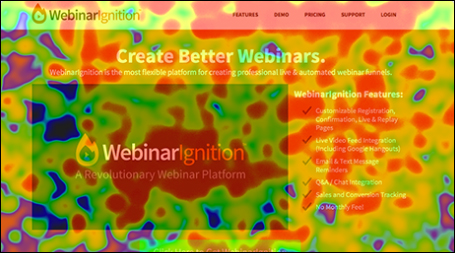
If you own a WordPress site, then you can easily add heatmap tracking with video session replays to your arsenal of essential online analysis tools with an easy-to-install and very inexpensive WordPress-compatible software application.
Heat Map Tracker – Live ClickTracking & HeatMap Tracker
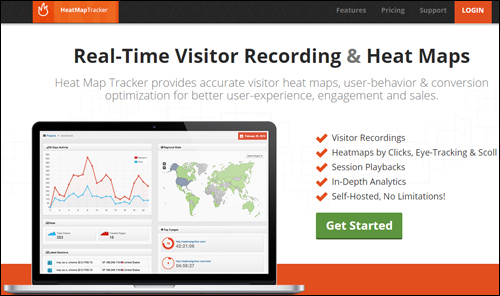
(HeatMap Tracker)
Description
Heat Map Tracker is technically not a WordPress plugin, but a software application that is compatible with WordPress (and other web applications) and that lets you visually track your website visitors’ every movement and creates instant heatmaps that show where users click and where they are scrolling on your site content.
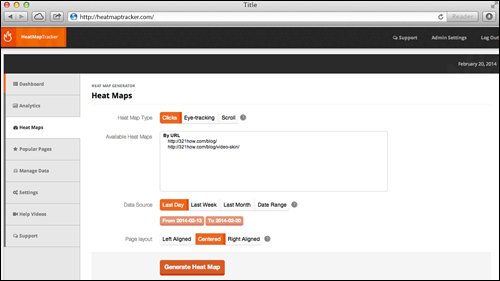
HeatMapTracker software enables you to see your site from your visitor’s perspective.
For more details, visit the software site here: HeatMap Tracker
Benefits Of Using Heat Map Tracker
The better you know how your users are engaging with your web site, the more you can improve your website’s user experience. Imagine knowing the obstacles that have been preventing your visitors from fully engaging with your website, such as confusing navigation elements, or distracting design elements. As the site owner, you can help your site visitors to complete certain actions, such as opting into a newsletter or click on certain links or buttons.
Although Google Analytics has an overlay feature which can show you which links on a page are being clicked, a heatmap can also display any clicks that users are making on your site, regardless of whether they are links or not. This is important because if a heatmap analysis helps you discover that users are clicking on an image which they suppose to be a link, but happens to not be a link, you can quickly edit this by linking the image to the destination your visitors are trying to get to, or let your visitors know that the image is not a link.
Heatmaps, therefore, can be one of the most useful ways to test the design of your website, assess how navigatable your content is and improve conversions.
Here are just some of the benefits and advantages of using Heat Map Tracker to monitor visitor behaviour on your site:
Monitor Everything Users Do On Your Web Site
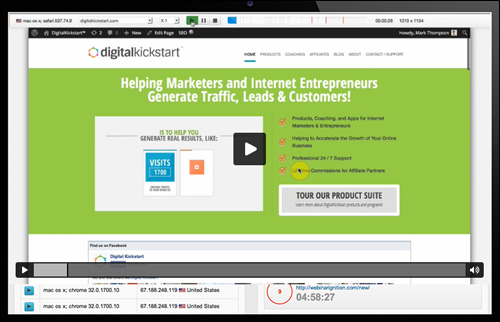
HeatMap Tracker captures every user browsing session on your website, enabling you to observe all clicks, eye-tracking and page scrolls.
Complete Control Without Restrictions
The software is self-hosted, giving you no limits on session recording and pageviews.
Free Upgrades & Enhancements
There is a one-time cost to buy the application, after which you are then entitled to receive unlimited script upgrades and added features for free.
Additional benefits of the application include:
- Improve User Experience: By seeing how visitors navigate your website, you can discover obstacles preventing visitors from progressing to the end of your sales funnel and optimize your site.
- Stop Guessing About Visitor Behaviour: The video playbacks of your users’ sessions show you precisely what is happening on your web pages. Heat Maps let you know exactly which links and buttons users click on, where they are drawn to most on your website, how long they choose to stay on a specific section, how fast they navigate down your content and more! No more guesses or making wrong assumptions … just pure evidence of what takes place when people visit your site.
- Increase Visitor Engagement: HeatMap Tracker helps you improve visitor engagement with your site, which improves your online sales and conversions. There are a number of ways to achieve this and we present some of these in the “Tips” section further below.
Heat Map Tracker Features
HeatMap Tracker provides many features for WordPress users. Here are just a few of these:
- Fast and simple to install and implement. Be up and running in no time.
- View heatmaps by clicks, eye-tracking and scrolls. See if visitors are clicking your site’s links, buttons, images and call to actions, see which areas of your content visitors eyes are drawn to and see how far down the page your visitors scroll as a benchmark of the length of time your site can keep them interested. HeatMapTracker lets you review and analyze every single user experience to help you learn how users are interacting with your website or specific pages on your site.
- Unlimited session screen captures and browser session playbacks. Are you required to provide reports to your CEO, Chief Digital Officer or clients about your site’s performance? With HeatMap Tracker you can spy on users on your web pages for a few days, a few weeks, one month, etc.
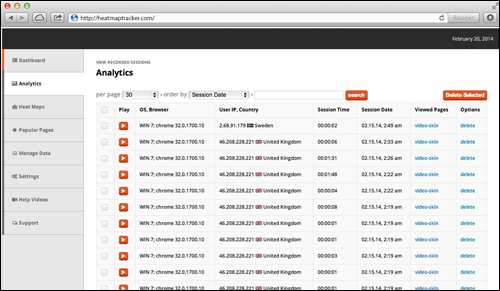
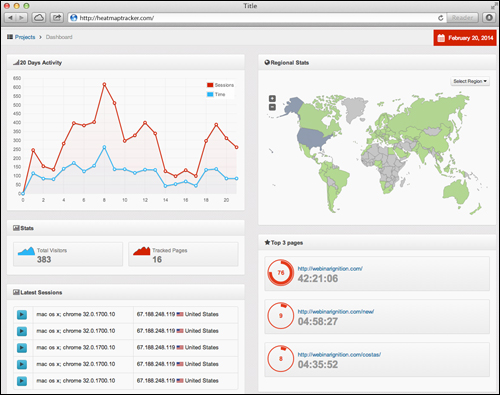
- In-depth analytics. HeatMap Tracker provides in-depth analytics and at-a-glance statistics with a summary of each project. Overview stats lets you view total visitors, tracked pages and total sessions HeatMapTracker has recorded for each project. You can quickly see the top pages your readers are moving towards and how they are interacting with each page’s content, allowing you to invest more time on improving pages that your readers are more interested in. You can also analyze regional demographics of your visitors and see where they are coming from.
Additional features:
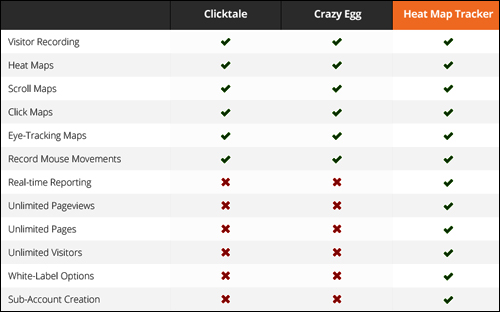
The image below shows how HeatMapTracker measures up against alternative heatmap analytics services like CrazyEgg and Clicktale:
User Testimonials
Here are a few of the testimonials that plugin customers have provided for the HeatMap Tracker software:
“This plugin is the ultimate tool if you need to analyze your site visitors behaviour, including clicks, pages visited, time spent on each page, and a load of other details.” Tudor Pangal, Dream.Decide.Act.Succeed.
***
“HeatMapTracker is a wonderful WordPress plugin that lets you analyze where visitors on your website click, most of all you can see exactly what your visitors doing.” Towhid Zaman, CEO & Founder at DevsCraft, LLC
***
“HeatMap Tracker is a product you HAVE to own – and you probably don’t even realise it yet – how will you know what isn’t working on your website unless you can track it? This one product has allowed me to get the “edge” on my competitors – don’t let your competitors beat you to it.” Gordon Drayson, Gordon Drayson OnlineBookingAssistant.com
Heat Map Tracker Useful Tips
Here are just some of the many ways you can use HeatMapTracker on your site to improve your results:
- Discover what works (i.e. where visitors click) and what’s not working (where visitors are not clicking). For example, are users engaging with your videos? Are they clicking on images thinking that these may be links to another location?
- Get useful information on how to improve your landing pages, signup forms, memberships, screen resolution, etc.
- Get insights on ways to create A/B split testing to improve results
- Get insights prior to and during a website redesign, or if you decide to use a new WordPress theme for your website.
- conduct “above the fold” experimentation to improve your landing page’s “first impression”, or optimize the impact of the home page’s real estate elements on your users, such as banners, links, buttons, sales copy, etc…
- Identify if an element on your page should be inserted, rearranged, or removed.
- Produce “before” and “after” comparison reports for digital services.
- Analyze if visitors prefer to click images vs buttons versus text links, and how particular user segments engage with your website.
- Troubleshoot potential site security and vulnerabilities.
Product Support
HeatMapTracker is part of the Digital Kickstart Group owned by Mark Thompson, a recognized online marketer with a solid reputation for providing reliable products and customer support. The product download area includes video instructions for installing and setting up the software.
Software Price
HeatMapTracker comes in three separate editions:
- Basic License – Single use only. Price = $197.00 One-off payment.
- Professional (Multiple) License – Installs on up to ten domains. Price = $297.00 Single Payment.
- White Label Branding License – In addition to all of the features available in the Basic & Professional editions (click tracking, heatmaps, browser session recording, unlimited recording / pageviews, unlimited updates and enhancements and access to support), the Agency edition lets you install the software on unlimited sites, create client accounts, and set up automated PayPal client invoicing, making it an ideal solutions for web development agencies. Cost = $497.00 One-off payment.
Please Note: The cost to purchase HeatMapTracker can vary, depending on whether there are any promotions or limited-time specials being offered. The pricing shown above was current at the time this review was written. This may not be the actual pricing charged by the plugin author when you visit the product website and there may be additional upsells or one-time offers after your purchase.
Check the plugin’s website for the current price here:
Additional Info
For a demo of the software in action, including instructions and how to tutorials, FAQ and more, visit the Heat Map Tracker website.
We Recommend
Analytics services like Google Analytics can provide you with good information on things such as how many people are visiting your pages, how they are finding it and what they do whilst visiting your site. However, if you want to truly gain a deep understanding into how your web site and your content is being used by your visitors to engage with your business online, then a heatmap analytics software tool can be a great way to do this.
We suggest purchasing a license of HeatMap Tracker for real-time heatmaps and accurate visitor recordings with detailed user-behavior analytics & conversion optimization for better, visitor engagement and to make more sales of your products or services.
For more details, check out the software here: HeatMapTracker – Live Click-Tracking And HeatMap Tracking Plugin
***