 The days of talking “at” your audience online are well and truly over. It’s no longer enough to just put up a web page with static information. To achieve success in today’s connected digital world, requires actively “listening” to your audience’s needs and feedback, and building a community around your brand, company, and products.
Social channels create a direct line of communication between your brand and your audience and give you immediate access to the latest buzz about your services or products.
Social media monitoring allows you to find insights into what people are saying about your brand, products, or company on social media, measure the impact of campaigns, help you take preventative measures if you detect negative comments or feedback by dissatisfied users, spy on your competition, and spot opportunities for engagement. It can also provide you with vital data about emerging trends and what clients and consumers are thinking about specific topics, businesses, brands, or products.
As a tool for business intelligence, social media monitoring is invaluable. Using social media monitoring as a form of business intelligence, however, is a complex undertaking, typically carried out by a cross-section of people including PR staff, market researchers, marketing teams, social engagement and community personnel, sales teams, and social marketing agencies. Typically, smaller businesses don’t have the budget to pay social media monitoring professionals to track their coverage in the media.
Fortunately many technology providers have developed affordable tools that facilitate the active monitoring of a wide range of social media channels, allowing companies to identify and even predict what is being said online about their brands so they can respond to conversations and engage with online users in various social media platforms.
In the article below, we explore several social media measurement tools that you may want to check out.
WordPress – An Ideal Platform For Social Media Marketing
WordPress is not just a powerful, scalable and extremely easy to use content management platform used by millions of businesses worldwide, WordPress also integrates fully with many social media applications, allowing you to easily grow your online presence in the social realm.
To learn more about why WordPress is the vehicle that can help you achieve your online business goals, see this article: Everything You Need To Know About Growing A Successful Business With WordPress
Using some of the tools listed in Part 2 of this article and a WordPress site, you will be able to market your business effectively on social media and take advantage of new social marketing opportunities.
Let’s take a look at some of the reasons why WordPress is an ideal platform for marketing your business on social media.
Pitch Your Services And Products To An Audience Of Buyers On Your Social Media Networks With WordPress
WordPress comes with built-in social features, like interactive commenting and discussions. A range of WordPress plugins can add additional social features to your site that let you reach a wider audience on social networks like Facebook, Twitter, LinkedIn, Pinterest and many others.
For example, there are plugins that can add social sharing buttons, forums, add photos from Instagram, Twitter feeds, Facebook feeds, testimonials, surveys, polls … even optimize your content for social networkign sites.
WordPress is not only ideal for social media as a content publishing and marketing tool, it can also be completely transformed into a full-blown social network site, using WordPress plugins like BuddyPress, WPSymposium, and others.
BuddyPress
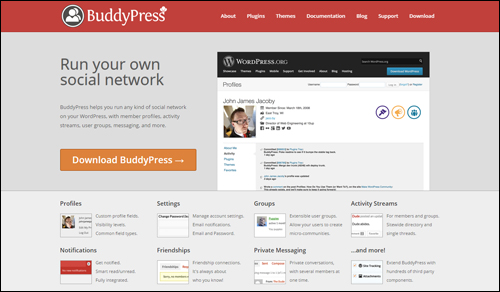
(Run your own social networking website with BuddyPress WordPress plugin)
Set up a social networking community on your website, with member profiles, messaging, activity streams, user groups, and more.
BuddyPress is often referred to as “social networking in a box.” You can turn features on and off to suit your needs and the plugin has an active community of plugin developers who regularly contribute new plugins that greatly extend the platform.
WP Symposium Pro
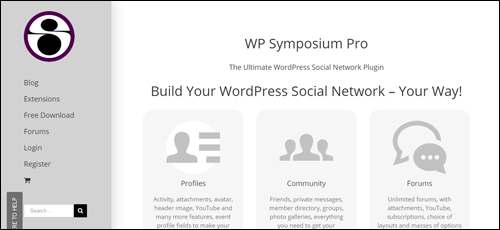
(WPSymposium Pro WordPress social networking plugin)
WP Symposium Pro provides a strong support community and assistance for members who require professional help. Social features of the plugin include:
- Friends
- Activity Wall
- Private Messaging
- Notification Bar
- User Directory
- Groups
- Forum
- Photo Galleries
- Chat
- RSS Feeds
WPSymposium lets you work with the theme you have. You can add features to posts and pages using shortcodes.
Share Your Content Across Multiple Social Channels
With most social media tools, sharing and syndicating your content is very easy. There are tools that let you compose, schedule and broadcast your content over many social channels simultaneously and manage your social marketing campaigns from one central location, saving you a considerable amount of time and money.
If you want to drive most of your social marketing from WordPress, you can. WordPress not only lets you publish content on your own domain, it also offers many plugins that allow users to share your content on Twitter, Facebook, Pinterest, LinkedIn, etc. For more information, read the article we’ve written about social media sharing plugins for WordPress and our comprehensive article series on how to automatically syndicate your content across various social media channels with WordPress.
Social Media – Great For Market Research
Use social media tools and services to discover what consumers want, identify trends and new business opportunities and stay one step ahead of your competition.
Once you have identified new content opportunities, you can post messages individually on each of the social networks you’d like to reach, or publish these on a WordPress site that’s been configured to automatically notify your social networking sites.
Also, many applications are available that let you conduct surveys and polls of customers online. Many applications can be integrated with WordPress.
Build Your Credibility And Brand And Showcase Your Talent
Strengthening your business brand and online reputation, showcasing your talent, or establishing your authority online requires commitment, dedication and a robust social marketing strategy.
You are trying to engage with real people online, and so your interactions must be meaningful and authentic. Focus on the needs of your target audience, and listen to their conversations to gain valuable insights.
Remember, we have been given two ears and one mouth as a reminder that we are meant to do twice as much listening as talking. What you post online and how you respond to other user’s comments and discussions is very important. Everyday we hear horror stories of brands that handle a situation poorly and end up suffering heavy losses when their response or behavior gets circulated online.
Although social media provides many new channels for gaining wider exposure online, it can also be extremely time-consuming.
An expertly configured WordPress-driven website can help establish your authority online, share great information with your clients and customers, and drive visitors to your business.
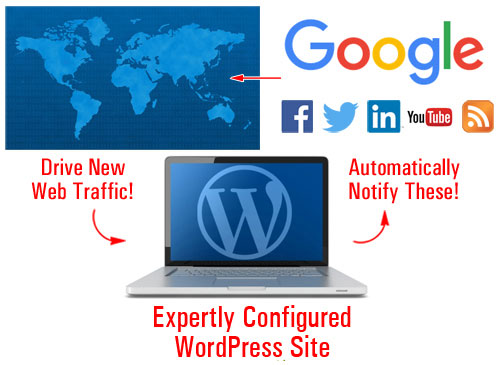
(Automatically distribute content across various social channels using an expertly configured WordPress-driven blog.)
Study The Influencers
Being able to listen to social conversations can help you reverse engineer what experts in your niche are doing right.
Explore Joint Venture Opportunities, Find Affiliates, Recruit Talented Staff, etc.
Recruitment companies research profiles of individuals when looking for potential candidates to fill specific positions. As a business owner, you can do the same, and look for staff, network with other business owners, and connect with like-minded marketers and potential JV partners. Connecting with others through social media can grow your revenue, get your name out there, and lead to potentially lucrative new ventures.
Could Your Content Be The Next Online Viral Sensation?
Most businesses would love to have a viral content marketing strategy. “Going viral,” however, is a difficult thing to achieve, as it relies on many factors that cannot be controlled. Throwing loads of dollars at a clever advertising is no guarantee of viral success. Many ridiculous memes have become internet viral hits while large and well-funded campaigns have failed to take off.
In many cases, the best you can do is study and research your audience, and provide content that users will find so useful, compelling, informative or even funny, that they will be naturally motivated to share with others.
Some of the tools listed in Part 2 of this article could help your content go viral, or at least help you set up relatively inexpensive marketing campaigns.

We have created a free email training course that shows you how to create meaningful and engaging content. In this free course we also discuss ways to create content with the potential to go viral and help your business grow faster. For more details, go here or subscribe using the form below:
Social Media Monitoring – Useful For All Businesses, Big And Small

(Social Media Monitoring – Useful For All Businesses, Big And Small)
Social media monitoring activities can be divided into two main groups:
- Online Reputation Management (ORM)
- Tracking Online Trends
Managing Your Online Reputation
You have probably heard of online reputation management (ORM). If you haven’t, you will be hearing it more and more as time goes on, because it is becoming increasingly more important for many individuals and brands to track what others are saying about them online – especially if what is being said is negative. No doubt you’ve heard the saying that when someone has a bad experience with a product or service they will tell 10 more people about it. People or competing companies could be posting negative things online about you or your business and if left unchecked, this can seriously damage your reputation.
Originally an aspect of the services of public relations firms, reputation management is an issue that now affects many businesses and individuals online.
If you or your image, name or good standing is being affected by negative material being posted online, you have to find a way of diluting the negative effects with an excess of positive material, or restoring consumer trust and confidence.
Before you can do this, however, you first have to find out about it. The sooner you can discover a negative comment, bad review, or misinformed opinion, the sooner you can begin to do something about it.
That’s where social media monitoring tools can help you. If you Google your name or your business/brand and a negative comment or bad review comes up, you can then address the issue, e.g. post a response, contact the website or person directly, etc.
Many companies are ignoring opportunities to create happier customers and grow their business because they are not monitoring their online reputations.
Monitoring what is being said online extends beyond well-known brands, celebrities, movie stars, famous musicians, and security-conscious agencies. The ability to monitor the online reputation of of an average individual is also very important. For example, consider these situations:
- A former spouse in the middle of a bitter divorce or child custody battle is feeling hard done by.
- A former employee feels disgruntled after being fired.
- A potential employer searches online for information about you. They may not find anything bad, but there may not be a lot of good, positive things published online either to support your job application.
Even if you are just starting out, you can still create a “set and forget” social media alert system, so that if anything does come up online, you can act proactively and respond in a timely manner.

Do you know what users are saying about your business online?
We’ve written an article about a tool for WordPress users that can help you avoid the escalation of negative reviews about your business, products or services through effective user review management. More information: Power Online Reviews – Easy User Feedback Management Plugin For WordPress
Online Trend Monitoring
Regardless of which niche or industry you operate your business in, there are always new and exciting things happening. New products get released, new services get launched, events get scheduled and announced online, influential people say something controversial that gets mentioned in the news, companies release useful research data, new videos are published containing fantastic tips or ideas, something outdated gets updated and becomes relevant again, something becomes the next viral phenomenon on Facebook, yesterday’s must-have new thing suddenly stops trending and gets replaced with the new “new” thing, services get discontinued, people retire, and so on.
All of this can provide you with an endless source of new content and new content ideas (how many news media outlets now incorporate a segment on what’s trending on social media?)
Social media content is topical content. Posting regular content with your useful comments or insightful opinions to your site not only can help drive more traffic to your business, but your blog or website could end up becoming an authoritative destination or resource for your niche or industry. People may end up referring you to others on social media, and who knows … your site or business could even end up becoming a topical, or newsworthy source of content that other people will write about and mention in their content.

This is the end of Section 1
In the next section we explore more than 25 media resources for business owners. To continue reading this article, click here: WordPress Resources For Social Media Tracking – Part Two
***
"I was absolutely amazed at the scope and breadth of these tutorials! The most in-depth training I have ever received on any subject!" - Myke O'Neill, DailyGreenPost.com