
Note: Since this post was written, the developers of RunClick have rewritten the software and turned it from a plugin into a web-based hosted solution called Webinar JEO.
Read our new post here or visit the website to learn more about this product.
***
Webinar software are a time-saving and effective way to do business, promote information and discuss ideas. The problem, however, is that the cost of using webinar and video conferencing solutions can be quite expensive for many users, with some services requiring you to remain subscribed and pay ongoing fees, and restricting the number of viewers who can attend.
Fortunately, if you are a WordPress user, there is now a way to run webinars without limits or ongoing expenses.
RunClick – Webinar & Video Conferencing Plugin
(RunClick – Webinar and Video Conferencing Software)
Plugin Description
The RunClick webinar and video conferencing software allows you to manage a professional video conferencing platform on your WP site using Google Hangouts.
Google Hangouts is a powerful broadcast system, but it’s not really a marketing solution. RunClick takes advantage of the high quality audio visual capabilities of Google Hangouts, and also gives you the power of evergreen webinars at no extra cost, as well as built-in lead capture and follow up features, providing you with a complete webinar and video conferencing and marketing system.
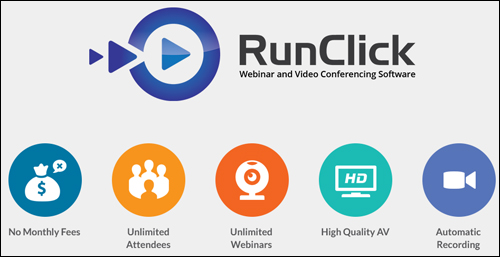
RunClick (previously released as “Hangout Plugin”) is a very simple-to-install and easy-to-configure WP video conferencing software that will help you promote and broadcast your information to an unlimited global audience, build engagement with your attendees, close sales live over the web, turn your business presentations into webinars that can be scheduled to run automatically, and instantly set up automated follow-up campaigns.
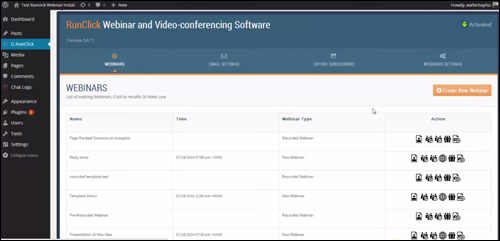
For more details, visit the plugin site here: RunClick
Plugin Benefits
Here are just a few of the benefits of using RunClick to run webinars and video conferences using Google Hangouts on your WP website:
Unlimited Events
With RunClick you can run as many webinars, web conferences, training courses and live presentations as you want.
No Ongoing Costs
Unlike many solutions that restrict the number of people who can attend your webinars, RunClick allows you to stream information to an unlimited number of viewers.
No Monthly Costs
Some webinar/video conferencing services can be quite expensive or require users to stay subscribed and pay ongoing fees, even if they have no events planned. Some solutions, for example, cost hundreds of dollars per month.
Some additional benefits include the following:
- Hold Virtual Meetings: RunClick allows you to hold virtual meetings with anybody anywhere around the world, monitor attendance, send out minutes, and use Google’s own infrastructure to provide better audio and video quality to your virtual meetings than solutions like Skype.
- Increase Engagement: You can chat, run surveys and share real-time information with participants to boost your interactivity and monitor results with real-time reporting.
- Profit With Evergreen Products: Your presentations are automatically recorded, enabling you to set up ongoing replays and make continuous revenue from evergreen presentations.
Features
RunClick is a total webinar and digital conferencing solution that provides many unique features to WP users. Here are just a few:
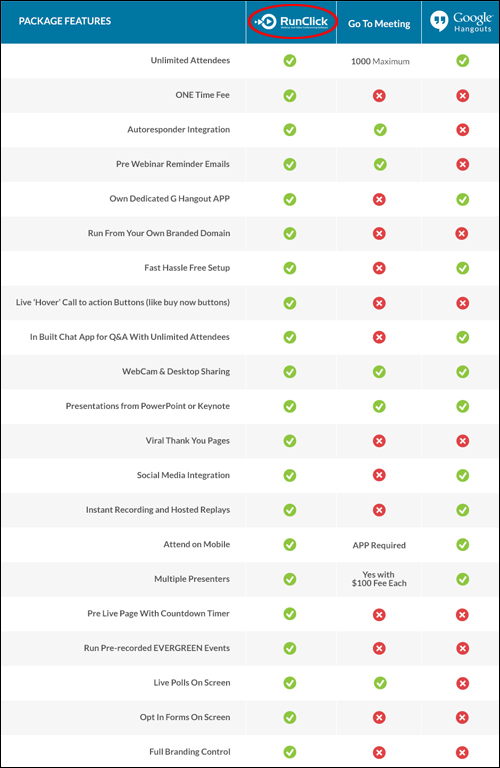
- Easy Installation And Setup: Unlike the majority of webinar and video conferencing hosted services, RunClick installs easily on a domain. The software can be set up in about 10 minutes or less.
- No Caps Or Restrictions: Schedule unlimited webinars to audience.
- Social Sharing Features: Add Facebook, Twitter and Google buttons.
- Plays On All Devices: Webinars display great on all devices: desktop PCs, laptops, tablets and smartphones.
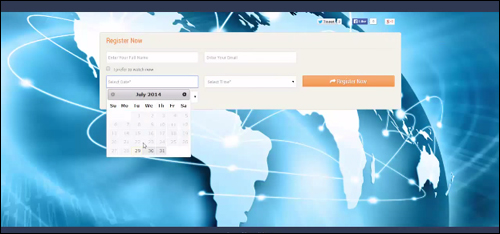
- Built-In Lead Capture System: You can add a full registration system that allows you to capture contact details for everyone who registers to attend your event, add them to your auto-responder system and send each of your contacts reminders and follow-up messages.
- Sales Conversion Options: Timed buttons, link overlays and countdown timers let you display things like order buttons, hyperlinks and polls that appear at the right moment of your streamed presentation.
- Automated Sales Pipeline: Since you manage the system and own all of the leads, you can follow up with all registrants, even if they fail to attend. You can add leads to your auto-responder and send them your webinar replay later!
- High Audio And Video Quality: RunClick employs Google’s own webcast application to deliver high audio and visual quality to your webinars.
- Automatic Capture: Just click on “Go” and begin your broadcast. The software will automatically begin recording it.
- Control Of Your Branding: RunClick includes a range of high quality design templates, giving you control of your pages and your branding. You can even add your own custom designs.
RunClick also gives you the ability to replay pre-recorded sessions and gives you extra replay options like:
- Timed Availability: You can schedule replays to be available and display expiring timers to increase urgency and maximize registrations. Once the deadline has lapsed, replays are then automatically taken down.
- Replay Access Feature: You can schedule replays to become available unregistered members, or restrict viewing to event registrants only.
Testimonials
Below are just a few of the testimonials and comments users have published about RunClick:
”For anyone else considering Walt’s plugin, don’t even consider – just do it! His plugin will become the gold standard – if it is not already.” Sydney, CEO Wealthy Investor Limited
***
”I’ve been writing about technology since type was set in hot meal… this plugin makes me feel like I died and went to heaven. I’m setting up a bunch of Hangouts next week so I can kick the tires HARD and work out all the glitches… and honestly, most of my gliches are user based. The internet has plenty of room for lots of people to do business. It’s going to be a fun ride.” Frances Flynn Thorsen
***
Useful Tips
You can instantly create information products from your slide presentations and seminars and create passive sources of income with the RunClick video conferencing plugin for WP installed on your site.
The plugin automatically records your events, so with a little bit of ingenuity and a minimum investment of time and effort on your part, you can significantly expand your business and increase your profitability.
For example, even if you have little authority in your area of interest yet, you can run webcasts featuring invited experts who will then answer all of your questions or talk about a specific topic and provide most of the content for the presentations. This provides you with high quality content that involves no expertise on your part to create.
Support
RunClick was developed by Walt Bayliss, a well-known and highly respected WordPress plugin and software developer. The software is well-supported, and users get lifetime upgrades and new releases for free with their purchase, backed by a risk-free, thirty day, full refund guarantee.
”Walt’s level of support and commitment makes this project extremely outstanding” David Cicia
Product Price
The RunClick software gives you the ability to run as many webinars as you want and can be downloaded for a one-time purchase fee of US$97.
Note: The cost of purchasing RunClick depends on whether there are any promotions or limited-time specials being offered. Currently, the plugin is being retailed for the amounts shown above. This may or may not be the actual pricing charged by the software developer when you visit the plugin site and there may be additional upsells or one-time offers after your purchase.
Check the plugin’s website for the latest pricing:
Additional Information
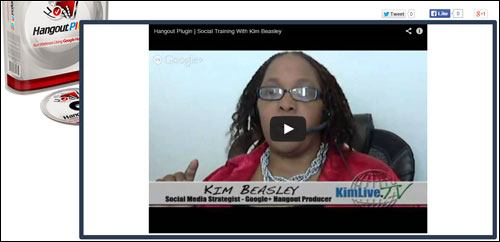
For ”how to” videos of the plugin in action, including installation instructions and tutorials, FAQs, support help desk, contact details and more, visit the RunClick website.
Our Recommendation
RunClick lets you hold video meetings and make high-quality webinars, web casts, sales presentations and more with no limits on how many people you can present to, and with no ongoing costs.
If you run a business or sell products or services online, or if you need to provide assistance to remote users, manage virtual meetings, make sales presentations, and more, then we highly recommend choosing RunClick. It is a cost-effective, easy to use, well-supported and complete webinar and video conferencing software solution that installs and integrates easily with your WP site.
For more information, visit the plugin website here: RunClick – Video Conferencing Plugin For WordPress
***