 In Part One of our WordPress Web Site Traffic Blueprint article series, we explained that the key to turning your site into an automated traffic generation machine is to use an “expertly configured” WordPress website.
As we also explained, an expertly configured WordPress web site is different than a professionally-configured WordPress web site. An ”expertly configured” WordPress website or blog is a site that is not only built with the WordPress CMS platform, but has also been expertly set up and configured (either by yourself or professionally) to take full advantage of the tremendous power, features and functionality of WordPress and how it can be integrated with various services, specifically in areas like search engine optimization, content syndication and reporting.
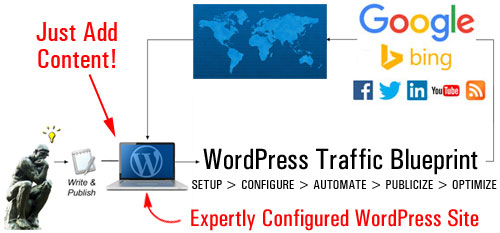
(With an expertly configured WordPress website or blog, all you have to do is publish content on a regular basis to generate web traffic!)
Once you have your WordPress site expertly configured and fully set up, all you then need to do to automatically drive more traffic is add content on a regular basis.
As outlined in Part One of this article series, the components of the automated online traffic blueprint are as follows:
- Setup
- Configure
- Automate
- Optimize
In this article, we look at the “Setup” phase of this process. We will help you understand the best way to start if you don’t have a website yet, or if you already have an existing site that may or may not have been built using WordPress.
WordPress Web Traffic Automation Blueprint – Setup Phase
If You Have No Web Presence
If you haven’t got a website yet, it’s quite simple … build a WordPress site!
WordPress is the most powerful, flexible, cost-effective and easy-to-use content management system on the planet. We provide loads of articles, tutorials, and tips about the benefits and advantages of using WordPress to grow your business online.
For example, to learn just how popular WordPress has become, see this article: Statistics And Market Share About WordPress
After making the choice to build your site with WordPress, the next step is to decide which WordPress platform you will build your web presence on.
This is important because there are two types of WordPress platforms available …
WordPress.org vs WordPress.com
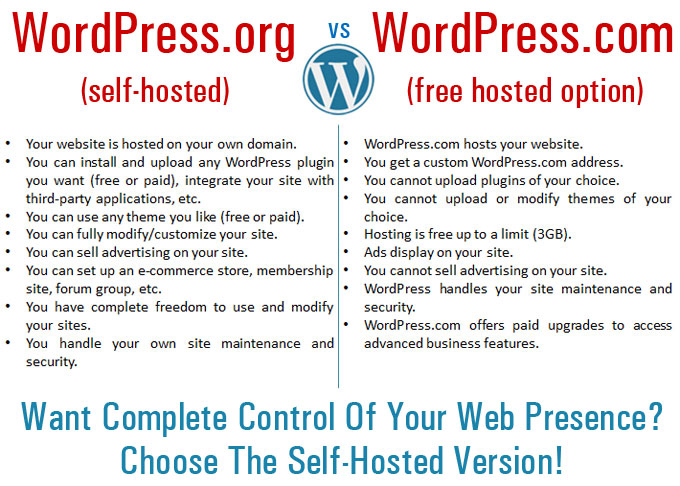
(WordPress – Self-Hosted Or Hosted?)
WordPress offers website owners a “self-hosted” and a “hosted” option.
The “self-hosted” option allows you to download the full-featured WordPress software at no cost from WordPress.org and host a WordPress site or blog using your own domain name.
In the “hosted option”, WordPress hosts your site for free at WordPress.com. There are, however, a number of limitations on what you can and can’t do with your blog when WordPress.com hosts it for free.
If you are planning to build a professional web presence and you want to set up the traffic system described here, then you should choose the “self-hosted” WordPress version. The benefits of choosing the “self-hosted” option (WordPress.org) far outweigh those of hosting a free site at WordPress.com. You get to have complete control over your web presence and avoid the limitations of the hosted option. Keep in mind that You can overcome the limitations of the free hosting options by upgrading to a paid option, but then why not just start off by hosting a WordPress site on your domain and avoid the hassles of upgrading later?
If You Have An Existing Web Site
If you already have an existing website, first, check if the site has been built using WordPress.
If you need help with this step, check this article: Tell-Tale Signs It’s A WordPress Blog And Free WP-Checking Tools
If your existing web site was built using WP software, move to the next step, and make sure that your site’s internal settings have been properly configured. We cover this step in more detail in another tutorial.
If your site is not powered by WordPress, then you have some decisions to make.
Take a look at the simple flowchart below. It will help you choose how to set up WordPress on your domain …
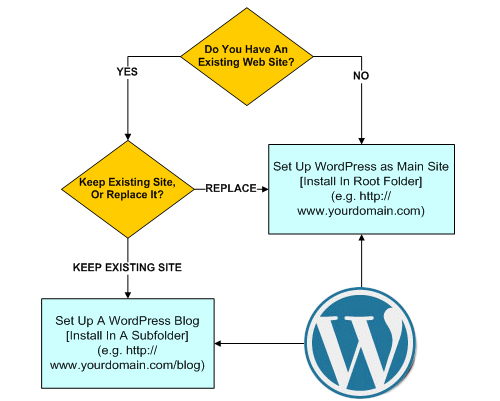
(Use this simple flowchart to help you decide how to set up WordPress on your domain)
Basically, you have two choices:
- Replace your existing web site with a WordPress-driven site, or
- Keep your existing site and add a WordPress-powered blog. This blog will then be used to drive traffic to your main web site.

If you choose to keep your existing web site and add a WordPress blog, make sure to use the self-hosted version of WordPress, which requires a domain name and web hosting, but allows you to fully configure your blog’s settings and customize the design and style of your existing website using an appropriate theme for WordPress.
To use WordPress for your main site, install it in the “root” folder of your domain (i.e. www.mydomainname.com).
If you already have an existing website, then you will want to install WordPress in a subdirectory of your domain, e.g. www.mydomainname.com/blog (you can name your subdirectory anything you like).
If you already have an existing website that you don’t want to delete or replace with a WordPress site, the other option you have is to set up your WordPress site or blog on an entirely different domain.
This way:
- mydomainname.com – goes to your existing website
- myotherdomain.com – goes to your WordPress site
Once you have set up your WordPress site, the next step is to configure its internal settings. This step is explained in the next article in the series.

This is the end of Section 2
To continue reading about this topic, click on the link below:

This tutorial is part of a comprehensive series of articles aimed at helping you learn how to grow your business online cost-effectively with a WordPress website and proven marketing strategies that are easy and quick to implement.
Subscribe To Our Site And Get Notified When New Tutorials Get Published!
***
"These tutorials have so much information and are easy to understand. If you use WordPress or plan to in the future these will help you with everything you need to know." - Valisa (Mesa, Arizona)
***