WordPress Traffic Automation Guide
 This article is part of a series of comprehensive articles and tutorials designed to help small business owners learn how to grow their business using a WordPress website or blog and proven online marketing methods.
***
WordPress Traffic Automation Blueprint – Overview
 Traffic is the lifeblood of almost every business online.
Finding sustainable ways of generating more traffic to your website is vital to growing a successful digital presence. Lack of online traffic is also one of the most common complaints made by website owners everywhere.
Why Are So Many Businesses Struggling To Get More Visitors To Their Web Sites?
Search for any of the following information in Google …
- “attract more traffic to my web site for free”
- “how can I drive more visitors to my web site for free”
- “best 25 resources to get web visitors”
- “learn how to get web traffic using LinkedIn”
- “I need more web traffic”
… and you will find thousands of pages containing information on methods to help increase your website visitors …

(There are many ways to increase your website visitors. In this article series you will learn how to set up a simple system to take advantage of many of these traffic generation methods!)
There is clearly no shortage of ways to drive more visitors to your web site. There are thousands of products and free sites online that can teach you strategies to get more traffic to your site.
The problem is often more to do with business owners not investing sufficient time into learning how to generate new web traffic sustainably, not setting up systems to manage the traffic generation process effectively, and, in many cases, not even being aware that there are many ways to leverage and automate your web traffic generation.
The picture below shows the approach most small businesses take when it comes to generating traffic to their sites …
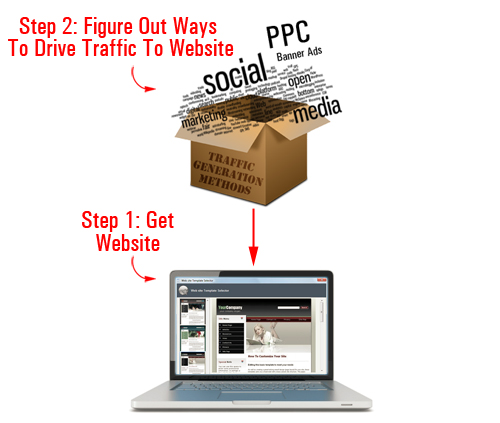
(This is how many site owners approach the challenge of generating web traffic)
Essentially, the approach most businesses typically take is this: first, you build a website, and then you figure out how to drive traffic to your site.
As we will show you in just a moment, there is a better way.

You shouldn’t make the mistake of thinking that “outsourcing” your traffic generation will address this problem.
There is nothing wrong with outsourcing if you have great systems set up to manage and process information about your traffic generation campaigns. If not, all you will probably do is end up investing a lot of your time and money searching for a profitable traffic strategy.
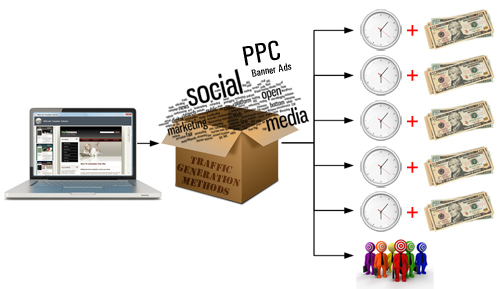
(Without laying down a solid foundation and putting proper systems, website traffic generation can be very costly!)
Getting regular web traffic sustainably requires laying a solid foundation online, implementing the right systems, testing elements in your campaigns, experimenting with different strategies, tracking results, measuring ROI across different traffic generation strategies, and so on.
Is There A Simple, Automated Way To Increase Traffic?
Imagine if all you had to do to drive targeted traffic to your web site was to publish great content consistently.
This is not fantasy or fiction … it’s a fact! Many website owners are currently doing this … and so can you!
In this article series, we explain how to create an automated traffic generation system that can begin driving new targeted traffic to your site, simply by publishing regular content to your site.
How To Set Up A System That Will Automatically Help Drive More Traffic To Your Site
As you can see in the diagram below, the web traffic blueprint we discuss in this article series involves three basic steps:
- Set up systems to lay down a solid foundation for driving sustainable web traffic
- Add web content on a regular basis to drive traffic and generate data organically
- Test other traffic strategies
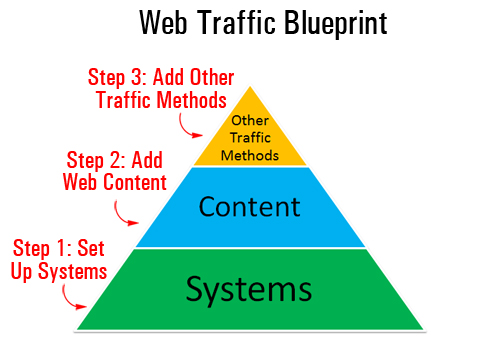
(To get sustainable traffic, you first need to put in the right systems)
Right now, we’ll mostly be focusing on Step 1. The aim of this article is to lay the foundations of a traffic generation system that will ultimately:
- Save time using automation and leverage
- Save money in lots of different ways
- Automatically get your website pages indexed faster in search engines
- Instantly notify and publicize your content to all of your social media accounts (e.g. Facebook, Twitter, LinkedIn, etc.)
- Access valuable data about your traffic generation campaigns, monitor results, measure ROI, etc.
- Outsource traffic generation while maintaining full control of the process
- Grow your business online cost-effectively and sustainably
You can achieve all of the above using what we will refer to throughout our article series as an “expertly configured” WordPress website …
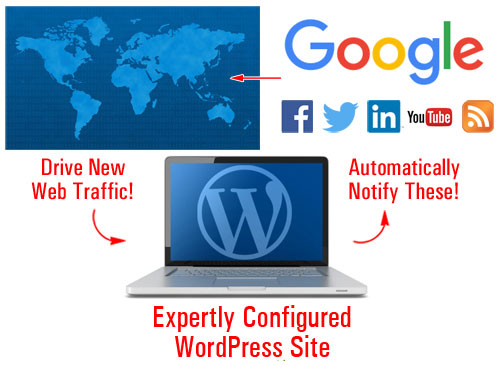
(With an expertly configured WordPress web site, you simply add new content and your website does the rest!)
An Expertly Configured WordPress Web Site – What Is It?
An expertly configured WordPress site is different than a professionally-configured WordPress site.
An expertly configured WordPress website or blog is a blog that is not only powered by the WordPress CMS, but has also been expertly set up and configured (either by yourself or professionally) to take advantage of the enormous power, features and functionality of WordPress and how it integrates with various services, specifically in areas like SEO, content syndication, and reporting.
Why Use An Expertly Configured WordPress-Driven Site?
We provide a number of great articles on this site about the benefits of using WordPress-powered sites to grow your business online.
Understanding why and how an “expertly configured” WordPress blog will begin delivering a stream of web traffic to your business requires several article installments, which is why we strongly recommend that you spend some time reading our other articles and subscribe to our site (this way, we can let you know when we publish new information on this topic).
Let’s start by answering a couple of basic questions:
Why WordPress? What does WordPress provide that other web platforms don’t?
Take a look at the illustration below …
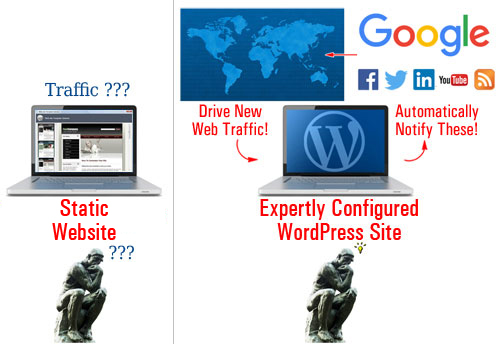
(Static vs Expertly Configured WordPress Website)
Many web sites are built using applications that create websites with “static” web pages. Essentially, this means that your web site pages mostly sit inside your server waiting to be discovered. By itself, the static website doesn’t communicate with anything else outside the platform; it doesn’t send out ’pings’ to anybody in the cybersphere or announce to any other website when new content has been published.
Think about it … if in a traditional website, your content just sits there passively waiting to be found, then you have to continually promote your website and your content to maintain new web visitors coming.
WordPress is different!
WordPress provides a number of features that let site owners set up, easily configure and build an automated “web traffic generation” machine, where all you then need to do is post content and your site does the rest, immediately notifying various online properties about your site to start generating you new web site traffic …
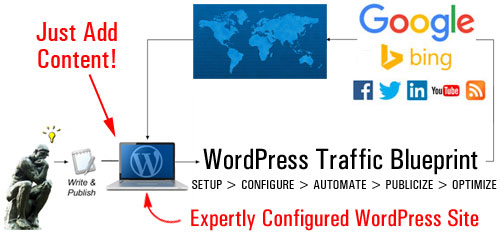
(With an expertly configured WordPress site, you just add content and your site will then do the rest!)
An Automated Content Distribution, Traffic And Lead Generation, And Sales & Marketing System
With an expertly configured WordPress site, you can build more than just a website for your business … you can set up an automated traffic and lead generation and sales & marketing system, where all you do is publish your content and WordPress then automates the rest …
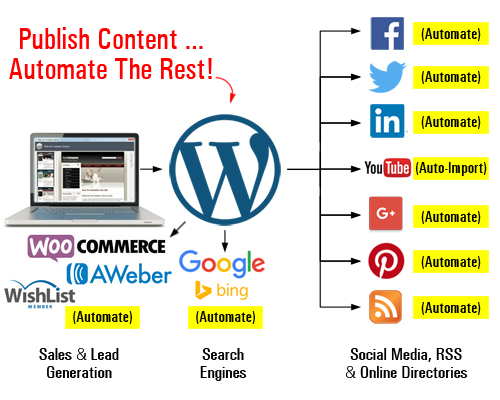
(Set up an automated content distribution, lead and traffic generation, and sales and marketing system with WordPress)
As your business evolves, you can add more functionality and automate processes like:
- Sell products and services with e-commerce,
- Capture leads with opt-in forms and add your subscribers to newsletters and autoresponders,
- Allow visitors to register on your site with different membership levels,
- And so much more!
You can do all of this using inexpensive WordPress plugins. Once these plugins are installed and configured on your site, just direct your visitors to the appropriate sections (e.g. your store, subscription forms, membership area, etc.)
The video below shows you what an expertly configured WordPress site can do for your business …
In Part 2 of The Web Site Traffic Blueprint overview, we break down the components of your automated online traffic machine:
- Setup – Learn the best way to start if you don’t have a web presence yet, or if you already have an existing site that may or may not have been built using WordPress.
- Configure – WordPress already comes with a number of built-in features and settings to help you generate traffic. Learn what features and settings need to be expertly configured for optimal results.
- Automate – Your traffic system requires not only expert configuration of internal WordPress settings but also expert integration of your site with 3rd-party tools and other sites (e.g. webmaster, analytics, and social media accounts).
- Publicize – After configuring your WordPress settings and integrating your website with various external services, you simply begin publishing new content regularly and WordPress will immediately notify and inform search engines, your social media accounts and other online properties about the new content, giving your site wider online exposure to more web visitors.
- Optimize – We recommend beginning with a content-focused strategy to build traffic organically. With the right systems in place, you can also begin to track and analyze the traffic generated as a result and start gathering valuable data that will allow you to make better decisions when using additional traffic generation methods.

This is the end of Part 1
To read the rest of this article, click on the link below:
WordPress Web Site Traffic Blueprint Part Two – How To Get More Website Traffic For Your Business
This tutorial is part of an article series designed to help business owners learn how to grow their business online inexpensively and drive traffic automatically using a WordPress-powered website and proven online marketing methods.
Subscribe To Our Site And Get Notified When New Tutorials Get Published!
***
"I love the way your email series "Infinite Web Content Creation Training Series" is documented and presented. It is very absorbing and captivating. The links and tutorials are interesting and educational. This has motivated me to rewrite my content following the concepts I am learning from the email series." - Mani Raju, www.fortuneinewaste.com