WordPress Traffic Automation Guide
 This article is part of a comprehensive series of tutorials aimed at helping you learn how to grow your business online inexpensively and drive traffic sustainably with a WordPress-driven website and proven web marketing strategies.
***
WordPress Traffic Automation Blueprint – Overview
 Web traffic is the lifeblood of most businesses online.
Learning sustainable strategies to get traffic to your website is vital to building a successful presence online. Lack of online traffic is also one of the most common complaints made by website owners everywhere.
Why Do So Many Small Businesses Struggle To Bring Visitors To Their Web Sites?
If you search for any of the key phrases below in Google …
- “drive more visitors to your web site”
- “drive more traffic to my web site for free”
- “top 5 places to attract more visitors”
- “ideas to increase more website traffic using Twitter”
- “bring web traffic to my web site for free”
… and you will be presented with an overwhelming number of sites providing information about ways to help you get more visitors to your site …

(There are loads of strategies to increase web traffic to your site. This article series is designed to help you set up a simple system to take advantage of most of these traffic generation strategies!)
There is clearly no shortage of ways to drive visitors to your web site. There are tons of products and free resources online that can show you strategies to increase visitors to your site.
The problem often has more to do with business owners not investing sufficient time into learning how to generate new traffic sustainably, not setting up systems for managing the process effectively, and, in many cases, not even being aware that there are several ways to automate and leverage your web traffic generation.
The diagram below shows the approach many small businesses take when it comes to generating web traffic …
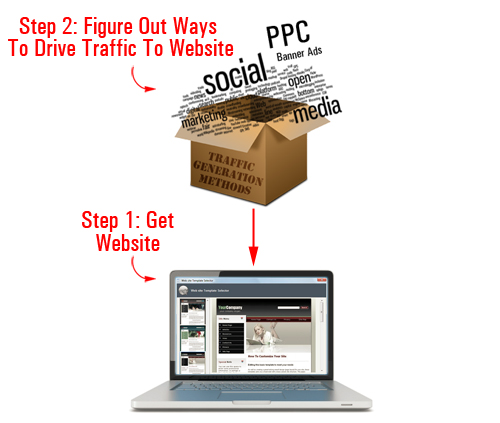
(This is how most website owners approach traffic generation)
Essentially, the approach many businesses typically take is this: first, you get your website, and then you figure out ways of driving traffic to the site.
As you will discover in a moment, there is a better way.

Don’t make the mistake of believing that “outsourcing” your traffic generation will address the problem.
There is nothing wrong with outsourcing if you have great systems in place to manage your traffic generation campaigns. If not, you will probably end up investing a lot of your time and money looking for a profitable method.
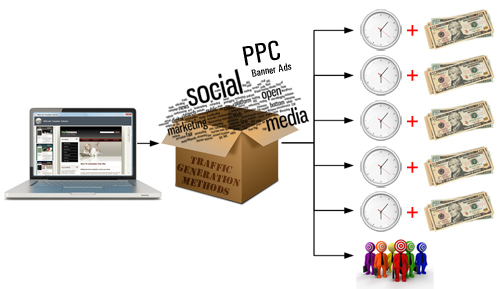
(Without a solid foundation and the right systems in place, online traffic generation can be very costly!)
Sustainable traffic generation requires laying a solid foundation online, putting proper systems in place, testing variables in your campaigns, experimenting with different methods, tracking results, comparing ROI across different traffic generation opportunities, and so on.
Is There A Way To Automate The Process Of Driving More Website Visitors?
Imagine owning a website where the only thing you had to do to drive targeted traffic to your website was to regularly publish content to your website.
This is not science fiction or fantasy … it’s a fact! In fact, many website owners already have some or all of the prerequisites set up to profit from the automated traffic system we have just described … and so can you!
In this article series, we explain what it takes to set up an automated traffic generation system that will begin delivering targeted visitors to your business, simply by publishing content on a consistent basis to your website.
How To Set Up An Automated Traffic System
As you can see in the diagram below, the web traffic method we discuss in this article series involves 3 fundamental steps:
- Set up specific systems to lay down a solid foundation for getting sustainable traffic
- Add web content on a regular basis to drive visitors and generate data organically
- Start adding other traffic strategies and test
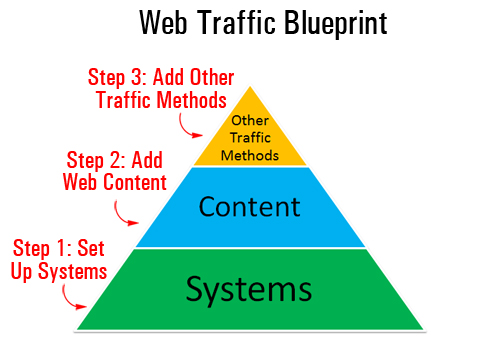
(Driving web traffic sustainably requires laying a solid foundation online and implementing systems)
At this point, we’ll mostly be focusing on Step One. The aim of this article is to help you lay the foundations for a traffic generation system that will ultimately help you:
- Save time using automation and leverage
- Save money in many different ways
- Automatically get your web pages indexed faster in search engines
- Instantly share your content to all of your social media accounts (e.g. Facebook, Twitter, LinkedIn, etc.)
- Gain valuable insights about your traffic generation methods, monitor results, measure ROI, etc.
- Outsource traffic generation while maintaining full control of the process
- Grow your business online cost-effectively and sustainably
All of the above can be achieved using what we will refer to throughout our article series as an “expertly configured” WordPress website …
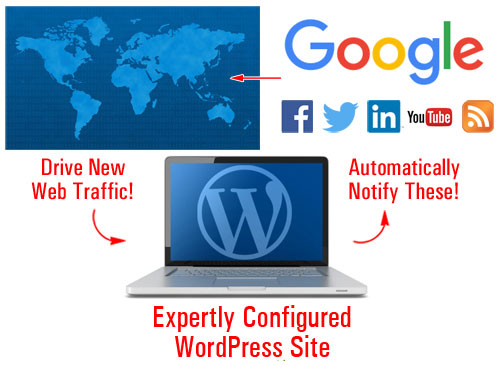
(With an expertly configured WordPress website, you just add content and WordPress then does the rest!)
An Expertly Configured WordPress Website – What Is It?
An expertly configured WordPress web site is different than a professionally-configured WordPress site.
An expertly configured WordPress site is a website that is not only driven by the WordPress CMS platform, but has also been expertly set up and configured (either by yourself or professionally) to take full advantage of the enormous power, ease-of-use and functionality of WordPress and its integration with various services, specifically in areas like SEO, third-party site notification, and analytics.
Why Use An Expertly Configured WordPress-Powered Website?
We write extensively on this site about the benefits of using the WordPress CMS to grow your business online.
Understanding how and why an “expertly configured” WordPress web site can instantly attract new targeted traffic to your business requires a number of article installments, which is why we strongly recommend that you spend some time reading our content and subscribe to our site (this way, we can let you know when we publish new information on this topic).
Let’s start by addressing these basic questions:
Why does it need to be WordPress? What does WordPress do that other web platforms don’t?
Take a look at the picture below …
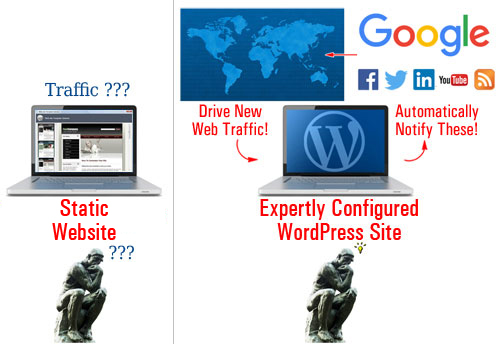
(Static vs Expertly Configured WordPress Website)
Many websites are built using platforms that create “static” websites. Essentially, this means that the content typically sits inside the server waiting to be found. On its own, a static website doesn’t communicate with anything else outside the platform; it doesn’t broadcast to anybody in cyberspace or inform any other website when new content has recently been published to the site.
Think about it … if with a traditional website, your content just sits there passively waiting to be found, then you have to keep promoting your site and your content to continue driving web traffic.
WordPress is different!
The WordPress platform provides several features that allow site owners to set up, configure and build an automated “web traffic generation” machine, where all you then need to do is publish new content and your site will then do the rest, immediately notifying various online properties about your site to start bringing you more web site traffic …
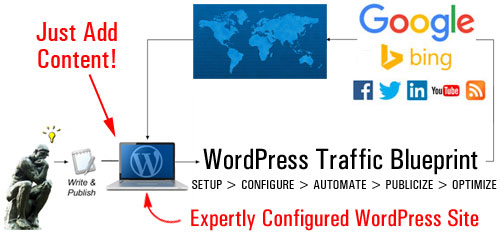
(With an expertly configured WordPress website, you just post content and your site does the rest!)
An Automated Content Distribution, Traffic And Lead Generation, And Sales & Marketing System
With an expertly configured WordPress site, you can build more than just a website for your business … you can set up an automated traffic and lead generation and sales & marketing system, where all you do is publish your content and WordPress then automates the rest …
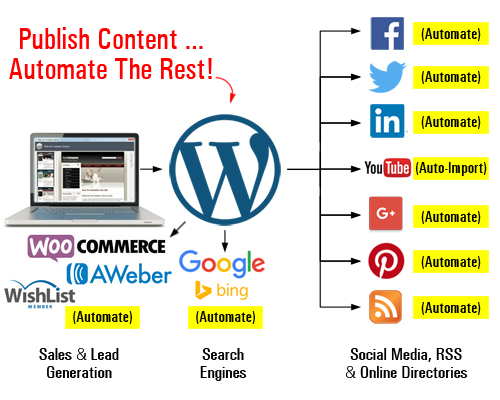
(Set up an automated content distribution, lead and traffic generation, and sales and marketing system with WordPress)
As your business evolves, you can add more functionality and automate processes like:
- Sell products and services with e-commerce,
- Capture leads with opt-in forms and add your subscribers to newsletters and autoresponders,
- Allow visitors to register on your site with different membership levels,
- And so much more!
You can do all of this using inexpensive WordPress plugins. Once these plugins are installed and configured on your site, just direct your visitors to the appropriate sections (e.g. your store, subscription forms, membership area, etc.)
The video below shows you what an expertly configured WordPress site can do for your business …
In Part 2 of The WordPress Web Traffic Blueprint overview, we explain the components of your automated web traffic system:
- Setup – Learn the best way to get started if you don’t have a web presence yet, or if you already have an existing site that may or may not have been built using WordPress.
- Configure – By default, WordPress already comes with a number of built-in features and settings that can help you generate traffic. Learn what features and settings have to be configured for optimal benefit.
- Automate – Your traffic machine requires not only internal WordPress settings to be expertly configured but also an expert integration of your built-in WordPress features with third-party services and other online properties (e.g. webmaster, analytics, and social media accounts).
- Publicize – Once configuring your WordPress settings and integrating your website with various third-party tools, you simply begin to publish new content on a consistent basis and WordPress will instantly notify and inform search engines, your social media sites and other online properties about the new content, giving your site wider online exposure to potential visitors.
- Optimize – We recommend starting with a content publishing strategy to build sustainable traffic. With the right systems in place, you can start to measure and understand your incoming traffic and start gathering valuable information that will allow you to make intelligent and cost-effective decisions as you expand to other traffic generation strategies.

This is the end of Part 1
To read the rest of this article, click on the link below:
This tutorial is part of a comprehensive series of articles designed to help small business owners learn how to grow their business and drive traffic sustainably with a WordPress-powered website and proven online marketing methods.
Subscribe To WPCompendium.org And Get Notified When New WordPress Tutorials Get Published!
***
"These tutorials have so much information and are easy to understand. If you use WordPress or plan to in the future these will help you with everything you need to know." - Valisa (Mesa, Arizona)