Grow Your Accounting Business Online With WordPress
 Accounting professionals today are facing significant and increasingly difficult challenges thanks to the digital economy.
Online Challenges For Accountants
Today, more than ever, accountants must find smarter ways to remain competitive, find new clients, and retain current business. Not only do you have to actively participate in the communities and industries you serve, you must also develop a strong presence online. This includes having a dynamic website and figuring out better ways to promote your business services online.
In addition to spending money in offline marketing activities such as advertising on newspapers, ads in industry publications and magazines, radio and tv, etc., you will probably find that in order to compete, you will need to designate a greater part of your marketing budget to develop and maintain a website that attracts clients, engages users, outperforms the competition in search engines and gives your business a wider amount of marketing exposure online.
This means that your site not only has to look professional, your pages have to load fast, and your site has to be easy to navigate, but it’s also important to keep in mind that your site’s needs will change over time and sections will need to be frequently updated. This requires the implementation of a sound website and content management strategy.
Another problem that CPAs face online (as do other businesses for that matter), is that your site has around thirty seconds to provide users with what they need or they will go elsewhere to get their needs met.
“Websites have evolved into central information hubs where service information is still present but enhanced with web portals, hyperlinks to state and federal sites, and a variety of free tools.”
Michael Alter, http://www.accountingweb.com/technology/accounting-software/tips-for-improving-your-website
Opportunities For Accounting Businesses In The Digital Economy
As well as facing many new challenges, there are also loads of online opportunities available for accounting firms that can adapt to meet the demands of the online economy and can think outside the box in terms of marketing their services better online.
In this article, you will discover ways to attract more visitors and establish stronger online credibility for your business.

As well as providing general website improvement tips, we also place special emphasis on the benefits and advantages of using the WordPress content management system to power your accounting or financial services website or blog.
For more information about the benefits and advantages of using the WordPress platform, go here:
- Discover Why A Poorly Designed Web Site Can Lose You Business
- Learn How To Grow Your Business With WordPress
Useful Tips For Improving Your Accounting Or Financial Services Site
In this section we’ll start with the basics and show you how to improve your website and get better results. We show you what pages your site needs, what content works best, suggestions for improving your layout and navigation structure, etc.
If you need assistance or help planning your website, see this detailed guide we have written: The Website Planning Process Explained: A Useful Guide For Business Owners
Basic Pages
All websites require some essential web pages. Let’s review these.
Services
You need a page that explains your services and any products that you offer.
Your page will include all the services you offer, such as:
- Business accounting – business planning, company formation, general accounting, payroll, preparing financial statements, book keeping, budgeting, forecasting, financing, strategic planning, consulting services, etc.
- Taxation – preparation, planning, reviewing, auditing, advice, problem resolution
- Investment strategies
- Corporate finance
- Wealth creation
- Superannuation/retirement plan (401k) advice
- Audit risk assessment and assurance
- Quickbooks – setup, training, tune up, and support
- Specialist services – mergers, acquisitions, information technology, secretarial, rentals, trusts, fiduciary accounting, succession planning, selling a business, asset transfers, etc.
- Lending and leasing
Make sure to list all of the services you provide, not just the ones you specialize in. Provide your visitors with information that will educate them about what your services do and direct them to your contact or appointment booking page.
About Us
This page needs to describe your business and what it stands for, its unique approach, community contributions, etc.
It’s important to also list any awards, certifications, recognitions, accreditations, publications, associations, etc., that you can use to promote your company and position it above your competitors.

(List all of your industry awards accreditations, certifications, recognitions, associations, publications, etc. in your About Us page. Screenshot source: deloitte.com)
Meet Your Staff
Are you looking for ideas to sell more products online or increase user interaction with your site? Then something you can do, is help your visitors get to know you and your business better.
Prospects need to relate to your business. A great way to do that is to have a page that introduces your employees. This page should include a photo and a brief biography. Since most visitors won’t be familiar with accounting terms your descriptions should tell who they are and what their specialties are. It should also explain what those specialties mean. It should even include social buttons so your prospective clients can follow selected staff members on their social networks.
On this page, don’t be afraid to humanize your people with personal stories, hobbies, etc., but make sure to outline each employee’s expertise and qualifications, how they add value or contribute to the success of your team, and more importantly, how they will help add value to your clients’ business.

(Make sure to add a team profile page. Screenshot image source: deepsky.com)
We have created a detailed tutorial on how to create and add a simple employee directory to your site using a free plugin here: Plugin Tutorial: Adding An Employee List Directory To Your WordPress Site
Recruitment Page
This is a listing of career opportunities within your company. This page could include training, employee benefits, professional development, etc. It should include case studies of trainees who have established a solid career path thanks to your company and information such as the job outlook and upcoming career opportunities in the accounting industry.
Also include a positions available section in this page. If there are no positions currently available, consider inviting people to return periodically to this page, subscribe to your newsletter, follow your social pages, etc.
Case Studies And Testimonials
Case studies and testimonials from past clients are a great way to show prospective clients businesses minimize tax, increase profitability, or grow strategically. By adding a page with case studies and reviews from clients, you are also helping to provide prospective clients with social proof online.
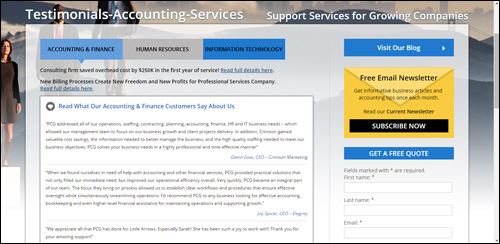
(Add a web page with testimonials from previous clients and case studies. Image sourced from: pcg-services.com)
If you want to learn more about using client testimonials and reviews, refer to this article: How To Turn More Visitors Into Qualified Leads With Profit-Boosting Client Testimonials
Contact Page
Having a contact page is crucial.
It should provide:
- Business Name
- Your physical location
- Phone
- Fax
- Email address
- Map and directions
- Web address
- Contact form
- Name of person to contact
- Social media web addresses
- Chat
If you have several areas you want to make this clear when displaying the address and contact information.
Consider also including links to an FAQ page, frequently-visited pages, special offers, helpdesk, newsletter, blog, etc.
Add An Accounting Or Financial Services Blog
A blog is a powerful marketing tool for your business. Most blogging platforms are built around a content management system that is simple to use and allows you to promote your business using content such as company events, updates, useful articles and tutorials, informative posts, promotional videos, infographics, etc.
If you already have an established accounting or financial services site, then consider adding a WordPress blog to promote your company.
If you don’t have a website yet, or your existing accounting site is hard to add new content to or not delivering you the results you want, then WordPress can become both your business website and blog.

Very few people know that an expertly configured WordPress site can become an automated traffic system that can help begin to deliver targeted traffic to your business, simply by publishing regular content to your site.
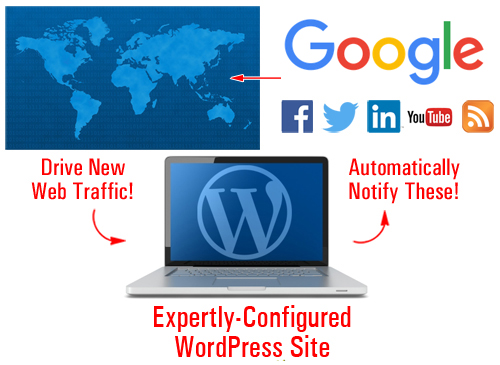
(An expertly configured WordPress site can generate new traffic automatically to your website)
For more info, see this article: Web Site Traffic Blueprint – Learn How To Create An Automated Web Traffic-Getting Machine With WordPress
Legal Information
As a professional accountant, having a website that complies will all legal requirements online is crucial, not just for establishing credibility with prospective clients, but also to ensure that you are not breaking laws and regulations wherever your business is located.
Adding the following legal pages to your accounting site will help keep you out of legal hot water with most regulatory authorities, third-party service providers (e.g. Facebook), and other potential sources of threats and legal inconveniences:
- Contact Us
- Privacy Statement
- Terms Of Use
- Website Disclaimer
- Affiliate Agreement
- Anti-Spam Policy
- Compensation Disclosure
- DMCA Notice
- Earnings Disclaimer
- External Linking Policy
- Health/Financial Disclaimers
- Refund Policy
- Video/Audio Terms
- etc.
To learn more about adding legal pages to your site, see this article: Adding Legal Pages To Your WordPress Site
Improve The Content On Your Website
In today’s globally competitive economy, being generous with content that educates and informs readers has become one of the key business differentiators.
You want to provide great content with advice and tips that will get your readers sharing your web pages with others and coming back for more information. Using content is a great way to inform and teach your visitors and prospective clients about your business and about doing business with your organization.
For example, topics for an accounting or financial services business could include the following:
- Explanations of balance sheets
- Overlooked tax deductions
- Directors’ duties and legal responsibilities
- How to present accounts for fundraising activities
- Cashflow planning
- Business insurance
- Protecting revenues
- Tips on structuring your self-managed retirement fund
- Do’s and don’ts of … (e.g. purchasing vs leasing, setting up payroll systems, etc.)
You can also create a series of educational articles that will help your your readers understand your accounting or financial services, such as software accounting, business accounting, business budgeting, reducing debt, financial concepts made simple, etc.
Remember to use relevant keywords in your articles that your readers would search for online.
We recommend subscribing to our Content Marketing Email Training Series. You will receive regular training emails with easy-to-digest information that will show exactly how to drive more traffic to your website, save money creating useful content that will add value to your visitors and grow your business online using content marketing strategies. It’s not only a great course with loads of useful information, it’s also completely FREE!
Tips For Improving User Experience
Improving your site’s user experience (typically referred to as UX) will help you keep visitors coming back and engaging with your site. This section will show you different ways to improve your visitor engagement and UX.
Use RSS Feeds
Adding RSS (Really Simple Syndication) feeds can help to improve your visitor engagement and user experience in a number of different ways.
If you provide valuable content, other sites may want to syndicate your content to their visitors.
Some of the benefits of having other businesses syndicate your content, include:
- All of your updates are kept in one place
- Content distribution doesn’t rely on email
- Your feeds can be shared and picked up by other sites online
- RSS feeds allow for subscribing
- An RSS feed provides links back to your site
- Feeds can be submitted to RSS directories and aggregator services
- RSS provides a number of ways for readers to receive your content (e.g. view your content on their mobile device using different applications)
- It’s built into WordPress
There are also a number of benefits to adding syndicated content to your site from other websites, such as the fact that you don’t have to write, manage or update the content.
To find useful RSS feeds just search online for relevant government departments and well-known industry bodies.
Below we have listed some exaples of feeds you may want to add to your accounting website:
- Taxation Policy Center: http://www.taxpolicycenter.org/press/rss.cfm
- Australian Taxation Office: https://www.ato.gov.au/RSS-news-feeds.aspx
- Canada Revenue Agency: http://www.cra-arc.gc.ca/rssfeeds/
- UK HM Revenue and Customs: http://www.hmrc.gov.uk/rss/rss.htm
- South Africa Revenue Service: http://www.sars.gov.za/Pages/RSS-Feeds.aspx
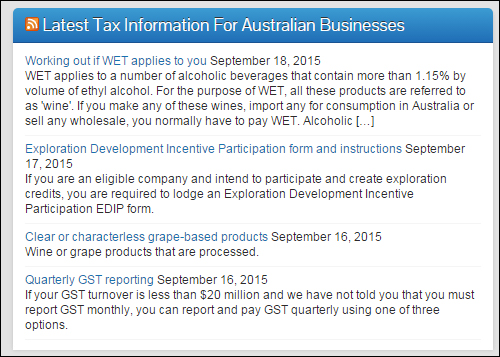
(Add RSS feeds to improve your accounting website’s user experience.)
Checklists And Forms
Adding checklists and forms to your site is a great way to increase visitor engagement and add value to your readers. Checklists and forms can give them step-by-step instructions and resources to complete tasks. Checklists and forms are great business planning tools.
Forms and checklists could address subjects such as:
- How To Set Up A Company
- Rental Property Checklist
- Non-Profit Activity Checklist
- Disclosure Requirements
- Individual Tax Checklist
- Trust Tax Checklist
- Income Tax Variation Forms
Add Unique Tools
Providing useful tools, gadgets and applications for businesses (or links to these tools) on your website can help increase visitor engagement and add significant value to your target audience. Calculators, such as loan and tax calculators, are useful tools you can add to accounting websites. Others would include time cards, and retirement and interest calculators.
In part two, we discuss a number of online tools you can use in your website using WordPress plugins that can help improve search engine optimization, increase user engagement and generate more visitors to your business.

***
This is the end of part 1 of this guide on ways to build your accounting business presence online.
To view Part Two, click here:

Subscribe To This Site And Get Notified Of New Tutorials!
***
***
"Wow! I never knew there's so much to learn about WordPress! I bought one of the WordPress for Dummies three years ago, such authors need to be on this course!" - Rich Law, Create A Blog Now
***