Grow Your Accounting Business Online With WordPress
 The digital information age has not only transformed the way business is done worldwide, it has also created difficult challenges and great opportunities for the accounting and financial services industry.
Challenges Professional Accountants Face Online
CPAs today must work harder than ever before to remain in business. Not only do you have to actively participate in the communities and industries you serve, you must also maintain an active digital presence. This includes having a dynamic web presence and learning how to better promote your business services online.
In addition to spending dollars in offline marketing activities, businesses in the accounting industry are also finding that they will need to invest a greater share of their marketing budget to developing and maintaining a website that will drive prospective clients, engage users, outperform the competition in search engines and help give them wider reach online.
This means that your site not only has to look great, load fast, and your website has to be easy to navigate, but it’s also important to keep in mind that your site’s needs may change over time and sections may need to be frequently updated. This requires implementing well-planned website and content management strategy.
One other challenge that certified public accountants face with their websites, as all other professions do for that matter, is that your site has only around thirty seconds to provide visitors with what they need or they will go away.
“Websites have evolved into central information hubs where service information is still present but enhanced with web portals, hyperlinks to state and federal sites, and a variety of free tools.”
Michael Alter, http://www.accountingweb.com/technology/accounting-software/tips-for-improving-your-website
Opportunities For Certified Public Accountants In The Digital Economy
As well as facing many new challenges, there are also loads of online opportunities available to businesses in the accounting sector that are willing to evolve to meet the challenges of the online economy and think progressively about marketing their business better online.
In this detailed guide, you will learn opportunities to source more business and build more online credibility for your business.

As well as providing practical tips and information on cost-effective ways to improve your accounting web presence, we also recommend that you consider using the WordPress CMS platform to power your accounting business website or blog.
To learn more about the benefits and advantages of using the WordPress Content Management System (CMS), see the articles below:
- Discover Why A Poorly Designed Website Can Cost You Money And What To Do About It
- Everything You Need To Know About Growing A Successful Small Business Online With WordPress
Practical Tips For Improving Your Accounting Or Financial Services Website
This section will show you how to improve your website and get better results online. We show you what web pages you need, what type of content works best for accounting websites, your layout and navigation, etc.
If you need assistance or help planning your accounting website, check out the detailed guide we have written here: A Comprehensive Guide To Web Site Planning For Non-Technical Business Owners
Improve Your Website Pages
All business websites require several basic pages. Let’s discuss the pages your should have and how to set up your accounting website for best results.
Services And Products Page
It’s essential to have a page that explains your services and products.
It will include all the products and services you offer, such as:
- Business accounting – planning, incorporation of companies, general accounting, payroll, preparing financial statements, book keeping, forecasting, budgeting, financing, strategic planning, consulting, etc.
- Taxation – preparing, planning, reviewing, auditing, advice, problem resolution
- Investment strategies
- Corporate accounting
- Wealth creation
- Superannuation/retirement plan (401k) advice
- Audit risk assessment and assurance
- Quickbooks – setup, training, tune up, and support
- Specialist services – mergers, acquisitions, information technology, secretarial, rentals, trusts, fiduciary accounting, succession planning, selling businesses, transfers, etc.
- Lending and leasing
Make sure to list all of the services you provide, not just the ones you specialize in. Provide your visitors with information that will educate them about the benefits of using your services and direct them to your contact or appointment booking page.
Who We Are
The ‘About Us’ page needs to describe your business and explain to visitors what your business stands for, its unique approach, philanthropical donations, etc.
Remember to also mention any accounting awards, recognitions, certifications, accreditations, publications, associations, etc., that can be used to promote the company and set it above other competitors.

(List all of your awards accreditations, certifications, recognitions, publications, associations, etc. in your About page. Screenshot image sourced from: deloitte.com)
Meet The Team
Are you searching for quicker, simpler and cost-effective ways to sell more products or services online and get visitors to interact more on your site? Then help prospects get to know your organization better.
People need to relate to your business. A great way to do that is to have a page that introduces your employees. This page should include a photo and a brief bio. Since most visitors will not tend to be very well-versed in accounting terms it should tell who they are and what their specialties are. It should also explain what those specialties mean. This page should also include social buttons so your site visitors can follow individual team members on their social networks.
On this page, don’t be afraid to show the human side of your team members with personal stories, hobbies, etc., but make sure to highlight your person’s qualifications, how their skills add value to your team, and more importantly, how they will help add value to your clients’ business.

(Add an employee page. Image sourced from: deepsky.com)
For a detailed step-by-step tutorial on how to create and add a list directory of employees to WordPress with no coding skills required, go here: WordPress Plugin Tutorial: How To Add A Staff List Directory To Your WordPress Site
Job Opportunities
This is a listing of career opportunities available within your firm. It should include training provided, benefits, advancement opportunities, social activities promoted or sponsored by your organization, etc. You can include information about upcoming career opportunities in the accounting and financial services industry.
Include also a positions available section in your page. If there are no positions currently available, consider inviting people to return periodically to the page, subscribe to your contact list, follow you on social media, etc.
Testimonials & Case Studies
Customer reviews and case studies are a great way to show potential clients businesses minimise tax, increase profitability, or grow strategically. Adding a page with case studies and reviews from clients also helps to establish social proof.
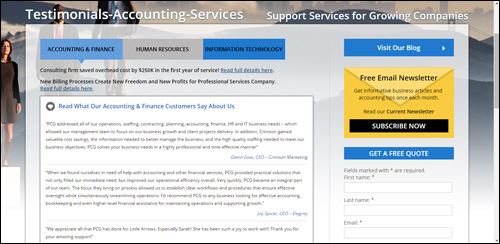
(Add a page to your site with case studies and reviews from clients. Image sourced from: pcg-services.com)
We have written extensively on using testimonials and reviews improve your business online. Go here to learn more: How To Create Better Results Online With Engaging Testimonials
Contact Us Page
Having a clean contact page is essential.
It should include some or all of the following information:
- Name
- Physical address
- Phone number
- Facsimile
- Contact email address
- Map
- Web URL
- Contact form
- Contact name
- Links to social media pages
- Live Chat/Skype (optional feature)
If your business services different locations you will want to make this clear when showing your address and contact info.
Consider also including links to an FAQ page, useful pages, special offers, helpdesk, newsletter, blog, etc.
Add A Blog
A blog can be a powerful marketing tool for your business. Many blogging platforms are built around a content management system that is easy to use and allows you to easily promote your business using timely content such as industry events, product updates, useful information, opinions and discussions, how-to videos, media presentations, etc.
If you already have an established accounting website, then consider adding a WordPress blog to promote your services.
If you don’t have a website yet, or your existing accounting website is very hard to add new content to or not delivering you the results you want, then WordPress can act both as your website and blog.

Very few businesses know that an expertly configured WordPress site can turn into an automated traffic-generation system that can instantly begin to attract targeted traffic to your business, simply by publishing content to your website on a regular basis.
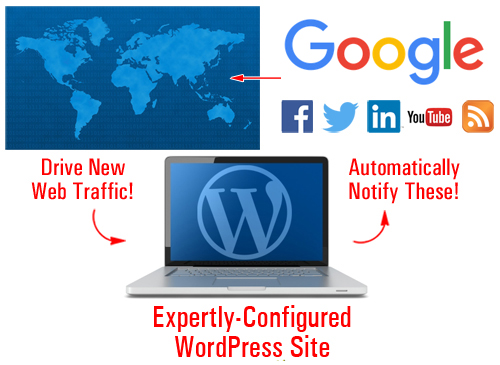
(WordPress can automate your traffic generation)
Go here to learn more: Website Traffic Blueprint – A Complete Guide To Driving More Traffic Automatically
Legal Information
It’s vitally important for accounting organizations to ensure they have a website that complies will all legal requirements online, not just for establishing trust and credibility with prospective clients, but also to ensure that no local, regional and federal laws or regulations are being contravened wherever you service clients.
Depending on the services you provide, adding the following legal pages to your accounting or financial services site will help keep you out of trouble with most regulatory authorities, third-party service providers, and other potential legal threats and inconveniences:
- Contact Page
- Privacy Policy
- Terms And Conditions Of Use
- Website Disclaimer
- Affiliate Agreement
- Anti-Spam Policy
- Compensation Disclosure
- DMCA Notice
- Earnings Disclaimer
- External Links Policy
- Financial Disclaimers
- Refund Policy
- Video/Audio Terms
- etc.
If you want to learn more about adding legal pages to your website, refer to this article: The Importance Of Adding Legal Pages To Your WordPress Site
Improving The Content On Your Website
In today’s globally competitive economy, content marketing has become one of the key differentiators for businesses that sell similar products or provide similar services.
Providing great content with useful information and tips will get your readers sharing your content and coming back for more. Content marketing is a great way to inform and teach your visitors and prospective clients about your business.
For example, topics for an accounting business could cover:
- How balance sheets work
- Profit & loss statements
- Duties and legal responsibilities of company directors
- How to present accounts for non-profit activities
- Cashflow planning tips
- Business insurance
- Protecting revenues
- How to structure your self-managed retirement fund
- Do’s and don’ts of … (e.g. purchasing insurance, claiming business expenses, etc.)
You can also create a series of informative articles that will help your readers understand your services, such as finance accounting, business accounting, business auditing, reducing business debt, financial concepts made simple, etc.
Remember to use relevant keywords and terms in your content that readers would search for online.
We recommend subscribing to our Content Marketing Email Training Series. You will receive regular training emails with easy-to-digest information and practical tips that will teach exactly how to drive more traffic to your website or blog, save money creating high-quality content that will add value to your site visitors and grow your business online using content. It’s not only a great course with loads of useful information, it’s also 100% FREE!
Improve User Experience
Improving user experience (often referred to as UX) will help keep visitors coming back and using your site. This section will show you ways you can improve your visitor engagement and user experience.
Add RSS Feeds
An RSS (Really Simple Syndication) feed provides lots of benefits for your accounting business.
If you provide information that adds value to others, other businesses will want to syndicate your content to their visitors.
Some of the benefits of syndicating your content to other sites using RSS feeds, include:
- All of your content updates are kept in one place
- Content distribution doesn’t rely on email
- Your feed can be shared and picked up by other sites online
- Allows for subscribing
- A feed provides links back to your content
- RSS feeds can be submitted to RSS directories and aggregators
- RSS provides several ways for your readers to receive your content (e.g. view your content on their mobile device using a feed reader)
- It’s built into WordPress
There are also a number of benefits when it comes to adding syndicated content to your website from other websites, such as the fact that you don’t have to write, manage or update the content.
You can find RSS feeds with useful content by visiting sites of relevant government departments or industry bodies.
Below we have listed examples of RSS feeds you may want to consider adding to your site:
- Taxation Policy Center: http://www.taxpolicycenter.org/press/rss.cfm
- Australian Taxation Office: https://www.ato.gov.au/RSS-news-feeds.aspx
- Canada Revenue Agency: http://www.cra-arc.gc.ca/rssfeeds/
- UK HM Revenue and Customs: http://www.hmrc.gov.uk/rss/rss.htm
- South Africa Revenue Service: http://www.sars.gov.za/Pages/RSS-Feeds.aspx
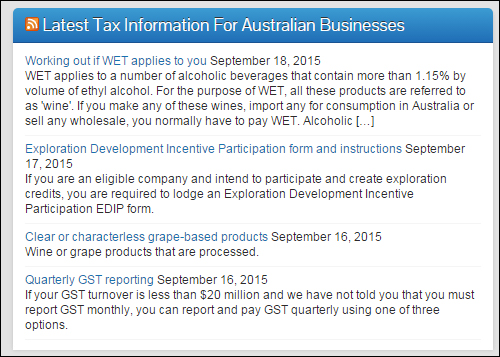
(Adding RSS (Really Simple Syndication) feeds can help to improve your accounting website’s UX.)
Add Online Checklists
Adding checklists and forms to your site is a great way to help increase visitor engagement and add value to your visitors. Checklists and forms can give them useful step-by-step instructions and resources to get necessary tasks done. Checklists and forms are also great planning tools.
Checklists and forms can cover areas such as:
- How To Set Up A Company
- Negative Gearing Worksheet
- Non-Profit Governance Checklist
- Disclosure Checklists
- Partnership Tax Checklist
- Capital Gains Tax Checklist
- Income Tax Variation Forms
Adding Unique Tools
Providing unique online tools, gadgets and applications for businesses on your website is a great way to increase visitor engagement and add value to users. Calculators, such as loan and tax calculators, are popular tools for accounting websites. Other tools can include time cards, or retirement and interest calculators.
In the next section of this guide, we take a look at a number of WordPress plugins you can add to your accounting or financial services site that can help to improve search engine optimization, improve user engagement and drive more web traffic to your business.

***
This is the end of part 1 of this article on ways to improve your accounting web presence.
Click here to continue reading:

Subscribe To WPCompendium.org And Get Notified When New WordPress Tutorials Get Published!
***
***
"I love the way your email series "Infinite Web Content Creation Training Series" is documented and presented. It is very absorbing and captivating. The links and tutorials are interesting and educational. This has motivated me to rewrite my content following the concepts I am learning from the email series." - Mani Raju, www.fortuneinewaste.com
***