 This tutorial is part of our WordPress installation tutorial series, where we show you how to install a WordPress site or blog on your own domain name with no coding skills required.
***
By now, you should already have an understanding of why you should choose WordPress as the online platform that will power your website or blog, and complete the website planning process.
WordPress Installation Process
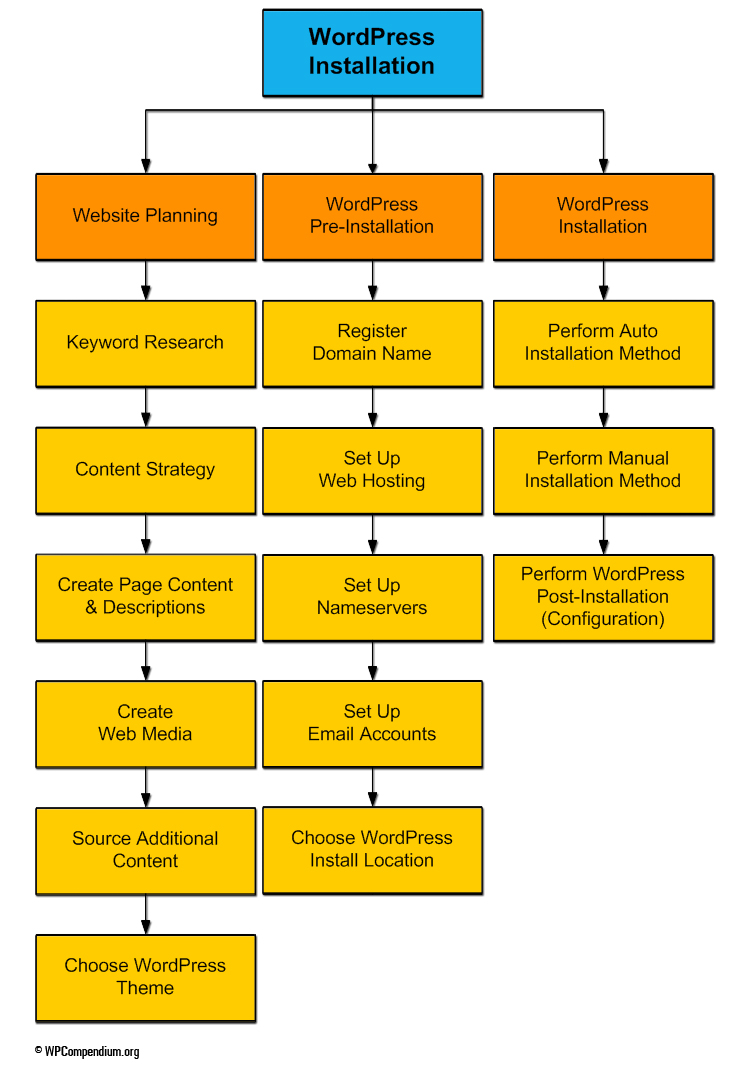
(WordPress Installation Process)
Installing a WordPress website or blog:
- Saves you money. You can save hundreds to thousands of dollars on the cost of web development by learning to install WordPress yourself (of course, if you want to save time, then, by all means consider using web developers). To learn more about saving money with WordPress, see our Digital WordPress Business Blueprint.
- Requires no coding skills. Our tutorials show you how to install WordPress on your domain with no coding skills required. There are some third-party applications you will need to learn how to use to perform your installation, but these also require no coding skills and are covered in our WordPress installation tutorials.
- Is not difficult. All you need is to invest a little time learning how. Fortunately, our WordPress installation step-by-step tutorials are laid out in logical, sequential order, and are designed to help you save time. Just follow the steps, and you will soon have a professional-looking website or blog installed on your domain.
Installing WordPress – An Overview
Can WordPress be installed quickly?
Absolutely! Once you learn how to do it, WordPress can be installed on any domain in under a minute … here’s proof:
As you can see, once you know what to do, installing WordPress on a domain is the easiest part of building your own website.
If you are just starting out, however, the steps you need to complete to install WordPress in 60 seconds or less can be very confusing. We have broken down every component of the WordPress installation process so that anyone can follow … even if you have no coding or programming skills!
This training module provides detailed tutorials and checklists that show you exactly what to do before installing a WordPress website or blog, and takes you step-by-step through the installation process itself, using the process shown in the flowchart below:
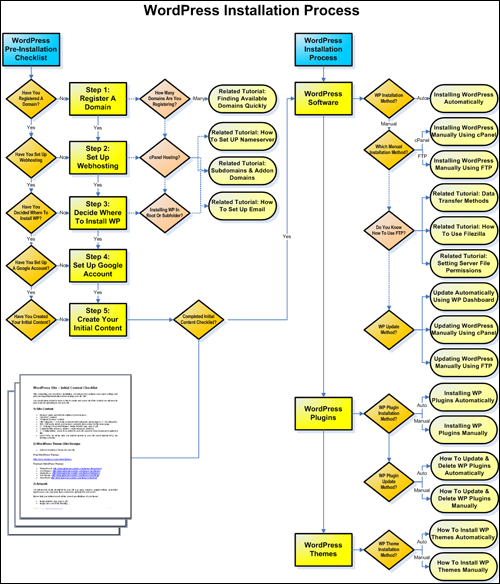 (How To Install WordPress – click the above image to enlarge)

The installation process covered in our tutorials assumes that you have no coding knowledge or web development skills. You will, however, need to learn how to use some applications to install WordPress. These applications are not difficult to learn and are covered in the step-by-step tutorials.
WordPress Installation Process
For best results, we recommend following the tutorials in this module in the exact order listed below:
- What You Need To Do Before Installing WordPress
- Registering A Domain Name
- How To Find Keyword Rich Domain Names Quickly (optional)
- How To Set Up Web Hosting For Your WordPress Site
- Setting Up A Nameserver For Your Domain Name
- How To Create Subdomains And Add-on Domains In cPanel (optional)
- Create An Email Account For Your Domain Name In cPanel (optional)
- Decide Where To Install Your WordPress Site
- Create A Google Account
- WordPress Content Checklist
- How To Install WordPress Using cPanel – Fast WordPress Installation Method
- How To Install WordPress Manually Using FTP (optional method)
- How To Transfer Files Between Your Computer And Your Server (3 Methods)
- How To Configure Server File Permission Settings (if required)
After you have completed this training module, you will know how to easily install a brand new site or blog on any domain name. The WordPress Configuration tutorials will then show you how to configure your the settings on your new site.
Installing WordPress – Recommended Resources
Before you start, we recommend going through these training modules:

We recommend watching the following video series in addition to our step-by-step tutorials in this module:
- Build A WordPress Site Fast
- How To Use Softaculous
- Using FTP
- How To Use cPanel
- Using Amazon S3
- Using Google Keyword Planner
- Google Tools (Gmail & Google Analytics)
You can access the above videos anytime by becoming a member of WPTrainMe.com (Pro Edition).
Access Hundreds Of WordPress Step-By-Step Tutorials And Videos From Your Own WordPress Dashboard
WPTrainMe gives you access to all of the comprehensive library of WordPress tutorials published here on WPCompendium.org, plus hundreds of WordPress ’how to’ video tutorials and additional resources directly from your WordPress dashboard using the WPTrainMe plugin (PRO edition). These tutorials and videos will save you time searching for information online and help you master the basics of using WordPress quickly and easily.
Inside the WPTrainMe PRO member’s area, you will also find a downloadable step-by-step WordPress Installation Guide containing the same tutorials included in this training module in printable format. This comprehensive 253-page PDF guide is fully illustrated with hundreds of detailed screenshots and will save you hundreds of $$$ building your own WordPress site …
 (WordPress Installation Guide)
To learn how to get access to WPTrainMe PRO at a special low price, click here.
Are you ready to begin? Then click on the link below to get started …
What To Do Before Installing WordPress
***
"Learning WordPress has been a huge stumbling block for me. I've been looking for something that covers absolutely everything but doesn't cost an arm and a leg. Thank you so much ... you have just provided me with what I have been looking for! Truly appreciated!" - Tanya
***