WordPress Traffic Automation Guide
 This tutorial is part of a series of articles aimed at helping small business owners learn how to grow their business online cost-effectively with a WordPress-driven website or blog and proven online marketing strategies.
***
WordPress Traffic Automation Blueprint – Overview
 Traffic is the lifeblood of almost every business online.
Knowing how to drive traffic to your website is one of the fundamental skills of running an online presence successfully. Getting traffic to a web site is also one of the greatest challenges faced by many web site owners.
Why Are So Many Businesses Struggling To Drive More Visitors To Their Websites?
Type any of the key phrases below into Google …
- “increase more web traffic to your site for free”
- “drive traffic to my website for free”
- “best 100 methods to bring visitors”
- “need to get more visitors using paid advertising”
- “get more people to my website”
… and you will be immediately presented with loads of information on ways to help you increase your website visitors …
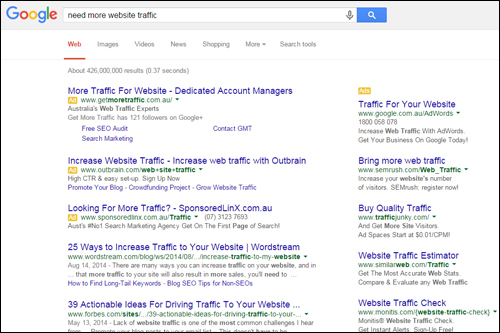
(There are lots of methods to get more website visitors. In this article series you will learn how to set up a system to benefit from most of these traffic generation methods!)
There is clearly no shortage of ways to drive more traffic to your site. There are tons of tutorials and free information that can show you methods to increase visitors to your site.
The problem often has more to do with business owners not investing enough time into learning how to grow traffic sustainably, not setting up systems for managing the traffic generation process effectively, and, in many cases, not even being aware that there are ways to configure your website to leverage and automate your web traffic generation.
The illustration below shows the approach many small businesses take when it comes to generating traffic to their sites …
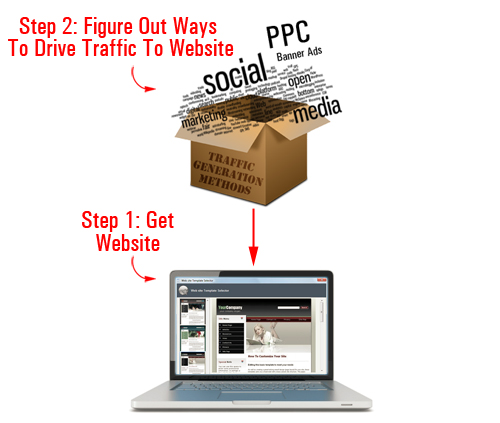
(This is how many businesses approach traffic generation)
Essentially, the approach most businesses typically take is this: first, you build a website, and then you figure out ways of driving traffic to your website.
As we will show you in just a moment, there is a better way.

Don’t make the mistake of believing that ”outsourcing” your traffic generation to experts will address this problem.
Outsourcing is fine if you have systems in place to manage your traffic generation campaigns already. If not, all you will probably do is end up wasting a lot of your valuable time and money looking for a winning traffic-getting strategy.
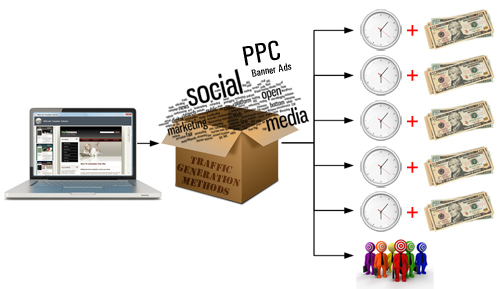
(Without a solid foundation and proper systems in place, traffic generation can become a costly waste of time and money!)
Driving web traffic sustainably requires setting up a solid foundation online, putting the right systems in place, continually testing campaign variables, experimenting with different services, analyzing results, measuring ROI across different traffic generation strategies, and so on.
Is There A Simpler, Automated Way To Grow Web Visitors?
Imagine if you owned a website where the only thing you had to do to deliver new visitors to your web site was to publish great content consistently.
This is not fiction or fantasy … it’s a fact! Many website owners are already doing this … and you can too!
In our Website Traffic Blueprint article series, you will discover how to create an automated traffic generation system that can help begin attracting web traffic to your site, simply by adding regular content to your web site.
How To Set Up An Automated Traffic Generation System
As you can see in the diagram below, the web traffic method we discuss in this article series involves three basic steps:
- Set up specific systems to lay down a solid foundation for driving sustainable traffic
- Add web content on a regular basis to start driving traffic and generating data
- Start testing other traffic methods
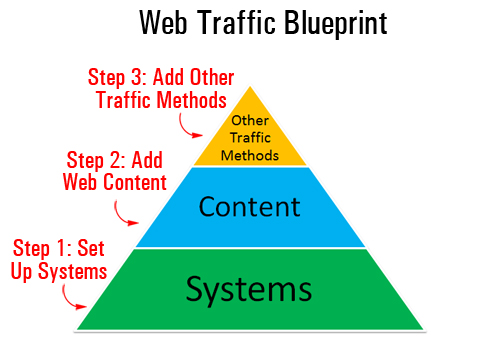
(To get sustainable web traffic, you need to first put in the right systems)
Right now, we’ll mostly be focusing on Step One. The aim of this article is to help you lay the foundations for a traffic generation system that will ultimately help your business:
- Save time using automation and leverage
- Save money in many different ways
- Automatically notify search engines
- Instantly notify and publicize your content to all of your social media accounts (e.g. Facebook, Twitter, Pinterest, etc.)
- Gain valuable insights about your traffic generation campaigns, analyze results, measure ROI, etc.
- Outsource traffic generation while maintaining full control of the process
- Grow your business online cost-effectively and sustainably
You can achieve all of the above using what we will refer to in this article series as an “expertly configured” WordPress website …
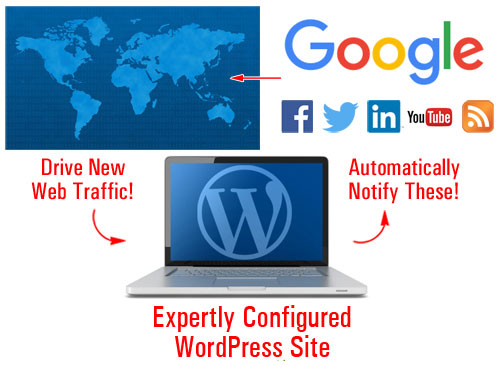
(With an expertly configured WordPress site, you simply add content and WordPress will then do the rest!)
An Expertly Configured WordPress Web Site – What Is It?
An expertly configured WordPress web site is different than a professionally-configured WordPress site.
An expertly configured WordPress website or blog is a web site that is not only powered by the WordPress CMS, but has also been expertly set up and configured (either by yourself or professionally) to take full advantage of the tremendous power, ease-of-use and functionality of WordPress and its integration with other services, specifically in areas like SEO, content syndication, and analytics.
Why Use An Expertly Configured WordPress Website?
We have published many detailed articles on this site about the benefits of using the WordPress platform to grow your business online.
Understanding how an “expertly configured” WordPress website can help begin delivering new targeted traffic to your business requires a number of articles, which is why we really recommend that you spend some time reading our posts and subscribe to our site (this way, we can let you know whenever a new article gets published).
Let’s begin by addressing these basic questions:
What makes WordPress so special? What does WordPress provide that other web platforms don’t?
Take a look at the illustration below …
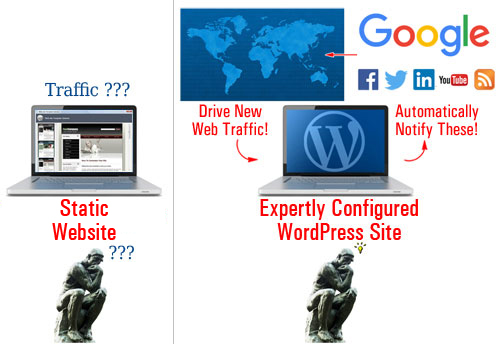
(Static Website vs Expertly Configured WordPress Site)
Many websites are traditionally built with platforms that create websites with “static” web pages. Essentially, this means that your content mostly sits inside your server waiting to be discovered. A static website doesn’t communicate with anyone else outside the platform; it doesn’t send out ’pings’ to anyone in cyberspace or inform any other website when new content has been published in the website.
Think about it … if with a static website, all of the content simply sits there passively waiting to be found, then the web site owner has to keep promoting their web presence and its content to keep driving web traffic.
WordPress is different!
The WordPress CMS software comes with default functionality that gives site owners the ability to set up, easily configure and build an automated “web traffic generation” machine, where all you then need to do is post new content and WordPress does the rest, instantly notifying search engines, social media and other online properties about your site to automatically generate your business new website visitors …
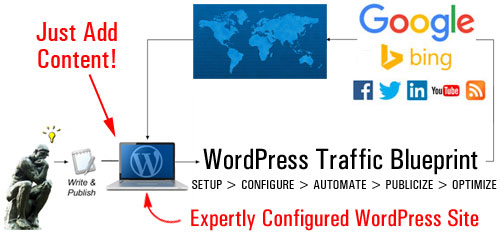
(With an expertly configured WordPress web site, you just publish content and WordPress does the rest!)
An Automated Content Distribution, Traffic And Lead Generation, And Sales & Marketing System
With an expertly configured WordPress site, you can build more than just a website for your business … you can set up an automated traffic and lead generation and sales & marketing system, where all you do is publish your content and WordPress then automates the rest …
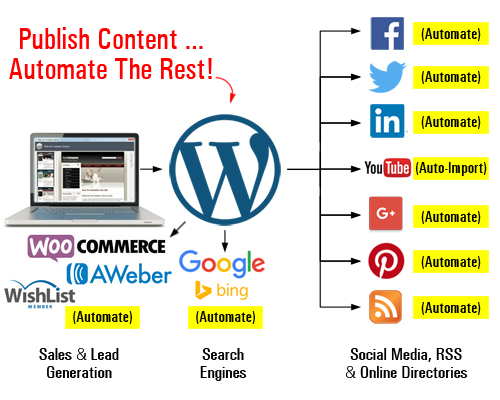
(Set up an automated content distribution, lead and traffic generation, and sales and marketing system with WordPress)
As your business evolves, you can add more functionality and automate processes like:
- Sell products and services with e-commerce,
- Capture leads with opt-in forms and add your subscribers to newsletters and autoresponders,
- Allow visitors to register on your site with different membership levels,
- And so much more!
You can do all of this using inexpensive WordPress plugins. Once these plugins are installed and configured on your site, just direct your visitors to the appropriate sections (e.g. your store, subscription forms, membership area, etc.)
The video below shows you what an expertly configured WordPress site can do for your business …
In Part Two of The Website Traffic Blueprint overview, we go over the components of your automated traffic system:
- Setup – Learn the best way to get started if you don’t have a website yet, or if you already have an existing site that may or may not have been built using WordPress.
- Configure – By default, WordPress already comes with a number of built-in features and settings that can help you generate traffic. Learn what features and settings need to be expertly configured for optimal results.
- Automate – Your traffic machine requires not only internal WordPress settings to be configured but also integrating your WordPress site with external services and other online properties (e.g. webmaster, analytics, and social media accounts).
- Publicize – Once your WordPress site has been configured and integrated with various external tools, all you have to do is publish new content consistently and WordPress will instantly notify and inform search engines, your social media accounts and other online properties about the new content, giving your content wider online exposure to new targeted visitors.
- Optimize – We recommend beginning with a content marketing strategy to build sustainable traffic. With the right systems in place, you can then begin to measure and analyze the traffic generated as a result and start gathering valuable data that will allow you to make better decisions as you expand to other traffic generation strategies.

This is the end of Section 1
To read the rest of this article, click here:
This article is part of an article series designed to help you learn how to grow your business online inexpensively using a WordPress-powered website or blog and proven online marketing strategies.
Would You Like To Get Automatically Notified When New Tutorials Are Published? Then Subscribe Using The Form Below!
***
"Wow! I never knew there's so much to learn about WordPress! I bought one of the WordPress for Dummies three years ago, such authors need to be on this course!" - Rich Law, Create A Blog Now