Grow Your Medical Or Healthcare Business Online With WordPress
 Medical practitioners face a number of challenges in today’s online economy, especially in terms of growing a business presence online.
Online Challenges For The Medical & Health Profession
Now, more than ever, businesses in the health and medical sector must work harder than ever to remain competitive. Not only do you have to maintain an active presence in the community your business serves, you must also develop a strong presence online. This includes having a dynamic website and learning how to better promote your practice online.
As well as investing money advertising offline, businesses in the medical industry are now also finding that increasingly larger amounts of their marketing budget will need to be allocated towards the development and management of a website that can attract clients, engage users, outperform the competition in search engines and give their business a wider degree of marketing exposure online.
This means that your website not only has to look professional, load fast, and your site layout has to be easy to navigate, but it’s also important to keep in mind that the needs of the website will change in time and many aspects will need to be frequently updated. This requires having a sound web and content management strategy.
One other problem that medical-related businesses (and most professions) face, is that they have only around thirty seconds to provide visitors with what they are searching for or they will leave the site.
“Websites have evolved into central information hubs where service information is still present but enhanced with web portals, hyperlinks to state and federal sites, and a variety of free tools.”
Michael Alter, http://www.accountingweb.com/technology/accounting-software/tips-for-improving-your-website
Online Opportunities For Medical Services
As well as facing a number of significant challenges, there are also many online opportunities available to businesses in the health or medical-related profession that can evolve to meet the demands of the online economy and think outside the box in terms of improving their online marketing skills.
In this article, you will learn about ways to attract new business and establish online credibility for your business.

As well as providing general website improvement tips, we also recommend that you consider using the WordPress content management system (CMS) to power your health business website.
For more information about the benefits and advantages of using WordPress, go here:
- Discover Why A Poorly Built Web Site Can Lose You Potential Customers
- Mastering WordPress – The Small Business Owner’s Guide
How To Improve Your Medical And Health Center Site
We’ll start first by going over some basic information you need. In this section, we’ll look at how to improve your website and get better results online. We show you what web pages you need, what type of content works best, suggestions for improving your navigation structure, etc.
If you need website planning assistance, visit this page: A Comprehensive Guide To Web Site Planning For Non-Technical Business Owners
Basic Website Pages
Professional websites need several basic pages. Let’s go over these.
Products And Services
It’s essential to include a page that explains your services and any products that you offer. Depending on which area of health you specialize in, this page could list services like:
- Medicine & Surgery – e.g. ear, nose & throat, nephrology hematology, oncology, neurology, renal, colon/rectal surgery, eye diseases palliative care, etc.
- Dental Services – e.g. preventive dentistry, holistic dentistry, gum disease, veneers, crowns and bridges, implants, emergency dental, etc.
- Cardiology – e.g. cardiac patient rehabilitation, coronary care
- Prenatal/Postnatal – e.g. birth suites, maternity services, etc.
- Child Health services – paediatrics, child development, children services, etc.
- Diagnostic services – mammography, lung screening, radiology, pap smears, magnetic resonance imaging, allergy testing, etc.
- Pathology services – lab testing and analysis, routine pathology testing, clinical trials, speech pathology, etc
- Counselling services – mental health services, alcohol, tobacco & other drug counselling, domestic abuse, wellness, social development services
- Alternative treatments – acupuncture, homeopathy, hydrotherapy, yoga, chiropractic services, hypnosis, etc.
- Other medical services – diet and nutrition, podiatry, reproductive services, physiotherapy, inherited diseases, prosthetics, assisted living, home care, clinical information, medical equipment, etc.
List all of the services you provide, not just the ones you specialize in. Provide your visitors with information that will educate them about what your services do and why they should book an appointment.
Who We Are
This page needs to describe your business and explain to visitors what your business stands for, its unique approach, philanthropy, etc.
Remember to also mention any awards, certifications, recognitions, accreditations, publications, associations, etc., that could be used to promote your medical services and to set yourself above similar service providers.

(List all of your awards certifications, recognitions, accreditations, associations, publications, etc. in the About page. Image source: squaremedical.com.au)
Team Profile Page
If you are looking for simple ways to sell more products online, then make it easier for visitors to get to know you, your team and your business better.
Your business needs to be relatable. One great way to do that is to have a page that introduces your employees or team members. It should include a photo and a mini bio. Since most visitors are probably not familiar with medical or health terms your bio descriptions should tell who they are and what their specialties are. You may also want to explain what those specialized areas mean. This page should also include social buttons that will allow your site visitors to follow some of your staff members on their social pages.
In this page, make sure to outline your team member’s expertise, why they are an asset to your team, and more importantly, how they can help add value to your clients’ business.
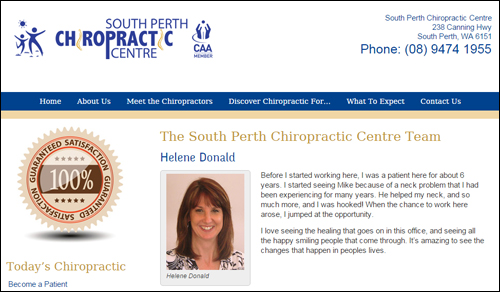
(Add a page that introduces your team members to prospective new clients. Screenshot source: southperthchiro.com.au)
If you need help how to easily create and add an easy-to-manage simple employee directory to your site with no coding skills required, refer to this tutorial: How To Create A Simple Staff Directory For Your WordPress Site
Recruitment Page
List any job or career opportunities available within the organization. This page should include training provided, employee benefits, professional development, social activities promoted or sponsored by your business, etc. You should also include information such as the job outlook and upcoming career opportunities in the health and medical industry.
Also include a positions available section in your page. If there are no positions currently available, consider inviting people to return periodically to the page, join your newsletter, follow you on social media, etc.
Case Studies And Testimonials
Case studies and client reviews are a great way to attract potential clients and showcase your services. By adding a page with case studies and testimonials from previous clients, you will also help to are also providing visitors social proof.
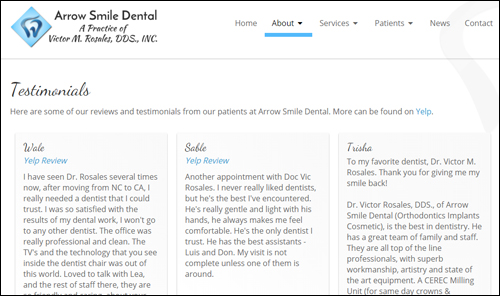
(Add a web page with testimonials from previous clients and case studies. Screenshot image source: arrowsmiledental.com)
If you want to learn more about using testimonials and reviews, refer to this article: Learn How To Improve Your Sales Conversions With More Effective User Testimonials
Contact Page
Having a contact page is absolutely necessary.
It should include:
- Company Name
- Your physical address
- Phone
- Facsimile
- Contact email address
- Map
- Website address
- Contact form
- Name of person to contact
- Social media web addresses
- Online chat feature (optional feature)
If your business services different areas you want to make this clear when showing your address and contact information.
Consider also including a few links point to commonly-asked questions page, frequently-visited pages, booking request, support area, newsletter opt-in form, blog, etc.
Add A Blog
A blog is a very powerful marketing tool for your business. Most blogging platforms typically comprise of a content management system that allows you to promote your business by publishing timely content such as news and announcements, updates, training articles, informative posts, promotional videos, infographics, etc.
If you already have an established site, then consider adding a WordPress blog to create more exposure for your clinic.
If you don’t have a website yet, or if your existing website is hard to manage or not delivering you the results you want, then WordPress can act both as your website and business blog.

Not many people know this, but an expertly configured WordPress site can turn into an automated traffic machine that can deliver new targeted traffic to your website, simply by publishing content to your website on a consistent basis.
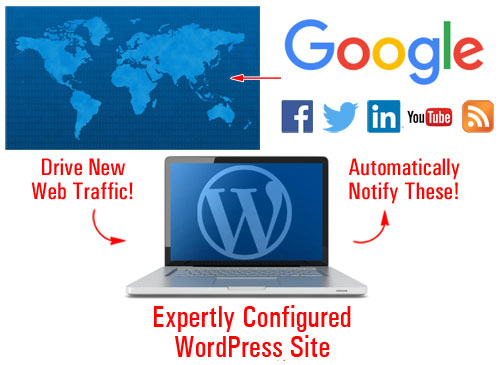
(WordPress can automate your traffic generation)
For more details, go here:
Legal Pages
Having a compliant website is extremely important. This is not only important for building trust and credibility with visitors, but also to ensure that no laws and regulations are being breached wherever you do business.
Depending on what services you provide, adding the following legal pages to your website will help you stay out of legal hot water with most regulatory authorities, third-party service providers (e.g. Facebook), and other potential legal threats and inconveniences:
- Contact Us
- Privacy Policy
- Terms Of Use
- Website Disclaimer
- Affiliate Agreement
- Anti-Spam Policy
- Compensation Disclosure
- DMCA Notice
- Earnings Disclaimer
- External Linking Policy
- Health/Financial Disclaimers
- Refund Policy
- Video/Audio Terms
- etc.
We have written a detailed article on adding legal pages to your website. If you would like to know more about this here: Adding Legal Pages To Your Site
How To Improve The Content On Your Site
In today’s globally competitive economy, being generous with content that educates and informs readers has become one of the key business differentiators.
By providing useful content with tips, information and advice, you will get your readers sharing it with others and coming back for more content. Publishing content is a great way to inform and educate site visitors and prospects about your business and services.
For example, if you provide services that help people lose weight, then some of the topics you could cover in your web content include:
- What is fiber and how can it help you with weight loss?
- Tips for developing portion control habits (smaller plate, don’t put food on the table, more vegetables)
- How to incorporate exercise into your busy schedule
- Vitamins and minerals that aid in weight loss (chromium, calcium, magnesium, etc.)
- And endless other content topics
You can also create a series of educational articles that will help your readers gain a better understanding of your services, by explaining benefits, procedures, terminology, etc.
Include keywords and terminology in your articles that readers will be searching to find you online.
We recommend subscribing to our Content Marketing Email Training Series. You will receive regular training emails with actionable information that will teach you how to drive more traffic to your site, save money creating high-quality content that will add value to your visitors and grow your presence online using content marketing strategies. It’s not only a great course with loads of useful information, it’s also 100% FREE!
Improving Visitor Experience
Improving your user experience (generally referred to as UX) helps to keep visitors coming back and using your site. This section will show you ways you can improve visitor engagement and UX.
RSS Feeds
RSS (Really Simple Syndication) feeds can help to improve visitor engagement and UX in several ways.
If you provide content that adds value to others, other sites will want to syndicate your content.
Some of the benefits of syndicating your content to other businesses using RSS feeds, include:
- All of your content updates are kept in one place
- Doesn’t rely on email
- Feeds can be shared online
- Users can subscribe to your feed
- It provides links back to your content
- Your feeds can be submitted to RSS directories and aggregators
- RSS provides multiple ways for your readers to receive your content (e.g. users can read your content on their mobile device using different applications)
- It’s built into WordPress
There are also a number of benefits when it comes to adding syndicated content to your site from other sites, such as the fact that you don’t have to write, manage or update the content.
To find RSS feeds with loads of useful content for your website, search online for medical or health-related government departments or well-known industry bodies.
Here are some examples of RSS feeds you could consider adding to your website:
- US Department Of Health And Human Services – e.g. Blog posts RSS feed: http://feeds.feedburner.com/SelectedHhsBlogPosts, etc. You can also choose specific RSS feeds, like feeds on women’s health issues (e.g. Breast cancer, Environmental health, HIV/AIDS, Mental health, Pregnancy, etc.) here: http://womenshealth.gov/news/rss/rss-feeds.html
- US National Libraries Of Medicine – For a list of feeds from leading medical journals, publications and websites (e.g. Haematologica, BMJ Heart, BMJ Medical Humanities, American Chemical Society, The International Journal of Tuberculosis and Lung Disease, etc.) go here: http://www.healthplusplus.com/wiki/List_of_RSS_feeds_on_health
- National Institutes Of Health (www.nih.gov) - Find various health-related feeds here: http://www.nih.gov/Subscriptions.htm
- FDA – Get FDA-related feeds (e.g. criminal investigations, FDA drug shortages, pet health, cosmetics, etc.) and podcasts here: http://www.fda.gov/AboutFDA/ContactFDA/StayInformed/RSSFeeds
- UK Department Of Health (www.gov.uk) – Latest news: https://www.gov.uk/government/organisations/department-of-health.atom
- The Department Of Health (Australian Government): http://www.health.gov.au/internet/main/publishing.nsf/xml/rssLatestNews.xml
- Department Of Public Health (Australia – State Level): e.g. Western Australia – http://www.public.health.wa.gov.au/feed/?types=news
- Centers For Disease Control And Prevention (www.cdc.gov) - Get various feeds on health-related topics and podcasts here: http://www2c.cdc.gov/podcasts/rss.asp
- Medical News Feeds: You can search medical news RSS feeds in major news publications like the NYTimes feeds section (e.g. Health news: http://www.nytimes.com/services/xml/rss/nyt/Health.xml)
- MedicineNet – Weekly Health and Medical News Digest: http://www.medicinenet.com/rss/weeklyhealth.xml. You can also choose specific RSS feeds here (http://www.medicinenet.com/rss/article.htm) (e.g. Alzheimer’s Disease, Arthritis, Migraine Headaches, Diet & Weight Management, Exercise & Fitness, Travel Health, etc.)
- MedicalNewsToday.com – Medical News Headlines: http://rss.medicalnewstoday.com/featurednews.xml
- Medical News Today – You can also choose specific feeds here: http://www.medicalnewstoday.com/newsfeeds-rss (e.g. Colorectal Cancer, Pharmacy/Pharmacist, Cervical Cancer/HPV Vaccine, Swine Flu, Medical Devices/Diagnostics, HIV/AIDS, Statins, etc.)
You can also search online for general RSS feeds, e.g. “medical rss feeds” or search for feeds on specific areas, e.g. “anxiety rss feeds”, “heart disease rss feeds”, “restless legs syndrome rss feeds”, etc.
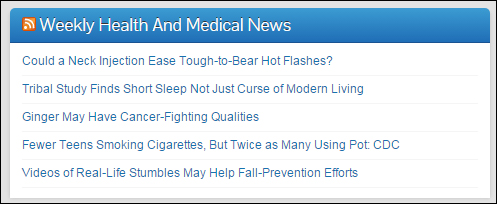
(RSS (Really Simple Syndication) feeds can help to improve your site’s UX.)
Add Downloadable Checklists
Adding checklists and charts to your site is a great way to increase visitor engagement and add value to your audience. Forms and checklists can provide visitors with useful instructions and resources to complete a task. They are great educational tools.
You can provide online or downloadable forms and checklists (or links to these) covering a range of subjects such as:
- Booking appointments
- Checklists for post-surgery recovery
- Health checklists and charts for specific systems
- Dental checklists – e.g. first visit, oral hygiene program, general dentistry, etc.
- Fitness and exercise program checklists
- General charts & infographics (e.g. caloric level of different foods, the importance of sleep at different ages, etc.)
Online Tools
Providing useful tools, gadgets and applications on your website can help increase visitor engagement and add significant value to your visitors. Health-related calculators are great tools you can add to your website. Other tools could include things like diagnostic tools, or even recipes.
In part 2, we take a look at a number of online tools you can use in your health or medical website using WordPress plugins that can also help to improve your seo, increase user engagement and drive more web traffic to your business.

***
This is the end of part one.
To keep reading, click here:
***
***
"This is an awesome training series. I have a pretty good understanding of WordPress already, but this is helping me to move somewhere from intermediate to advanced user!" - Kim Lednum