Grow Your Accounting Business Online With WordPress
 The digital age has not only transformed business worldwide, it has also created a growing number of challenges and opportunities for businesses in the accounting sector.
Online Challenges For CPAs
Now, more than ever, CPAs must find smarter ways to remain competitive, obtain new business, and retain current clientele. Not only do they have to actively participate in the communities and industries their business serves, they must also develop and maintain a strong presence online. This includes having a dynamic web presence and learning better ways to promote your business services online.
As well as spending money in offline marketing activities like advertising on newspapers, ads in industry publications and magazines, radio and tv spots, etc., businesses in the accounting industry are now also finding that increasingly larger amounts of their budget will need to be assigned towards the development and management of a website that drives clients, engages users, outranks the competition in search engines and helps increase their marketing reach online.
This means that your site not only has to look great, load fast, and be easy to navigate, but even more importantly, the needs of your website will change in time and sections may need to be frequently updated. This requires having a well-planned website and content management strategy in place.
Another problem that accountants face online (as most businesses do for that matter), is that your site has an average of 30 seconds to provide visitors what they need or they will go away.
“Websites have evolved into central information hubs where service information is still present but enhanced with web portals, hyperlinks to state and federal sites, and a variety of free tools.”
Michael Alter, http://www.accountingweb.com/technology/accounting-software/tips-for-improving-your-website
Opportunities For Certified Public Accountants In The Web Economy
As well as facing a number of significant challenges, there are also plenty of online opportunities available for accounting firms that can adapt to meet online demands and think strategically in terms of marketing their services better online.
This detailed guide will help you uncover opportunities to attract more potential clients and build more online credibility for your accounting or financial services business.

As well as providing tips and information on ways to improve your accounting web presence, we also emphasize the benefits and advantages of using the WordPress CMS platform to power your accounting or financial services business website or blog.
For more information about the benefits and advantages of using WordPress, go here:
- Learn How A Poorly Designed Web Site Can Cost You Customers And What To Do About It
- A Beginner’s Guide To Building A Successful Small Business Using A WordPress Blog
Useful Tips For Improving Your Accounting Site
This section explains ways to improve your accounting website and get better results. We will look at what web pages you need, what type of content you need, your layout and navigation, etc.
If you need assistance or help planning your accounting or financial services website, read this article: The Website Planning Process: A Cost-Saving Guide For Business Owners
Basic Pages
Professional business websites need a number of essential pages. Let’s review these.
Description Of services And Products
You need a page that explains your services and any products that you offer.
Your page will include services such as:
- Business – business planning, company formation, general accounting, payroll, financial statement compilation, book keeping, forecasting, financing, budgeting, strategic planning, consulting, etc.
- Taxation – preparation, planning, reviewing, auditing, advising, problem resolution
- Investment strategies
- Corporate accounting
- Wealth creation
- Superannuation/retirement plan (401k) advice
- Audit risk assessment and assurance
- Quickbooks – setup, training, tune up, and support
- Specialist services – mergers, acquisitions, information technology, secretarial, rentals, trusts, fiduciary accounting, succession planning, selling businesses, transfers, etc.
- Lending and leasing
List all of the services you provide. Educate your visitors about what these services do and why they should book an appointment.
About Us Page
The ‘About Us’ page needs to describe your business and explain to visitors what your business stands for, its unique approach, philanthropy, etc.
Remember to also include any awards, recognitions, accreditations, certifications, associations, publications, etc., that could be used to promote the company and set it above your competitors.

(List all of your business awards accreditations, certifications, recognitions, publications, associations, etc. in the About page. Screenshot image sourced from: deloitte.com)
Team Profile Page
If you are looking for inexpensive ideas to sell more products online or get people to stay longer on your site, then make it easier for prospective clients to get to know, like and trust you, your team and your business better.
Potential clients need to relate to your business. A great way to do that is to have a page that introduces your people. This page should include a photo and a mini biography. Since most visitors will not tend to be familiar with accounting terms your bio descriptions should tell who they are and what their specialties are. It should also explain what those specialties mean. This page should also include social buttons so your prospective clients can follow individual staff members on their social networks.
On this page, don’t be afraid to humanize your team members with personal stories, hobbies, etc., but make sure to highlight each staff member’s qualifications, why they are an invaluable asset to your team, and more importantly, how they can help add value to your clients’ business.

(Add a ‘meet the team’ page. Image sourced from: deepsky.com)
For a detailed tutorial about how to easily add an easy-to-manage list of staff members to a WordPress site, go here: Adding An Employee Directory: Tutorial
Career Opportunities Page
This is a listing of career opportunities within the firm. It could include training provided, employee benefits, advancement opportunities, etc. You can include case studies of recruits who have worked their way up in your company and information such as the job outlook and additional career opportunities in the accounting industry.
Also include a positions available section in your page. If there are no positions currently available, consider inviting people to return periodically to this page, subscribe to your newsletter, follow you on social media, etc.
Case Studies And Testimonials
Reviews from clients and case studies are a great way to show prospective clients minimize tax, increase profitability, or grow strategically. By adding a page with case studies and reviews from clients, you will also help to provide prospective clients with social proof online.
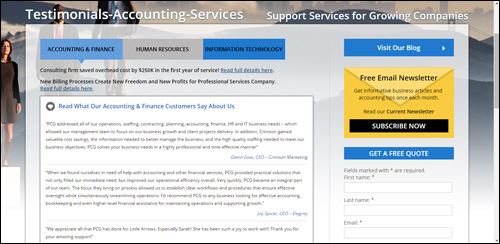
(Add a web page with client reviews and case studies. Screenshot image source: pcg-services.com)
We have created a detailed article on using client case studies and client reviews to improve your business results online. To learn more about this go here: How To Turn More Visitors Into Prospects With Knockout Client Testimonials
Contact Us
Having a clean contact page is crucial.
It should include the following information about your firm:
- Name Of Your Organization
- Physical location
- Telephone
- Fax
- Email address
- Map
- Web URL
- Contact form
- Request for more information – contact details
- Links to social media profiles
- Online chat feature
If you operate in several locations you will want to make that clear when showing your address and contact info.
You can also include links to an FAQ section, useful pages, special offers, helpdesk, newsletter opt-in form, blog, etc.
Add A Blog Section
A blog is a powerful marketing tool for your business. Many blogging platforms typically include a content management system that allows you to easily promote your business by publishing timely content like company events, company updates, useful articles, opinions on current topics, promotional videos, webinars, etc.
If you already have an established site, then consider adding a WordPress blog to promote your organization.
If you don’t have a website yet, or your existing site is very hard to keep updated with new content or not giving you the results you want, then WordPress can be used both as your website and your blog.

You may not be aware of this, but an expertly configured WordPress site can turn into an automated traffic-generation machine that can begin driving targeted traffic to your website, simply by adding regular content to your web site.
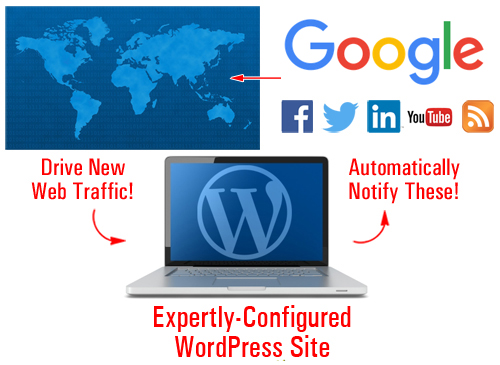
(An expertly configured WordPress site can generate new visitors automatically to your website)
Go here to learn more about this: WordPress Website Traffic Blueprint – How To Create An Automated Traffic-Getting Machine
Legal Pages
As a professional accountant, ensuring that you have a compliant website is crucially important, not just for building credibility with prospective clients, but also to ensure that no local, regional and federal laws or regulations are being broken wherever you provide services to.
Adding some or all of the legal pages below to your website will help keep you out of legal hot water with most regulatory authorities, third-party service providers, and other potential sources of legal threats and inconveniences:
- Contact Page
- Privacy Policy
- Terms And Conditions
- Website Disclaimer
- Affiliate Agreement
- Anti-Spam Policy
- Compensation Disclosure
- DMCA Notice
- Earnings Disclaimer
- External Linking Policy
- Health Disclaimers
- Refund Policy
- Video/Audio Terms
- and others
We have written a comprehensive article about adding legal pages to your website. Go here to learn more: How To Add Legal Pages To Your Website
Improve Your Content
In today’s highly competitive digital economy, the earlier you begin to publish great content on your site, the faster you will begin to differentiate yourself from your competitors.
Providing great content with information and tips will get your visitors to share your content and come back for more. Content marketing is the most effective way to inform and educate site visitors and prospective clients about your business and about using your services and products.
For example, topics for an accounting business could include the following:
- Explanations of balance sheets
- Overlooked tax deductions
- Duties and legal responsibilities of company directors
- Presenting accounts for non-profit activities
- Cashflow planning advice
- Business insurance
- Risk protection
- Tips on structuring your self-managed retirement fund
- Do’s and don’ts of … (e.g. purchasing vs leasing, setting up payroll systems, etc.)
You can also create a series of educational articles that will help your prospective clients gain a better understanding of accounting services, such as forensic accounting, tax accounting, business auditing, reducing business debt, financial concepts made simple, etc.
Remember to use the same keywords and terminology in your content that your prospective clients will be searching for.
We recommend subscribing to our Content Marketing Email Training Series. You will receive regular training emails with easy-to-digest information that will teach you how to drive more traffic to your web site, save money creating useful content for your visitors and grow your business online using content marketing strategies. It’s not only a great course with loads of useful information, it’s also completely FREE!
Improve Visitor Engagement And User Experience
Improving user experience (typically referred to as UX) helps to keep visitors coming back and engaging with your site. This section will show you ways you can improve your visitor engagement and user experience.
Adding RSS Feeds
RSS feeds provide plenty of benefits for your business.
If you provide content that adds value to others, other businesses will want to syndicate your content.
Some of the benefits of having other businesses syndicate your content, include:
- All of your updates are in one place
- your content distribution doesn’t rely on email
- RSS feeds can be shared and picked up by other sites online
- Users can subscribe to your feed
- A feed provides a way for links to point back to your site
- RSS feeds can be submitted to RSS directories
- There are a number of ways readers can receive your content (e.g. read the content on their mobile device using different applications)
- RSS is built into WordPress
There are also a number of benefits to providing great information on your site from other sites, such as the fact that you don’t have to write, manage or update the content.
To find RSS feeds with useful content just search online for finance and tax-related government departments or industry bodies.
For example, here are examples of useful RSS feeds you may want to add to your accounting website:
- Taxation Policy Center: http://www.taxpolicycenter.org/press/rss.cfm
- Australian Taxation Office: https://www.ato.gov.au/RSS-news-feeds.aspx
- Canada Revenue Agency: http://www.cra-arc.gc.ca/rssfeeds/
- UK HM Revenue and Customs: http://www.hmrc.gov.uk/rss/rss.htm
- South Africa Revenue Service: http://www.sars.gov.za/Pages/RSS-Feeds.aspx
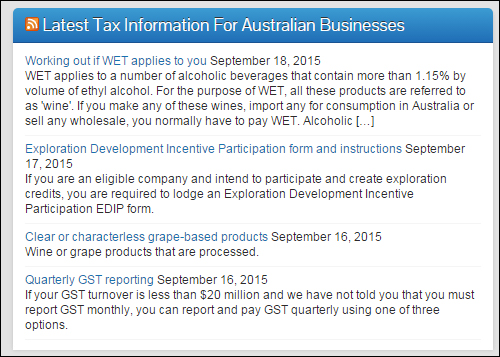
(Use RSS feeds to improve your accounting website’s UX.)
Checklists & Forms
Checklists and forms are a fantastic way to help increase user engagement and add value to your readers. They can provide visitors with useful instructions and resources to perform a task. Checklists and forms are also great business planning tools.
You can provide a range of forms and checklists (or links to these) covering areas such as:
- How To Set Up A Business
- Rental Property Checklist
- Not-For-Profit Governance Checklist
- Disclosure Checklists
- Individual Tax Checklist
- Capital Gains Tax Checklist
- Income Tax Variation Forms
Add Unique Tools
Providing unique online tools and applications for businesses (or links to these tools) on your website can help increase visitor engagement and add significant value to potential clients. Calculators, such as loan and tax calculators, are great tools to add to accounting websites. Others would include time cards, or retirement and interest calculators.
In part 2, we will be discussing a several WordPress-based tools you can add to your website that can help to improve search engine optimization, increase user engagement and drive more visitors to your business.

***
This is the end of section one.
To view the rest of this guide, click here:

Subscribe Using The Form Below And Get Notified When New Tutorials Get Published!
***
***
"Your training is the best in the world! It is simple, yet detailed, direct, understandable, memorable, and complete." Andrea Adams, FinancialJourney.org
***