Grow Your Medical Or Healthcare Business Online With WordPress
 Health professionals today face growing challenges.
Online Challenges For Health Practitioners
Today, more than ever, businesses in the health and medical industry must work harder than ever to remain competitive. Not only do you have to become more involved in the community you serve, you must also develop an active presence online. This includes having a dynamic website and learning how to better market your services online.
As well as spending money in offline marketing activities such as advertising on newspapers, ads in industry publications and magazines, radio and television, etc., you will probably find (if you haven’t already) that in order to compete with other medical or health businesses, you will need to allocate a greater portion of your budget to developing and maintaining a website that can attract new clients, engage visitors, outperform the competition in search engines and social media, and help you gain wider marketing exposure online.
This means that your website not only has to look professional, your web pages have to load fast, and your site has to be easy to navigate, but even more importantly, the needs of your website will change over time and sections will need to be updated frequently. This requires the implementation of a sound website and content management strategy.
Another challenge that medical businesses face online (and most businesses for that matter), is that your site has around thirty seconds or less to provide visitors with what they are looking for or they will look elsewhere.
“Websites have evolved into central information hubs where service information is still present but enhanced with web portals, hyperlinks to state and federal sites, and a variety of free tools.”
Michael Alter, http://www.accountingweb.com/technology/accounting-software/tips-for-improving-your-website
Opportunities For Health & Medical Businesses In The Online Economy
As well as facing a number of challenges, there are also plenty of online opportunities available to businesses in the medical or health-related industry that are willing to adapt to meet digital economy challenges and who can think outside the box about marketing their services better online.
In this comprehensive guide, you will discover a number of ways to drive more web traffic and establish online credibility for your business.

As well as providing practical tips and information on cost-effective ways to improve your medical or health website, we also place special emphasis on the benefits and advantages of using WordPress to power your medical or health-related business website or blog.
To learn more about the benefits and advantages of using the WordPress Content Management System, see the articles below:
- Learn Why A Poorly Constructed Website Can Cost You Money
- Using A WordPress Blog To Grow Your Business
Tips To Improve Your Medical Services And Health Practice Website
This section will show you ways to improve your health-related website and get better results. We show you what pages your site needs, what content works best for medical or health websites, suggestions for improving navigation structure, etc.
If you need assistance or help planning your website, visit this page: A Money-Saving Guide To Web Site Planning For Non-Technical Business Owners
Your Web Pages
Professional websites need some essential pages. Let’s review the pages your need and how to set up your medical or health website for best results.
Description Of services And Products
It’s essential to have a page that lists your products or services. Depending on which area you specialize in, your page can list services such as:
- Medical And Surgical – e.g. pain management, neurosurgery blood disorders, oral surgery, incontinence, respiratory, endoscopy, optometry operating theaters, etc.
- Dental Services – e.g. preventive dentistry, children’s dentistry, oral hygiene, teeth whitening, orthodontics, emergency dentistry services, etc.
- Cardiology – e.g. cardiac monitoring, chronic heart conditions
- Prenatal/Postnatal – e.g. birthing, midwifery, etc.
- Child Health services – paediatrics, child development, children services, etc.
- Diagnostic – mammography, lung screening, radiology, pap smears, MRI scanning, allergy testing, etc.
- Pathology services – lab testing and analysis, routine pathology testing, food and water testing, speech pathology, etc
- Counselling – mental health, alcohol, tobacco & other drug services, marriage counselling, wellness, social work services
- Alternative treatments – acupuncture, aromatherapy, functional medicine, yoga, chiropractic services, hypnotherapy, etc.
- Other medical services/therapies – diet and nutrition, othopedics, fertility services, physiotherapy, neurosciences, artificial limbs, sleep therapy, home care, clinical information, medical equipment, etc.
List all of the services you provide, not just the ones you specialize in. Provide your visitors with information that will educate them about the benefits of using your services and direct them to your appointment booking page.
Who We Are
The ‘About Us’ page should give a description of your business and explain to visitors what it stands for, its unique approach, community participation, etc.
It’s important to also list any industry awards, accreditations, certifications, recognitions, associations, publications, etc., that can be used to promote your medical, dental, chiropractic, surgery services, etc. and to set yourself above similar service providers.

(List all of your awards accreditations, recognitions, certifications, publications, associations, etc. in the About page. Screenshot source: squaremedical.com.au)
Staff
If you are searching for quicker, easier and cheaper ideas to sell more products or services online, then something you can do, is make it easier for prospects to get to know your organization better.
Your business needs to be relatable. A great way to do that is to have a page that introduces your employees. It should include a photo and a mini biography. Since most visitors are probably not very well-versed in medical-related terms your bio descriptions should tell who they are and what they specialize in. You may also want to explain what those specialized areas do. This page can include social buttons that will allow your visitors to follow selected staff members on their social networks.
On this page, don’t be afraid to show the human side of your people with personal stories, hobbies, etc., but make sure to highlight your employee’s qualifications, why they are an invaluable asset to your team, and more importantly, how they will help add value to your clients’ business.
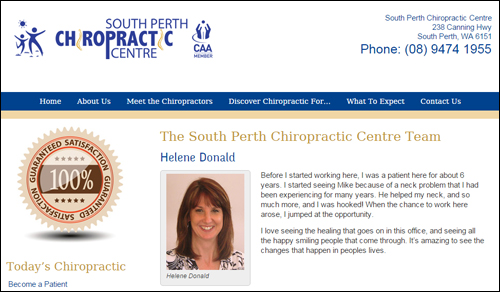
(Add a page that introduces your employees or team members to prospective new clients. Screenshot source: southperthchiro.com.au)
We have written a detailed tutorial about how to create and add an updatable simple team members directory in your web site here: How To Easily Add A Simple Staff Directory To Your WordPress Site Without Editing Code
We’re Hiring
This is a listing of job opportunities within the organization. This page would include training, employee benefits, professional development, social activities promoted by your organization, etc. It should include information about additional career opportunities in the health industry.
Include also a positions available section in your page. If there are no positions currently available, consider inviting people to return periodically to this page, subscribe to your newsletter, follow your social pages, etc.
Case Studies
Case studies and testimonials from past clients are a great way to attract prospective clients and showcase the services you offer. Adding a page with case studies and client reviews also helps your health-related business to provide visitors social proof.
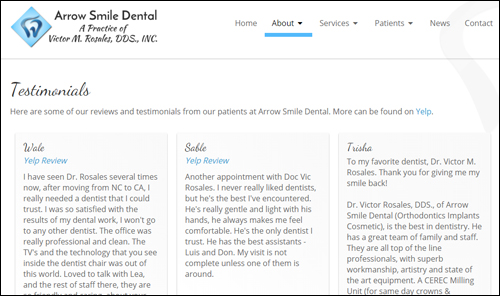
(Add a page to your site with case studies and reviews from clients. Screenshot image source: arrowsmiledental.com)
We have written extensively about using testimonials, case studies and reviews get better results online. To learn more about this go here: Discover How To Turn More Visitors Into Qualified Leads Using Highly Effective User Testimonials
Contact Us
Having a clean contact page is absolutely necessary.
It should provide:
- Name
- Your physical location
- Phone number
- Fax
- Contact email
- Google Map
- Website URL
- Contact form
- Request for information – contact details
- Links to social media profiles
- Live chat feature
If your business services multiple locations you should make this clear when displaying the address and contact information.
You can also include links pointing to the most commonly asked questions page, frequently-visited pages, online booking form, support page, newsletter, blog, etc.
Blog
A blog can be a powerful business marketing tool. Blogs typically comprise of a content management system that is easy to use and allows you to easily promote your business using timely content such as news and announcements, updates, training information, informative posts, videos, webinars, etc.
If you already have an established health website, then consider adding a WordPress-powered blog to promote your medical organization.
If you don’t have a website yet, or if your existing medical website is hard to keep updated or not delivering you the results you want, then WordPress can act both as your business website and blog.

Something not many people know about, is that an expertly configured WordPress site can turn into an automated traffic system that will help begin delivering new targeted traffic to your business, simply by publishing regular content to your web site.
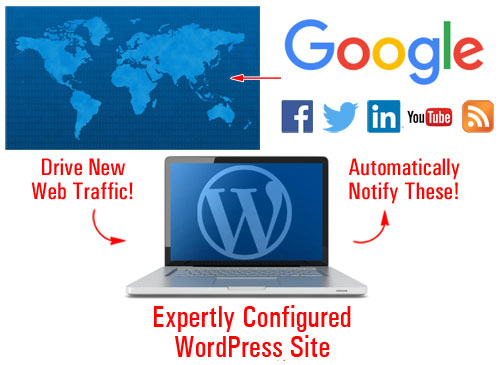
(An expertly configured WordPress site can generate web traffic automatically to your site)
Go here to learn more:
Legal Information Pages
Having a compliant website is extremely important. This is not only important for building trust with visitors, but also to ensure that you are not contravening local, regional and federal laws or regulations wherever you provide services.
Depending on what products and services you provide, adding the following legal pages to your medical-related site will help you stay out of legal hot water with most regulatory authorities, third-party service providers (e.g. Facebook), and other potential sources of threats and legal inconveniences:
- Contact Page
- Privacy Policy
- Terms And Conditions
- Website Disclaimer
- Affiliate Agreement
- Anti-Spam Policy
- Compensation Disclosure
- DMCA Notice
- Earnings Disclaimer
- External Linking Policy
- Health/Financial Disclaimers
- Refund Policy
- Video/Audio Terms
- etc.
We have written a detailed article about adding legal pages to your site here: Why You Need To Add Legal Pages To Your Site
Tips For Improving The Content On Your Site
In today’s highly competitive global economy, the practice of content marketing has become one of the key success factors for businesses that sell similar products or provide similar services.
You want to provide useful content with advice and tips that will get your visitors to share your web pages and come back for more. Content marketing is a great way to inform and teach your visitors and prospective clients about using your services.
For example, if you provide products or services that help people lose weight, then some of the areas you can publish content about include the following:
- What to do before starting any weight loss program (e.g. consult with doctor, record measurements, set goals, etc.)
- How to set realistic, but challenging weight loss goals
- How you eat your food - just as important as what you eat (eat at table, chew slowly)
- Vitamins and minerals that help with weight loss (chromium, calcium, magnesium, etc.)
- And many other content topics
You can also create a series of educational articles that will help your readers understand your health or medical services, by explaining benefits, procedures, costs (including payment plans, insurance coverage, etc).
Use the same keywords and terms in your articles that prospective clients will be searching to find you online.
We recommend subscribing to our Content Marketing Email Training Series. You will receive regular training emails with easy-to-digest information and practical tips that will teach you how to drive more traffic to your site, save money creating useful content for your visitors and grow your presence online using content marketing. It’s not only a great course with loads of useful information, it’s also 100% FREE!
Ways Of Improving User Experience
Improving website user experience (known as UX) helps keep visitors coming back and using your site. This section will show you ways you can improve visitor engagement and user experience.
Content Syndication – RSS Feeds
An RSS (Really Simple Syndication) feed provides lots of benefits for your website.
If you provide content that adds value to others, other businesses will want to syndicate your content.
Some of the benefits of syndicating your content to other sites using RSS feeds, include:
- All of your content updates are kept in one place
- Content distribution doesn’t rely on email
- RSS feeds can be shared online
- RSS feeds allow for subscribing
- It provides links back to your site
- Your feeds can be submitted to RSS directories and aggregators
- RSS provides a number of ways for readers to receive your content (e.g. subscribers can read your content on their mobile device using different applications)
- It’s built into WordPress
There are also benefits to adding syndicated content to your site from other sites, such as the fact that you don’t have to write, manage or update the content.
To find RSS feeds with useful content for your website, search online for medical-related government departments and industry bodies.
Here are some examples of RSS feeds you could add to your website:
- US Department Of Health And Human Services – e.g. Latest news feed: http://www.hhs.gov/rss/news/hhsnews.xml, etc. You can also select individual feeds, like feeds on women’s health issues (e.g. Breast cancer, Health care for women, HIV/AIDS, Minority women’s health, Screening tests and vaccines, etc.) here: http://womenshealth.gov/news/rss/rss-feeds.html
- US National Libraries Of Medicine – For a directory of feeds from leading medical journals, publications and websites (e.g. Journal of Applied Physiology, BMJ Disease in Childhood – Fetal and Neonatal Edition, RadioGraphics, BMJ Archives of Disease, BMJ Journal of Epidemiology & Community Health, etc.) go here: http://www.healthplusplus.com/wiki/List_of_RSS_feeds_on_health
- National Institutes Of Health - Find many health-related feeds here: http://www.nih.gov/Subscriptions.htm
- US Food And Drug Administration (FDA) – Get RSS feeds on fda-related topics like enforcement reports, health fraud, product recalls, drugs, etc. and podcasts here: http://www.fda.gov/AboutFDA/ContactFDA/StayInformed/RSSFeeds
- UK Department Of Health (www.gov.uk) – Latest news: https://www.gov.uk/government/organisations/department-of-health.atom
- The Department Of Health (Australian Government): http://www.health.gov.au/internet/main/publishing.nsf/xml/rssLatestNews.xml
- Department Of Public Health (Australia – State Level): e.g. Victoria – http://www.health.vic.gov.au/rss/newsfeed.xml
- Centers For Disease Control And Prevention - Find various feeds on health-related news and topics and podcasts here: http://www2c.cdc.gov/podcasts/rss.asp
- Medical News: You can search medical news RSS feeds in places like the NYTimes feeds section (e.g. Research: http://www.nytimes.com/services/xml/rss/nyt/Research.xml)
- MedicineNet.com – Daily Health and Medical News: http://www.medicinenet.com/rss/dailyhealth.xml. You can also select individual feeds here (http://www.medicinenet.com/rss/article.htm) (e.g. Medications, Arthritis, Chronic Pain, Pediatrics / Healthy Kids, Prevention & Wellness, Heart, etc.)
- Medical News Today – MNT Featured Headlines: http://rss.medicalnewstoday.com/featurednews.xml
- Medical News Today – You can also select specific feeds here: http://www.medicalnewstoday.com/newsfeeds-rss (e.g. Anxiety/Stress, Fertility, Fibromyalgia, Menopause, Rehabilitation/Physical Therapy, Sports Medicine/Fitness, Personal Monitoring/Wearable Technology, etc.)
You can also just search online for general feeds, e.g. “medical rss feeds” or search for feeds on specific areas, e.g. “bipolar rss feeds”, “diagnostics rss feeds”, “dementia rss feeds”, etc.
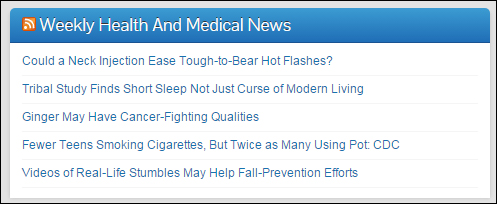
(Use RSS (Really Simple Syndication) feeds to improve your site’s UX.)
Checklists & Charts
Adding checklists and educational charts to your site is a great way to help increase user engagement, add value to your visitors and provide something unique. Checklists and charts can give them step-by-step instructions and resources to get necessary steps done. They can also be great client educational tools.
Checklists, charts and medical forms could cover topics such as:
- Booking appointments
- Checklists for pre or post treatment
- Health checklists and charts for specific systems
- Dental checklists – e.g. first visit, maintenance program, cosmetic dentistry, etc.
- Weight loss and exercise program checklists and charts
- General charts & infographics (e.g. caloric level of different foods, sleep requirements at different stages of development, etc.)
Provide Online Tools
Providing unique tools, gadgets and applications on your site is a great way to increase visitor engagement and significantly add value to your visitors. Calculators are useful tools for your website. Other tools would include things like diagnostic tools, or even recipes.
In part two of this guide, we take a look at a number of WordPress plugins you can use in your website that can also help improve search engine optimization, improve user engagement and generate more traffic to your business.

***
This is the end of section 1.
Click here to read the rest of this article:
***
***
"These tutorials have so much information and are easy to understand. If you use WordPress or plan to in the future these will help you with everything you need to know." - Valisa (Mesa, Arizona)