Grow Your Accounting Business Online With WordPress
 The digital age has not only transformed business globally, it has also created significant challenges and great opportunities for businesses in the accounting and financial services sector.
Challenges Accountants Face Online
CPAs today must work harder than ever before to remain competitive. Not only do you have to become more involved in the communities and industries your business serves, you must also maintain a strong web presence. This includes having a website and searching for smarter ways to grow your business services online.
In addition to investing money marketing offline, you will probably find that in order to compete, increasingly larger amounts of their budget need to be delegated to developing and managing a website that attracts new prospective clients, engages visitors, outperforms the competition in search engines and social media, and helps you gain wider exposure online.
This means that your site not only has to look great, your web pages have to be fast-loading, and your site layout has to be easy to navigate, but even more importantly, your site’s needs may change over time and sections may need to be updated often. This requires having a sound website and content management strategy.
Another difficult challenge that accountancy firms face online (and all other businesses for that matter), is that they have an average of 30 seconds or less to give users the information they are looking for or they will go elsewhere to get their needs met.
“Websites have evolved into central information hubs where service information is still present but enhanced with web portals, hyperlinks to state and federal sites, and a variety of free tools.”
Michael Alter, http://www.accountingweb.com/technology/accounting-software/tips-for-improving-your-website
Opportunities For CPAs In The Online Economy
As well as facing a number of business and technology changes, there are also many online opportunities available to businesses in the accounting profession that can adapt to meet online demands and can think strategically in terms of improving their online business marketing skills.
In this comprehensive guide, you will discover new opportunities to drive more traffic and create significant improvements in your business online.

As well as providing tips and information on cost-effective ways to improve your website, we also recommend that you consider using the WordPress Content Management System to power your accounting website or blog.
To learn more about the benefits and advantages of using the WordPress Content Management System (CMS), see these articles:
- Discover How A Poorly Constructed Web Site Can Lose You Potential Clients
- WordPress For Business Owners – An Online Guide To Building A Successful Small Business Using WordPress
Practical Tips To Improve Your Website
In this section we’ll start with the basics and show you ways to improve your website and get better results online. We will look at what pages you need, what content you need, navigation structure, etc.
If you need assistance or help planning your accounting or financial services website, read this detailed guide: A Money-Saving Guide To Web Site Planning For Non-Technical Business Owners
Essential Web Pages
Professional business websites need a number of essential pages. Let’s discuss the pages your need and how to structure your accounting or financial services website for best results.
Services Page
It’s essential to include a page that describes your services or products.
This page should include all the products and services you offer, such as:
- Business – business planning, company formation, accounting, payroll, preparing financial statements, bookkeeping, budgeting, financing, forecasting, strategic planning, consulting, etc.
- Taxation – preparation, planning, reviewing, auditing, advice, problem resolution
- Investment strategies
- Corporate finance
- Wealth creation
- Superannuation/retirement plan (401k) advice
- Audit risk assessment and assurance
- Quickbooks – setup, training, tune up, and support
- Specialist services – mergers, acquisitions, information technology, secretarial, rentals, trusts, fiduciary accounting, succession planning, selling a business, transfers, etc.
- Lending and leasing
List all of the services you provide. Educate your visitors about the benefits of using these services and why they should book an appointment with you.
Who We Are
The ‘About Us’ page needs to describe your business and what your business stands for, its unique approach, supported community programs, etc.
It’s important to also list any awards, certifications, recognitions, accreditations, associations, publications, etc., that can be used to promote your company and position it above the competition.

(List all of your awards certifications, accreditations, recognitions, associations, publications, etc. in the About Us page. Screenshot source: deloitte.com)
Our Team
Are you looking for cost-effective ways to sell more products or services online or get prospects to stay longer on your site? Then help prospective clients get to know, like and trust you, your team and your organization better.
Potential clients need to relate to your business. A great way to do that is to have a page that introduces your staff. This page should include a photo and a mini biography. Since most visitors will not tend to be well-versed in accounting terms your descriptions should tell who they are and what their specialties are. You may also want to explain what those specialties mean. This page should also include social buttons that will allow your prospective clients to follow your team members on their social pages.
On this page, don’t be afraid to show the human side of your team members with personal stories, hobbies, etc., but make sure to highlight each team member’s experience, why they are an invaluable asset to your team, and more importantly, how they will help add value to your clients’ business.

(Make sure to add a page that introduces your staff or team members to prospective new clients. Image source: deepsky.com)
We have created a detailed tutorial on how to create and add an easy-to-manage list of employees in WordPress using free WP plugins here: How To Add A Simple Employee Directory To Your WordPress Site Without Editing Code
Recruitment Page
This is a listing of career opportunities within your company. It could include training provided, employee benefits, opportunities for advancement, social activities sponsored by your organization, etc. You should also include information such as the job outlook and upcoming career opportunities in the accounting and financial services industry.
Include also a positions available section in this page. If there are no positions currently available, consider inviting people to return periodically to the page, subscribe to your newsletter, follow you on social media, etc.
Testimonials & Case Studies
Client reviews and case studies are a great way to show potential clients the benefits of doing business with your company. By adding a page with client reviews and case studies, you will also help to provide social proof.
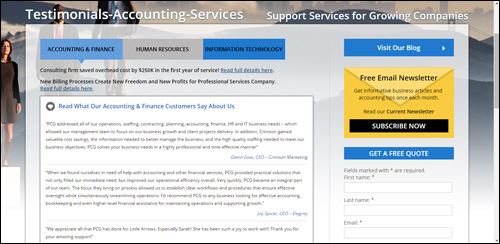
(Add a page with case studies and client reviews. Screenshot image sourced from: pcg-services.com)
We have written a comprehensive article on using testimonials, case studies and client reviews get better results online. Go here to learn more about this: Learn How To Achieve Better Results Online With Engaging Client Testimonials
Contact Us Page
Having a contact page is absolutely necessary.
It should provide visitors with some or all of the following information:
- Company Name
- Address
- Phone
- Fax number
- Email address
- Google Map and directions
- Web URL
- Contact form
- Name of person to contact
- Links to social media profiles
- Live chat
If you operate in multiple locations you want to make that clear when displaying the address and contact information.
Consider also including a few links for commonly-asked questions, main pages, special offers, support area, newsletter opt-in form, blog, etc.
Add An Accounting Or Financial Services Blog
A blog is a powerful marketing tool for your business. Many blogging platforms are built around a content management system that is simple to use and allows you to easily promote your business using content like announcements, updates, educational articles and tutorials, opinions on current topics, promotional videos, infographics, etc.
If you already have an existing accounting or financial services site, then consider adding a WordPress-driven blog to promote your company.
If you don’t have a website yet, or your existing website is very hard to keep updated with new content or not giving you the results you want, then WordPress can serve both as your business website and business blog.

Something few people know about, is that an expertly configured WordPress site can become an automated traffic-generation system that can instantly drive an ongoing stream of targeted traffic to your business, simply by publishing regular content to your website.
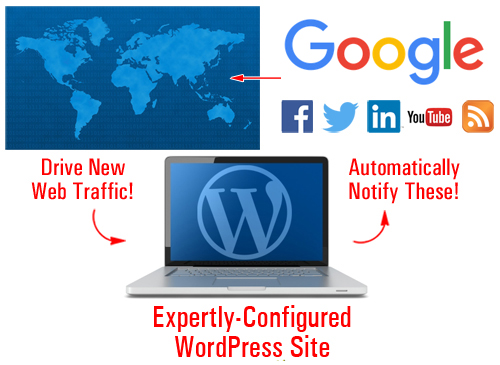
(WordPress can generate web traffic automatically to your website)
For more info, see this article: Web Site Traffic Blueprint – A Complete Guide To Increasing Your Website Visitors Automatically Using WordPress
Legal Information
It’s essential for accounting and financial services firms to ensure they have a compliant website, not just for establishing trust and credibility with visitors, but also to ensure that you are not breaching local, regional or federal laws and regulations wherever your do business in.
Depending on the products and services you provide, adding some or all of the legal pages below to your accounting website will help keep you out of trouble with most regulatory authorities, third-party service providers, and other potential sources of threats and legal inconveniences:
- Contact Page
- Privacy Statement
- Terms And Conditions Of Use
- Website Disclaimer
- Affiliate Agreement
- Anti-Spam Policy
- Compensation Disclosure
- DMCA Notice
- Earnings Disclaimer
- External Linking Policy
- Financial/Health Disclaimers
- Refund Policy
- Video/Audio Terms
- etc.
We have written a comprehensive article about adding legal pages to your site. For more details, go here: How To Add Legal Pages To Your Website
Improve The Content On Your Site
In today’s fiercely competitive online economy, the ability to deliver valuable content free of charge has become one of the key differentiators for businesses.
By committing to providing great content with useful advice and tips, you will get your readers sharing your web pages online with others and coming back for more. Content marketing is a great way to inform and educate site visitors and prospects about your business and about doing business with your firm.
For example, for an accounting or financial services business, topics can include the following:
- Explanations of balance sheets
- Profit & loss statements
- Duties and legal responsibilities of company directors
- Presenting accounts for non-profit activities
- Cashflow planning tips
- Business insurance
- Protecting revenues
- Structuring your self-managed retirement fund
- Things to look for when … (e.g. purchasing insurance, setting up payroll systems, etc.)
You can also create a series of informative articles that will help your readers gain a better understanding of your accounting services, such as software accounting, tax accounting, tax planning for small business, reducing debt, financial concepts made simple, etc.
Remember to use keywords and terminology in your articles that your readers would search for.
We recommend subscribing to our Content Marketing Email Training Series. You will receive regular training emails with actionable information that will show exactly how to drive more traffic to your website, save money creating useful content for your visitors and grow your business online using content. It’s not only a great course with loads of useful information, it’s also 100% FREE!
Ways To Improve Visitor Engagement And User Experience
Improving your site’s user experience (known as UX) will help keep visitors coming back and engaging with your site. This section will show you different ways to improve your visitor engagement and user experience.
Adding RSS Feeds
Adding RSS feeds can help to improve your visitor engagement and user experience in several ways.
If you provide useful content, other businesses may want to syndicate your content to their visitors.
Some of the benefits of syndicating your content to other sites using RSS feeds, include:
- All of your content updates are kept in one place
- Doesn’t rely on email
- RSS feeds can be shared online
- Allows for subscribing
- It provides a way for links to point back to your content
- Feeds can be submitted to RSS directories and aggregators
- There are a number of ways readers can receive your content (e.g. view the content on their mobile device using different applications)
- RSS is built into WordPress
There are also a number of benefits to providing valuable content on your site from other websites, such as the fact that you don’t have to write, manage or update the content.
You can find many useful RSS feeds by searching online for finance and tax-related government departments or industry bodies.
Below we have listed some exaples of useful RSS feeds you could add to your website:
- Taxation Policy Center: http://www.taxpolicycenter.org/press/rss.cfm
- Australian Taxation Office: https://www.ato.gov.au/RSS-news-feeds.aspx
- Canada Revenue Agency: http://www.cra-arc.gc.ca/rssfeeds/
- UK HM Revenue and Customs: http://www.hmrc.gov.uk/rss/rss.htm
- South Africa Revenue Service: http://www.sars.gov.za/Pages/RSS-Feeds.aspx
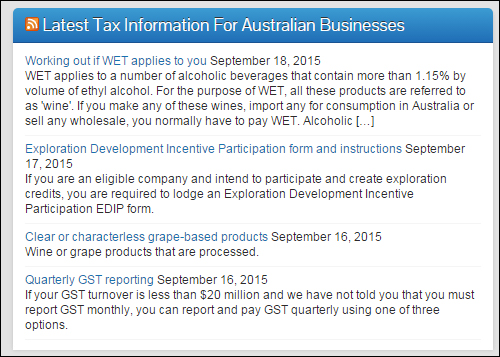
(Add RSS feeds to provide your visitors with a better user experience.)
Adding Online Forms And Checklists
Adding checklists and forms to your site is a fantastic way to help increase user engagement and add value to your readers. Forms and checklists can provide users with useful step-by-step instructions and resources to perform tasks. Checklists and forms are great planning tools.
You can provide a range of online or downloadable checklists and forms (or links to these) covering topics such as:
- How To Set Up A Business
- Negative Gearing Worksheet
- Non-Profit Activity Checklist
- Disclosure Checklists
- Partnership Tax Checklist
- Trust Tax Checklist
- Income Tax Variation Forms
Other Tools
Providing useful online tools, gadgets and applications for businesses (or links to these tools) on your website can help increase visitor engagement and add value to your potential clients. Calculators, such as loan and tax calculators, are some of the most popular tools for accounting websites. Other tools would include time cards, or retirement and interest calculators.
In the next section of this detailed guide, we will be discussing a several online tools you can use in your site using WordPress plugins that can help to improve search engine optimization, improve user engagement and generate more visitors to your business.

***
This is the end of section one.
To view Part Two, click this link:

Would You Like To Get Automatically Notified When New WordPress Tutorials Get Published? Then Subscribe To Our Site!
***
***
"Wow! I never knew there's so much to learn about WordPress! I bought one of the WordPress for Dummies three years ago, such authors need to be on this course!" - Rich Law, Create A Blog Now
***