 Welcome to Part 4 of our WordPress Website Traffic Blueprint article series, where we explain how to create an automated web traffic machine using the WordPress CMS platform.
So far, here is what we have covered in this series:
In Part One of this series, we explain why using an expertly configured WordPress website or blog is the key to generating automated web traffic …
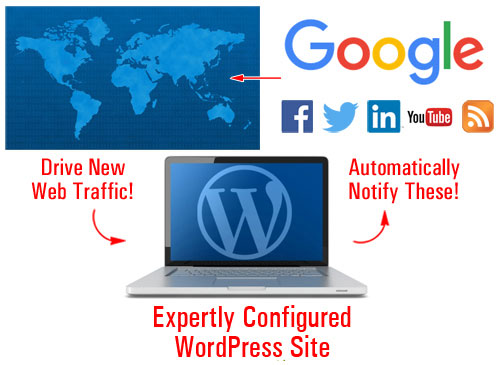
(With an expertly configured WordPress blog, all you have to do is publish new content consistently to begin attracting more web traffic!)
In Part Two, we look at critical setup decisions. We explain the best way to start if you don’t have a website yet, how to set everything up if you already have a site, and what to do if your website was built using WordPress.
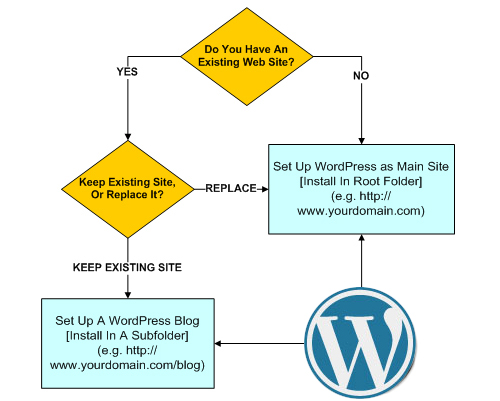
(In Part 2 we show you where to set up WordPress on your domain)
In Part Three, we discuss the configuration phase.
In this step, we configure all the settings (hosting, internal and external) that affect your website’s ability to generate traffic automatically …
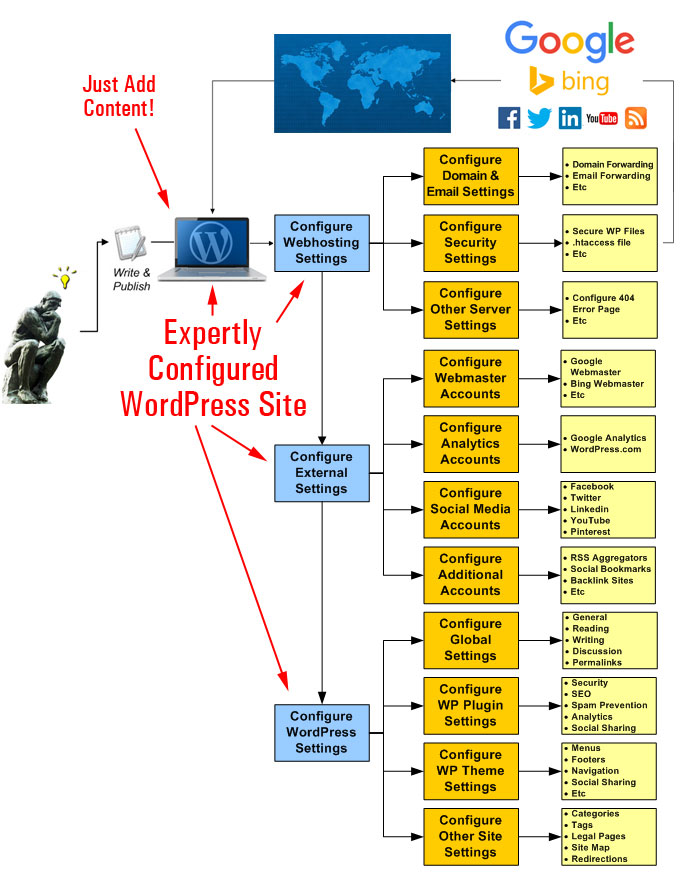
(In Part Three you learn how to configure all the settings (hosting, internal and external) that affect your website’s ability to generate traffic automatically)
In Part 4, we will show you how to set up various plugins that can help drive visitors automatically to your website or blog whenever you begin to post fresh content consistently.
Why It Makes Sense To Automate Your Traffic-Getting Process
Depending on which business marketing gurus you talk to, you could end up trying to spend an hour or two (or more) per day posting content on social media.
Most small business owners lack the time, resources and budget to employ the services of a full-time marketing and content creation department and engage in the kind of content marketing that many marketing experts recommend. If you spend half your day checking LinkedIn, Twitter, or Facebook in addition to writing content for your blog or website, how can anything in your business get done?
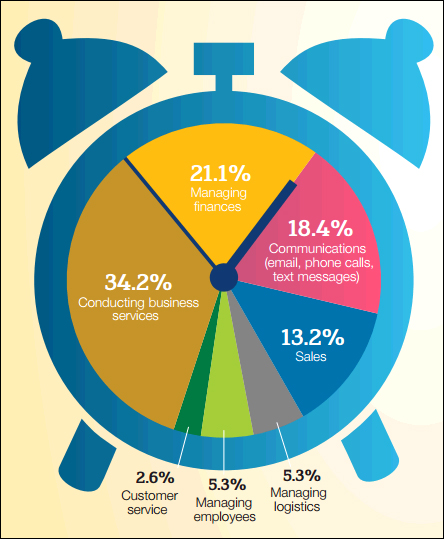
(Keeping a business up and running is how most small business owners spend their working hours. Image source: NFIB)
Small businesses spend most of their time keeping their businesses up and running. On top of this, there’s sales and marketing. After all, businesses need to remain competitive and grow in order to survive.
A study of small businesses conducted in 2012 by VerticalResponse – an email and social media marketing company, found that:
- Almost half of all businesses surveyed spent around six hours each week on social media (most of the other businesses surveyed that used social media spent even more time – between 6 and 21+ hours per week). This was a 66% increase from the previous year, so if the same survey was conducted today, the numbers would most likely be even higher.
- More than half of all businesses surveyed spent 1-3 hours or more to create a blog post.
- Finding and posting content for social media was their most time-consuming online activity.
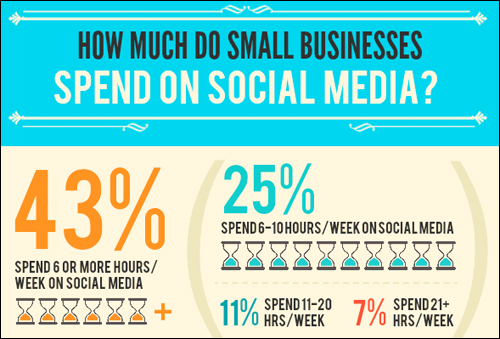
(Small businesses spend more time every year marketing and promoting themselves online. Infographic source: VerticalResponse.com)
As small businesses spend increasingly larger amounts of time marketing and promoting themselves online in order to compete and survive, this puts more and more of a squeeze on businesses to focus their time on other areas …
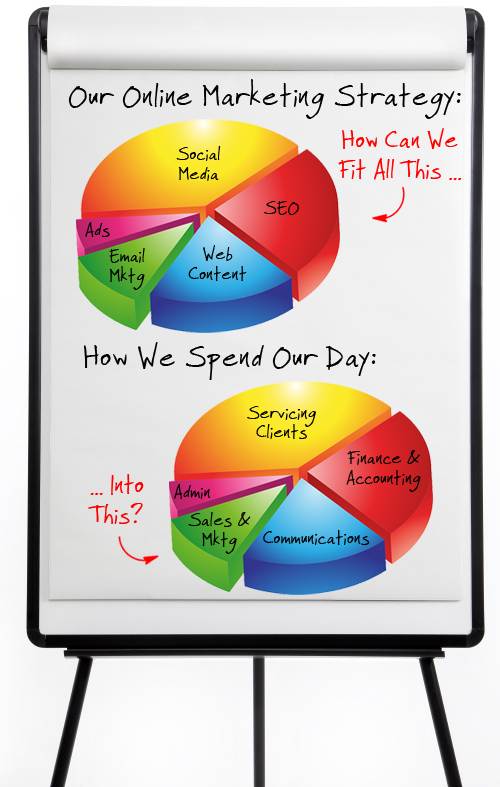
(Businesses with limited resources, budgets, and time and many business areas to focus on have to plan their marketing strategy very carefully.)
Another important thing to keep in mind is that, in addition to spending time social websites, you are investing all of your efforts into virtual real estate that you don’t control. You don’t own Facebook, Twitter, or StumbleUpon. These companies often will make decisions that can significantly affect your business without consulting you. Why invest so much effort and time building a business on someone else’s real estate? With WordPress (self-hosted), you can have complete control of your own real estate and distribute your content automatically to other websites.
Automating systems and process to save time is not new. Businesses have been doing it since the dawn of the Industrial Age. In the Information Age, however, the exponential growth channels for marketing and promoting a business online creates a number of dilemmas for small business owners and business managers, especially for those with limited resources, time, and budgets. For example:
- Which of these channels should you invest more of your efforts, budget, and time on?
- Should you invest so much time and effort building assets on sites that you do not control (e.g. Facebook, LinkedIn, Tumblr, etc.) while neglecting the benefits of building content on your own website?
- Do you create new content for every channel you plan to promote and market your business on?
The Benefits Of Automating The Web Traffic Generation With WordPress
What I’d like to show you now, is a free, simple, and effective formula that allows you to automate your traffic-getting process with WordPress.
With this strategy, you will be able to:
- Save time creating web content and social media,
- Save money on content creation and unnecessary web marketing channels,
- Determine which channels you should invest more budget, efforts, and your time on,
- Invest most of your time and efforts building your own asset instead of someone else’s and still benefit from other people’s marketing channels.

Many automated traffic solutions tend to focus on black hat methods, such as manipulating search engine results. This is not what the focus of this article series is about. In fact, we urge you to avoid using black hat sites, tools, methods, and anything that violates the terms of service and policies of companies like Facebook, LinkedIn, Google, etc..

(Web traffic automation doesn’t require using black hat methods!)
What we are focusing here is not to manipulate online services or break their terms of service, but to show you how to be smart with your limited resources and automate your content distribution so you can leverage your time and marketing efforts, and increase your exposure online to sites that your target audience frequents.
An Automated Content Distribution, Traffic And Lead Generation, And Sales & Marketing System
As we’ve just seen in the previous section, many small business owners lack the time, resources and financial means to engage in the kind of content marketing that many online experts are prescribing. What you want to do, then, is be strategic with your limited budget, resources, and time.
So, instead of doing this …
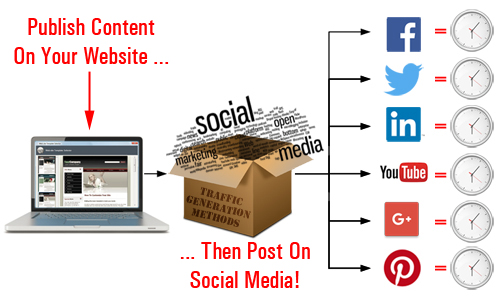
(Posting content to different channels is extremely time-consuming!)
Why not choose this one instead …
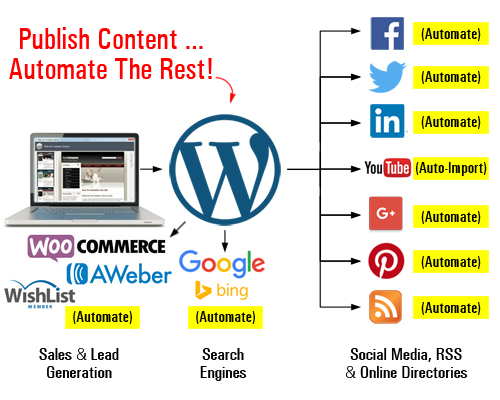
(Set up an automated content distribution, lead and traffic generation, and sales and marketing system with WordPress)
With an expertly configured WordPress site, you can build more than just a website for your business … you can set up an automated traffic and lead generation and sales & marketing system, where all you do is publish your content and WordPress then automates the rest.
With WordPress, you can publish content once, and automate your content distribution to all other channels.
You can:
- Automatically distribute content to social media services and bookmarking sites,
- Automatically distribute comments and content to other blogs and web properties using RSS
- Import content automatically (e.g. videos)
As your business evolves, you can add more functionality and automate processes like:
- Sell products and services with e-commerce,
- Capture leads with opt-in forms and add your subscribers to newsletters and autoresponders,
- Allow visitors to register on your site with different membership levels,
- And so much more!
You can do all of this using inexpensive WordPress plugins. Once these plugins are installed and configured on your site, just direct your visitors to the appropriate sections (e.g. your store, subscription forms, membership area, etc.)
How do you do all of this?
Simple … first, set up your WordPress website as shown in Part 2. Then, configure everything as described in Part Three. Once all of this is in place, you then automate the process using plugins.
The video below shows you how everything works once your WordPress site has been expertly configured …
WordPress Web Traffic Automation Blueprint – Traffic Plugins
Let’s take a quick look at some examples of plugins that can:
- Distribute content to social sites and social bookmarking websites
- Distribute comments automatically to other blogs
- Post content to other websites via RSS
Jetpack
You can get your posts automatically distributed to sites like Facebook, Tumblr, Twitter, LinkedIn, Google+ and more as soon as you publish new content using a plugin like JetPack.

Download URL: https://jetpack.com/
Jetpack is a free WordPress plugin with loads of great functions.
After Jetpack has been installed, you will need to connect the plugin to the WordPress.com account set up in Part 3 …
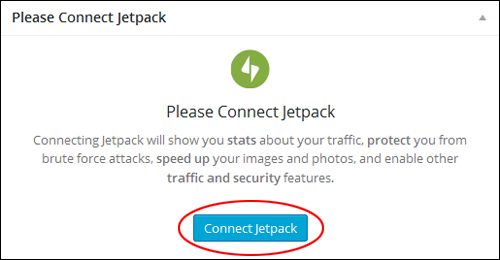
(Make sure that Jetpack is connected to your WordPress.com account)
Next, activate the Publicize feature …
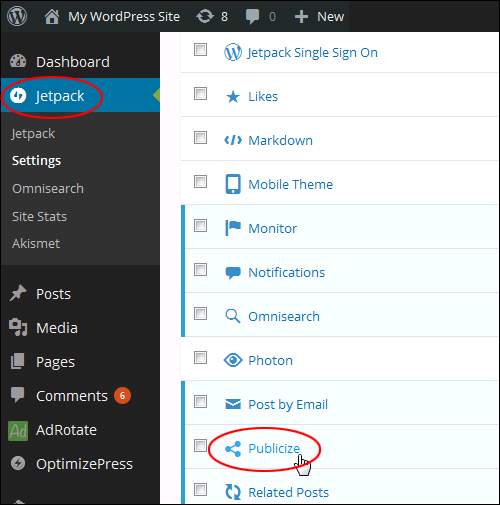
(Jetpack plugin – Publicize)
Configure this section to automatically share your posts on Twitter, Tumblr, Facebook, Google+, LinkedIn, and more …
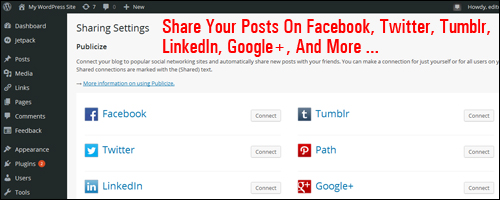
(Distribute your posts automatically to various social accounts.)
After configuring all plugin and account settings, your content is ready for distribution.
Publicize adds a new section to your Publish box …
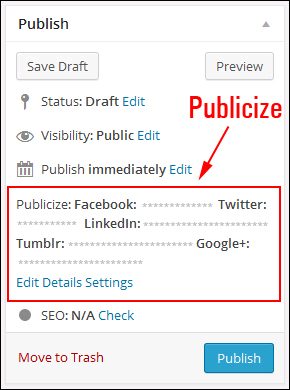
(Publicize settings appear in your post publishing section.)
Now, as soon as you publish a new post, it will automatically be shared online to every account you have set up …
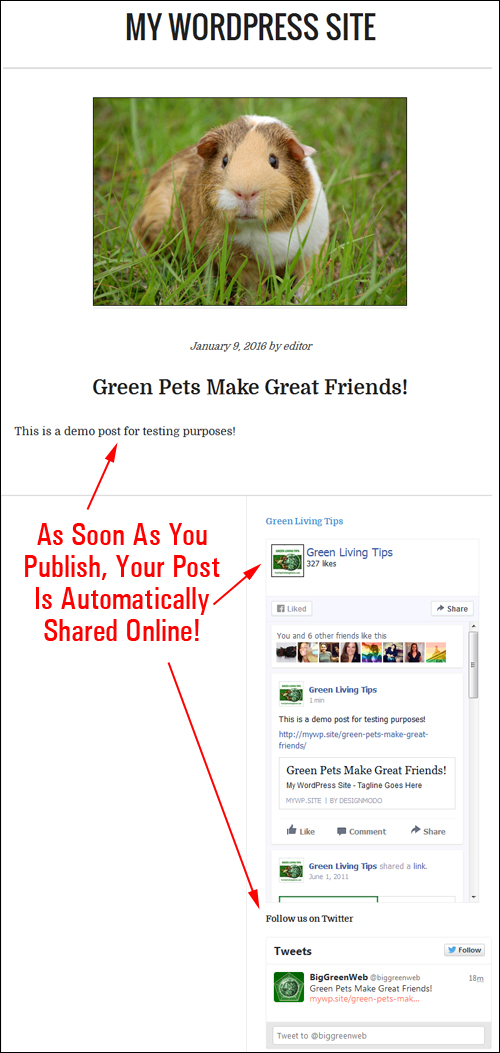
(As soon as posts are published, they will be automatically distributed online.)
This is a hands-free way to get more exposure online for your content on social media sites.
CommentLuv

(CommentLuv)
The built-in WordPress commenting system lets your site users engage with your website or blog, post comments, reply to other users and engage with your content as part of an online community.
You can enhance the WordPress native commenting feature using a third-party plugin like Disqus, IntenseDebate, LiveFyre, or CommentLuv that integrates your comments with social media, helping to spread and share your content around.
For example, using a WordPress plugin like CommentLuv (Premium version) can help make your blog more attractive to commenters by offering them a wider choice of backlinks if they tweet, +1, or like your post. This plugin will visit the website or blog of the comment author while they type their comment and retrieve their most recent blog posts, which can be included with their comment after clicking submit.

(CommentLuv can help attract more comments and improve user engagement on your web site.)
Go here to learn more about this handy plugin:
Social Link Machine
(SocialLinkMachine – WordPress content distribution plugin)
SocialLinkMachine is a set-and-forget WordPress plugin that allows you to automatically drip-feed your content to over 30 social sites, build anchor text backlinks, include relevant images and videos, and create social signals on auto-pilot …
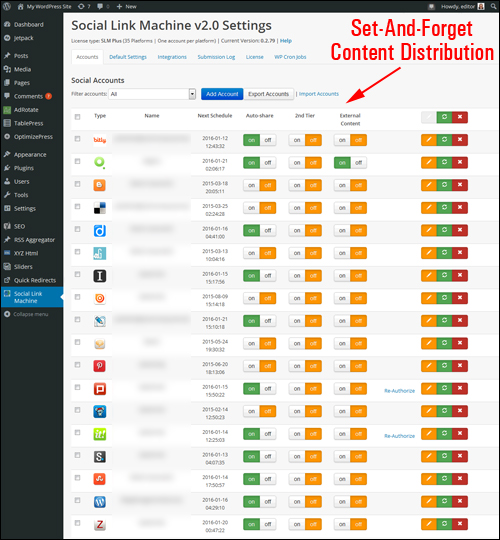
(Social Link Machine – syndicate your content to over 30 online platforms)
With SocialLinkMachine installed, you can automatically syndicate and drip-feed content to dozens of social sites, such as:
- Social Bookmarking Sites: e.g. Deviantart, Diigo, Instapaper, Zotero, etc.
- Web 2.0 Blogging Platforms: e.g. Blog.com, Sett, Tumblr, etc.
- Social Media Platforms: Facebook, YouTube, etc.
- Image Sharing: e.g. Pinterest, etc.
- PDF Sharing: e.g. Issuu, Scribd, etc.
For more details about the benefits of this plugin, visit this site: Social LinkMachine
Also, if you would like to know more about setting up social media tracking (in order to get useful information about your content distribution efforts), we have written a detailed article about social media monitoring tools that will help you manage, measure, and analyze your social media marketing campaigns. To learn more about this go here:

The above are just a few examples of the many plugins that WordPress makes available for automating the distribution of your content online.
Kickstart Your WordPress Traffic System
After your traffic automation system has been set up, we recommend kickstarting the process of driving traffic to your site with the steps shown in this tutorial:
WordPress Traffic Automation Blueprint: Content Sharing Stage – Summary
Once you have your WordPress site and plugins set up and expertly configured, all you then need to do to automatically drive more traffic is add fresh content on a consistent basis.

If you need help coming up with topics for posting content on your website or blog, we recommend subscribing to our FREE email training series here:
Once you have configured your WordPress site, the next step is to optimize as much of the process as you can. This step is covered in the next article in our series.
This is the end of Part Four
To keep reading this article, click here:

***
"Wow! I never knew there's so much to learn about WordPress! I bought one of the WordPress for Dummies three years ago, such authors need to be on this course!" - Rich Law, Create A Blog Now
***