 Welcome to Part Five of our Web Traffic Blueprint article series, where we explain how to drive new traffic automatically to your website using WordPress.
So far, here is what we have covered in this series:
In Part One, we explain why using an expertly configured WordPress website is the key to automating traffic to your website …
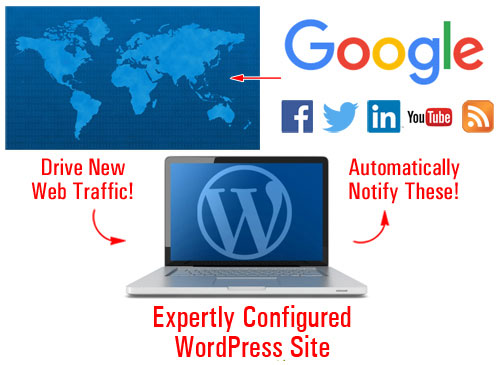
(With an expertly configured WordPress blog, all you have to do to automatically start generating web traffic is post web content consistently!)
In Part 2, we discuss the setup phase. We explain the best way to start if you don’t have a web presence yet, how to set everything up if you already have a website, and what to do if your site is built with WordPress.
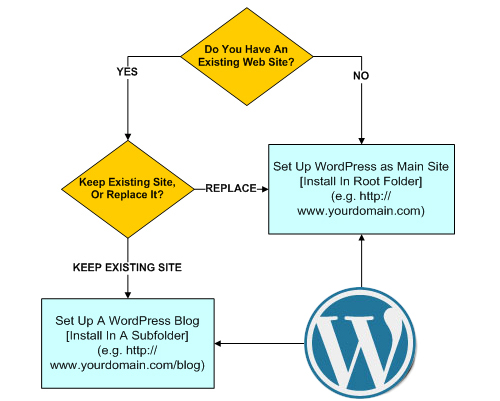
(In Part two we show you how to set up WordPress on your domain)
In Part 3, we focused on the configuration phase. We configured all the settings (hosting, internal and external) that can affect your site’s traffic-getting ability …
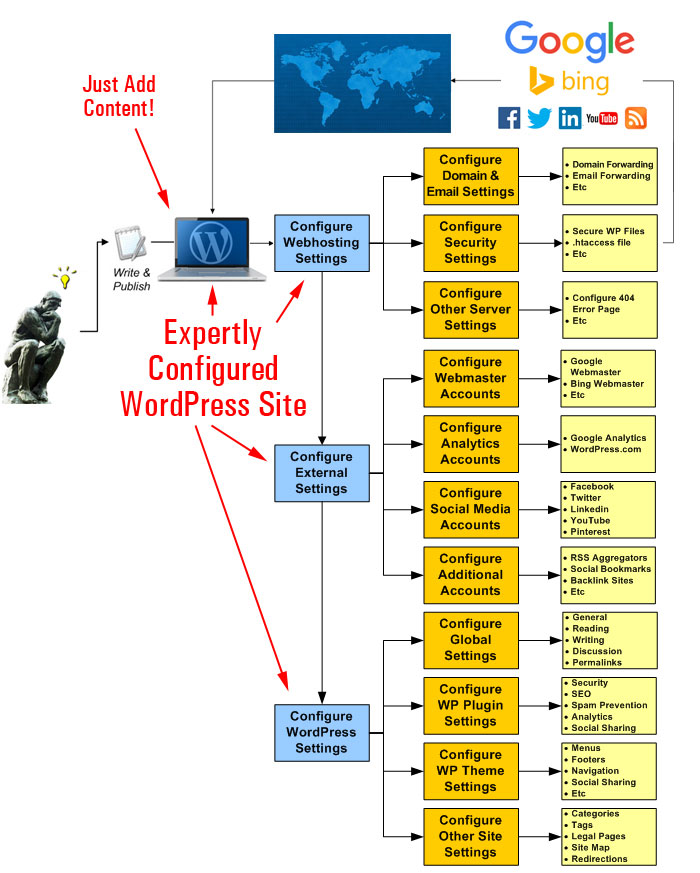
(In Part 3 we show you how to configure all the settings that can affect your site’s ability to generate traffic automatically)
In Part 4, we explained how to set up various plugins that can bring web traffic automatically to your site when you begin posting content on a consistent basis.
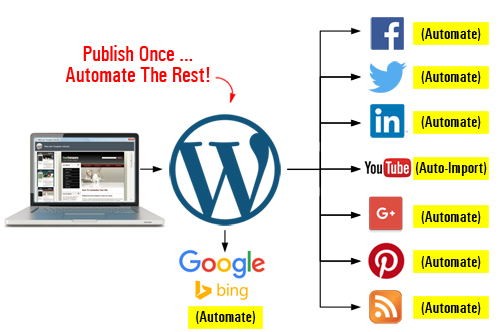
(Publish once, automate the rest!)
In Part Five of the WordPress web traffic automation blueprint article series, we discuss ways to optimize traffic to your website using different tools and strategies.
WordPress Web Traffic Blueprint – Systems
In addition to having an expertly configured WordPress website or blog, generating traffic successfully on a consistent basis is the product of a well-defined business vision, great digital planning, and excellent systems and process in place.
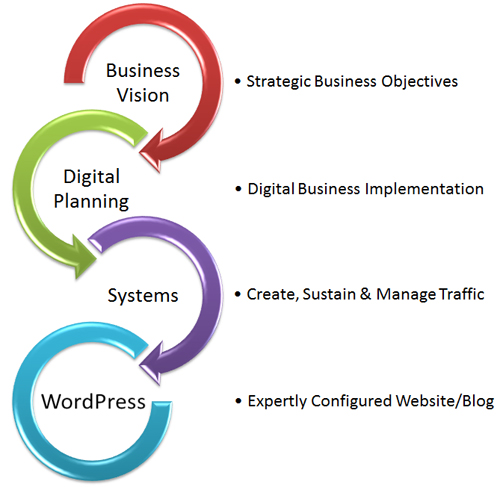
(Automating traffic is the product of having a clear business vision, planning, and great systems)
Let’s review the systems that will help you grow and manage all traffic.
These systems include:
- Marketing Systems – How you drive new traffic to your business.
- Technical Systems – The systems and processes used to keep your web presence operating efficiently for receiving new traffic.
- Business Systems – How you manage and respond to traffic.
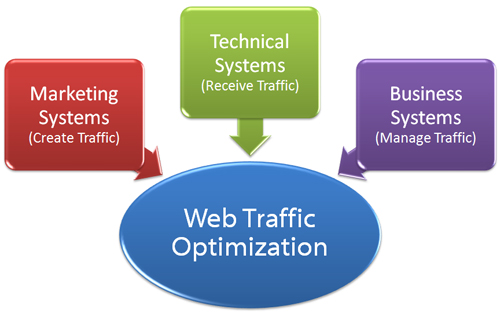
(Use systems to grow and manage your web traffic)
Let’s briefly review the above systems:
Marketing Systems
Your marketing systems consist of the processes and methods used to create new traffic for your website. Your online marketing systems can be tested by asking questions such as:
- What is your content marketing/online marketing strategy?
- What resources and portion of your budget will you allocate to these channels?
- Who will create your content and marketing campaigns?
- How will you track conversions and measure the results of your online campaigns?
During the setup and configuration phase, you would have installed an analytics program (e.g. Google Analytics). If you’re just starting out, you may want to consider investing in some paid advertising to help generate some initial results. If you’re tracking your marketing campaigns correctly, this should yield some actionable data, such as the keyword phrases people are searching online to find your website, which you can use to create content better targeted to your audience’s needs.
Technical Systems
Your technical systems keep your web presence optimized for receiving traffic. There’s no point driving traffic to your website if your site is constantly experiencing problems or your web pages take too long to load.
Your systems include handling technical areas like webhosting, website maintenance and support, installing and updating software (e.g. plugins), integration, customization, troubleshooting, etc.
You can test your technical systems by questions such as:
- Who is looking after my webhosting?
- Who will look after my website and keep my site, plugins, themes, etc. maintained and up-to-date?
- Who will fix errors, troubleshoot problems, provide technical support and advice, etc. when issues occur?
Many potential problems can be minimized if your website planning and setup and configuration phases have been completed correctly. As with all technology, however, you will always run into many problems. Your technical systems need to be able to handle these.
Business Systems
Your business systems help you manage the influx of traffic. This includes:
- Communication systems
- Managing human and financial resources
- Handling sales inquiries
- Order fulfillment
- Customer training/service
- etc.
If you intend to outsource areas of your digital marketing and technical maintenance, then make sure you also implement good systems for managing all outsourcing processes.
WordPress Traffic Automation Blueprint – Traffic Loops
If your business objectives are clear and your systems and processes are in place, all you need to focus your efforts on is developing, optimizing and automating a “traffic loop”.
Let’s walk through an example of how to implement, optimize, and automate a traffic loop. Take a look at the diagram below …
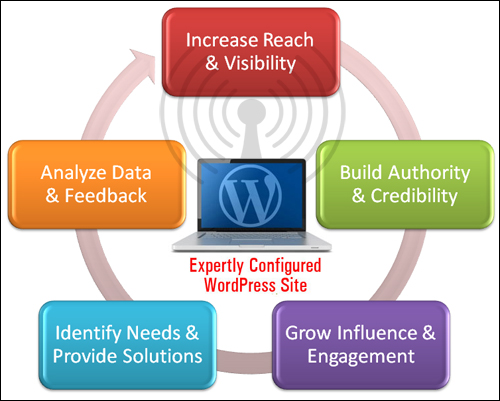
(Implementing an effective traffic loop)
Increase Reach & Visibility Online
The first step of the process is to increase visibility for your website.
Useful Tips & Ideas
- An expertly configured WordPress site allows you to automatically distribute your content to sites like Facebook, Twitter, LinkedIn, etc. The easiest way to increase your reach and visibility online, therefore, is to simply publish more content through your expertly configured WordPress site.
- As mentioned earlier, investing in some paid advertising can help generate actionable and intelligent data, which you can use to create content better targeted to your audience’s needs.
- Repurpose your content to leverage the power, appeal, and reach of different media formats.
- Continue learning about ways to drive more traffic using methods like Pinterest, YouTube, joint ventures, etc.
Plugins, Tools, And Strategies
We’ve already covered many excellent tools and methods in previous sections of this article series.
Also, if you haven’t already, look for WordPress plugins that allow you to easily add the following to your site:
- Share your comments and posts online,
- Run contests, offer discounts or downloads for likes/shares,
- Display user generated content, feeds, etc.
- Distribute content online in different media formats (e.g. videos, PDF guides, slides, etc.)
Build Authority And Credibility
Getting more of your content out there is great, but to make this more effective, your content needs to be building authority and credibility with visitors.
Publishing higher quality content improves your chances of getting more views from social sharing and hence more traffic.
Tips
- Focus on creating content that adds value to your audience and that showcases your expertise. This includes content that informs and educates readers, training content, case studies, adding testimonials, etc.
- Consider publishing educational guides that you can sell or distribute online.
Plugins, Tools, And Strategies
If you need help coming up with great topics for content that you can post on your site, then subscribe to our FREE email training series on growing your business online with content marketing here:
Also, see other posts and tutorials on this site to learn more about plugins that allow you to easily add the following to your website:
- Legal Pages
- Testimonials
- Customer Support (e.g. Helpdesk, Live Chat, etc.)
- Ratings
- User Reviews
- Badges/Certificates Of Recognition
Grow Influence & Engagement
As your business grows, you may want to consider developing “traffic on tap.” You can do this by building a list or starting an online community.
With “Traffic On Demand,” most of your traffic will come from an audience of customers or subscribers – people who already know you and trust you. Your influence and credibility can be used to generate traffic with every blog post you publish, forum post you add, or email broadcast you send out.
Useful Tips And Ideas
- Encourage users to leave comments and start discussions on your site.
- Add an autoresponder training course and encourage people to subscribe.
- Add a free or paid membership site, online forum, or social community.
- Create or join an online group on LinkedIn.
Tools, Plugins, And Methods
There are many solutions and plugins that are easy to implement and can help grow your online influence and improve engagement. For example:
- Autoresponders/Email Newsletters (e.g. Aweber, MailChimp, etc.)
- Contact Forms, Live Chat
- Forums and Discussion Groups (e.g. bbPress, BuddyPress)
- Polls & Surveys
- Webinars (e.g. Webinar JEO)
- Comment sharing
- Add media, image galleries, etc.
Identify Needs And Provide Solutions
By taking advantage of incoming traffic to discover what problems your visitors are trying to solve, you should have no problem developing new products and services, all of which can provide you with new opportunities to generate new sources of web traffic.
Useful Tips And Ideas
- Create a free or paid online training course.
- Publish instructional PDF guides or special reports that can be sold or distributed online (e.g. sell on on the Amazon Kindle book store.
- Add e-commerce to your site.
Plugins, Tools, And Methods
If you plan to provide products, services, and solutions online (as opposed to just providing information), then some of the more useful WordPress plugins you may want to add to your website include:
- Membership Site plugins (e.g. Wishlist Member, S2 Member, etc.)
- e-Courses (e.g. Courseware)
- Event Registrations (e.g. EventEspresso)
Analyze Data & Feedback
The final step of the process is the collection and analysis of data. By learning to interpret data gathered from existing traffic, you can discover new ways to generate content that can bring you additional traffic.
Hopefully, by now you already have installed an analytics program (e.g. Google Analytics) on your website. Make sure you can also understand the data.
WordPress Traffic Blueprint – Summary
All you have to do once you implement the above strategies is repeat the process over and over again, fine-tuning and refining your methods as you go to grow your traffic and improve your results.
In summary:
- Begin with an expertly configured WordPress site backed by good marketing, technical and business systems,
- Implement a content marketing strategy (with some paid advertising to drive initial traffic and generate useful data) to increase your reach and visibility online,
- Add plugins, list-building strategies, and other solutions if necessary to help build authority and credibility, and also to increase engagement with users,
- Promote any new solutions, products or services using your existing channels and strategies to generate additional streams of traffic,
- Analyse your data and your results, automate your processes wherever possible, and begin the cycle again.
Hopefully, now you have a blueprint that will help you drive more traffic automatically to your website and build a more successful business online.

***
"I am beyond impressed with what you have put together. I can tell that you put a ton of hard work into building what you have. You have the absolute best content on WordPress I have ever seen!" - Robert T. Jillie
***